





rockbox948
Members
-
Joined
-
Last visited
Everything posted by rockbox948
-
@JorgeB Thanks so much for all of your help with this. I am back up and running, my data was not lost, and the issue with the docker page not loading has been resolved!
-
@JorgeB Perfect! The cache pool is back and at 3TB. Is there anything else I should do before moving my domains and appdata folders back to the cache?
-
@JorgeB Thanks! I was able to copy the files to an external drive. I rebooted into normal mode and started the array. Both nvme drives were shown as unmountable and the option to format them was available. When I clicked the "Yes, I want to do this" checkbox in the Format section and got this warning about updating the parity. I thought the parity was unaffiliated with the cache pool.

-
@JorgeB Thanks so much for your help. I'm obviously not well versed on all of this. In my case, would the command from the FAQ be the following since this is the 1 TB drive that is full (I didn't see an sdX indicator for the drive)? mount -o rescue=all,ro /dev/nvmen1n1 /temp
-
This is from using the command twice.

-
@JorgeB In safe mode and without the typo I get this:

-
@JorgeB Everything is running extremely slowly. For example, the Main window took about 2 minutes to reload and show the array drives once I stopped the array and the terminal window took about a minute and a half to load. I did the first set of commands and got this. I'm not sure if this "worked". Do I proceed with the second set?

-
@JorgeB Thanks. To make sure I have the procedures right before I start: Stop the array. Try the first set of commands you provided. If that works, try the second set of commands. Stop docker and VM services. Start the array. If it mounts, restart docker and VM services. Is that correct?
-
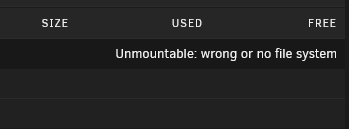
@JorgeB Two months later... I got really busy with work and could not get to addressing the docker image until now. I was planning to do this today but I had completely run out of room on my cache drive. I added a new 2 TB nvme and followed the instructions here: https://docs.unraid.net/unraid-os/using-unraid-to/manage-storage/cache-pools/#adding-disks-to-a-pool I completed the instructions and the cache pool showed both drives with a total of 3 TB. However, the GUI started running slowly (taking minutes to show the array drives) and neither Docker nor my VMs were loading. I rebooted the system and now both cache drives are showing as unmountable. When adding the new drive, I made sure to format it in btrfs to match the existing cache drive. I'm not sure where to go from here. Any help would be appreciated. diagnostics-20251120-2122.zip

-
Thanks. I will try to test this out this week.
-
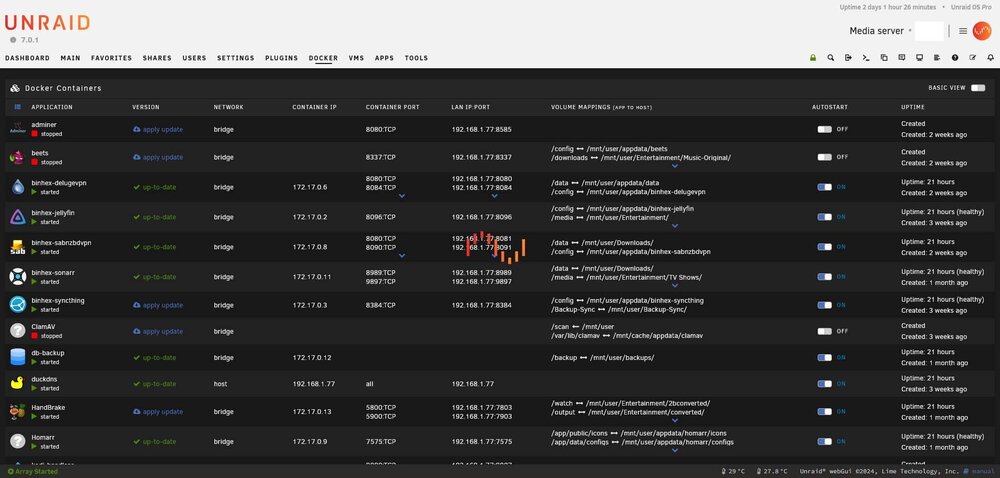
Correct. It continues to show the page as loading but never stops. I let it run undisturbed to see if I just wasn't patient enough. Two days later it was still doing it. With the loading screen active, I am unable to make any changes to anything on this page.
-
lol, I missed the screenshot part.
-
Thanks. I did that to delete the extra appdata folders on the array but the Docker page still refuses to load properly. The containers are active and seem to be functioning, it's just that the Docker page is misbehaving. Any other thoughts on what could cause this issue?
-
I believe I found the offending folders/files. However, some of them will not let me delete them using Krusader even after I have removed the docker container. Shouldn't the system let me delete the folder of the container is no longer active?
-
Activated Mover and it would be the Downloads share that I would expect to be moved. It looks like the majority of the space taken on the cache is actually for my VMS. That make sense now. However, the Docker page still isn't loading properly. tower-diagnostics-20250911-1917.zip
-
@KilrahThanks! The issue persists. I've attached the logs from after the change but before rebooting and then after rebooting, just in case it makes a difference. tower-diagnostics-20250911-0836.zip tower-diagnostics-20250911-0905.zip
-
Thanks, @JorgeB . I'm unsure about how to check container uptimes. Where would I go to do that? Nevermind. It looks like it might be Cloudflare. That one had an uptime of 18 seconds. Is there a way to uninstall a container when the Docker page will not load?
-
I recently upgraded my motherboard, processor, added an LSI 9211 as well as 2 drives. After the rebuild, I noticed that my 1 TB cache drive was nearly full. I thought there must have been files that hadn't been moved to the array from before the upgrade when my storage was nearly maxed out. I activated Mover and let it do its thing. After returning to my computer, the cache drive was still nearly full but now the Docker page cycles with the Unraid loading symbol but does not fully load the page. I'm not sure what I did or how to undo it. Any help is appreciated. tower-diagnostics-20250910-2109.zip
-
Thanks, I will get to work on this!
-
It looks like it is either a config issue or an issue with the original USB drive. I did what you suggested and the system booted without issue. Any thoughts on where I should start in trying to run this issue down?
-
Thanks for the suggestion. I will try to do that this weekend and report back.
-
Here are the diagnostics. Thanks! diagnostics-20250331-0751.zip
-
Thanks for the reply. I double checked and fast boot was diabled. Thanks for the reply. The boot priority was correct but it seems that maybe the USB header on the board is faulty. I removed the GPU and tried to reboot but the same issue persisted. Then I moved the USB drive to a different port and the system booted. I was able to access the GUI from my browser with no issues. However, I reinstalled the GPU and the system boots into Unraid but now I get timeout errors when trying to access the GUI from the browser.
-
Thanks for your reply! Prior to installing the GPU, I was running things headlessly and I could login into the GUI with no problem. When Unraid failed to start after the install, I connected my monitor to see what was going on. That's when I realized that the system was no longer moving beyond bios. Thanks for your reply! Any thoughts on where I should start? As mentioned above, everything was fine before the install. Also, I did set the bios to use the integrated graphic as the default. That worked for the monitor (I had to switch the HDMI cable to the motherboard port) but the system still goes straight to bios.
-
I've had Unraid running pretty solidly on: Intel 9700k Gigabyte Aorus z390 64 GB RAM Today, I installed my old GTX 1070 so that I could passthrough for some games. However, Unraid will no longer boot. The system now only takes me into the bios page. I've changed the settings so that it boots with the integrated graphics enabled but that has not stop the system from going right into bios rather than loading Unraid. Any thoughts? I appreciate the help.



