killy3000
Members
-
Joined
-
Last visited
Everything posted by killy3000
-
I noticed a couple of days ago that I am no longer able to access the web GUI for Radarr. When i try to access the GUI, the browser (edge) brings up the message "ERR_CONNECTION_REFUSED". So far I have tried the following to fix this issue without any luck: 1) Stopping and restarting the docker service 2) Rebooting the server 3) Updating the radarr docker container to the latest version 4) Accessing using different browsers (Chrome and Firefox) and devices (e.g. phone, tablet, work laptop) both on and off my home network. I can access all of my other dockers perfectly, including another instance of Radarr (Binhex), so I am at a loss as to why this suddenly isn't working. Logs are attached but I couldn't see any obvious issues and unfortunately this pretty much exhausts my knowledge of how to fix things on Unraid so I'm hoping that someone here can help. Edit: I have resolved the issue. In case anyone else with a similar issue reads this, it seems that the database was corrupted. I ended up getting everything working again by following this guide in the radarr wiki: https://wiki.servarr.com/useful-tools#recovering-a-corrupt-db-ui Hope that helps. radarr logs.txt
-
I'm a bit late replying but I just wanted to note that this worked perfectly and my server is back up and running again. Thanks @JorgeB for all of your help.
-
yes it did.
-
I have kicked off the process as you suggested and it looks to be doing what it should be. I guess I will know in a couple of days as it is a 16tb drive! Thanks for your help, I'll report back once it is (hopefully) fixed
-
not sure. Is there any way that I can tell other than starting up the array and checking when the last files were written to the disk?
-
I can replace the power splitter but I don't have another sas cable on hand. I should be able to hook those drives into the motherboard directly though so I guess I will do that too. How exactly do I go about force enabling disk 4?
-
They share both a mini sas cable and a power splitter cable
-
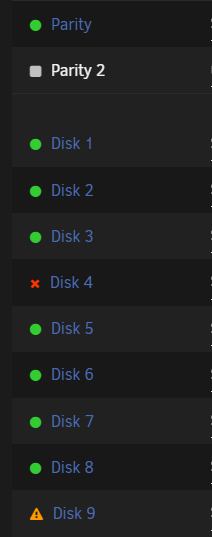
A couple of days ago, my unraid server reported that one of my disks had been disabled. The disk appeared to be healthy so I followed the instructions for rebuilding the drive here: Manual/Storage Management - Unraid | Docs This looked to be working as expected but when it finished all it appeared to have done was performed a parity check and it informed me that there were a very large number of errors. I assumed, possibly foolishly, that I had somehow just got something wrong in the process and I followed the rebuild instructions again, but after it started, there was another disk which was flagged as "unmountable" so I now have two disabled disks. At this point I realised that I was definitely in over my head and needed some support from people who actually know what they are doing, so I took down the array and made this post! tower-diagnostics-20220919-2211.zip