harmen
Members
-
Joined
-
Last visited
Everything posted by harmen
-
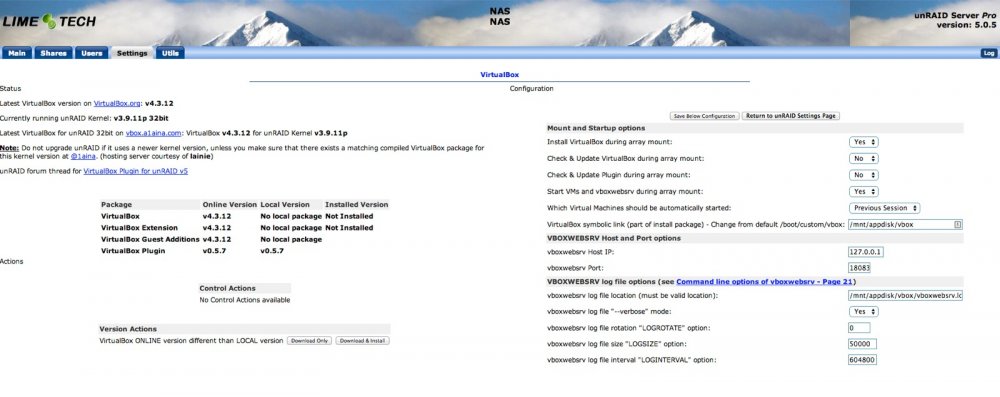
[sOLVED] Hi, I have installed the plugin for the first time on unraid 5.0.5 and it is not working. It is complaining about the kernel version. The webui also does not look good. The packages can not be installed. Please see log and screenshot. How can I fix this? EDIT: the symbolic link location is on a disk that is outside the array (not a cache disk either). It is mounted after the plugin is installed but before rc.virtualbox is ran. Is that a problem? EDIT 2: Never mind.... I Just had to click the 'Download and install' button under Version Actions. Can't believe I missed that one... T.i.a. Harmen Jun 5 20:28:25 NAS logger: installing plugin: virtualbox Jun 5 20:28:25 NAS logger: file /tmp/virtualbox-cleanup: successfully wrote INLINE file contents Jun 5 20:28:25 NAS logger: /bin/bash /tmp/virtualbox-cleanup ... success Jun 5 20:28:25 NAS logger: file /boot/config/plugins/virtualbox/virtualbox.cfg: already exists Jun 5 20:28:25 NAS logger: file /tmp/virtualbox-icon: successfully wrote INLINE file contents Jun 5 20:28:27 NAS rc.virtualbox[22064]: Icon downloaded from icon hosting server Jun 5 20:28:27 NAS rc.virtualbox[22067]: Icon copied to emhttp plugin folder Jun 5 20:28:27 NAS logger: /bin/bash /tmp/virtualbox-icon ... success Jun 5 20:28:27 NAS logger: file /etc/rc.d/rc.virtualbox: successfully wrote INLINE file contents Jun 5 20:28:27 NAS logger: successfully changed file mode Jun 5 20:28:27 NAS logger: file /usr/local/emhttp/plugins/virtualbox/event/disks_mounted: successfully wrote INLINE file contents Jun 5 20:28:27 NAS logger: successfully changed file mode Jun 5 20:28:27 NAS logger: file /usr/local/emhttp/plugins/virtualbox/event/unmounting_disks: successfully wrote INLINE file contents Jun 5 20:28:27 NAS logger: successfully changed file mode Jun 5 20:28:27 NAS logger: file /usr/local/emhttp/plugins/virtualbox/virtualbox.page: successfully wrote INLINE file contents Jun 5 20:28:27 NAS logger: file /usr/local/emhttp/plugins/virtualbox/virtualbox.php: successfully wrote INLINE file contents Jun 5 20:28:27 NAS logger: file /usr/local/emhttp/plugins/virtualbox/virtualbox_submit.php: successfully wrote INLINE file contents Jun 5 20:28:27 NAS logger: plugin successfully installed EDIT: Jun 5 20:28:27 NAS kernel: EXT4-fs (sdh1): mounting with "discard" option, but the device does not support discard Jun 5 20:28:27 NAS kernel: EXT4-fs (sdh1): mounted filesystem with ordered data mode. Opts: discard Jun 5 20:29:19 NAS rc.virtualbox[22437]: VirtualBox plugin update during array mount is disabled Jun 5 20:29:19 NAS rc.virtualbox[22438]: VirtualBox packages update during array mount is disabled Jun 5 20:29:19 NAS rc.virtualbox[22439]: Installing VirtualBox packages during array mount ... Jun 5 20:29:19 NAS rc.virtualbox[22465]: VirtualBox package kernel v does not match unRAID kernel v3.9.11p - no plugin installed Jun 5 20:29:19 NAS rc.virtualbox[22491]: VirtualBox and/or VirtualBox Extension not installed - cannot start vboxwebsrv Jun 5 20:29:19 NAS rc.virtualbox[22517]: VirtualBox and/or VirtualBox Extension not installed - cannot start Virtual Machines