





bleejean
Members
-
Joined
-
Last visited
-
Thanks everyone!
-
I will look into those options, thanks. I want to upgrade disk1 as well. I have already precleared another 18TB drive. Can I attach it to the server (after the array is started), format it xfs, then copy over the files from disk1 to it, then remove the original disk1 and use the "new config" option under tools to reconfigure the array to make the new disk into disk1? Is that a reasonable way to do things? Thanks.
-
Thanks a lot for your help! Let’s say I plug the original drive in after the array is started. Can I view the contents of that drive over the network? I’d prefer to copy the files using windows copy and paste/file explorer if possible. If not, would you mind sharing how I would copy the files? I’m pretty sure it is some command line type stuff right? I’m really unfamiliar with doing things that way.
-
I don't know if I am following. Are you saying that the file system type is included as part of the "data" of the drive and thus, when you rebuild a disk it will also "rebuild" the same file system type? (Sorry for my lack of correct terms). I do still have the original disk3 with its contents intact. However, I don't think I can add it to my server again since I am at my limit of 12 drives (and I don't really want to pay to upgrade to a pro license). Can I install it on a Windows PC on my network and copy the files over to the newly reformatted disk3 from there?
-
Ok, so did the new drive get formatted to reiserfs because the old one was and it is a copy of it? How can I fix the problem? Can I just reformat it to xfs too (and if so how do I do that)? And am I understanding correctly that I would then need to rebuild the array again? Thanks.
-
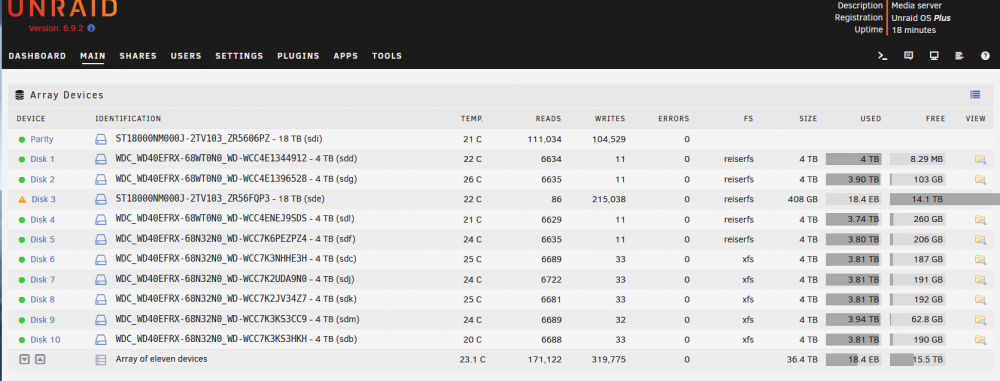
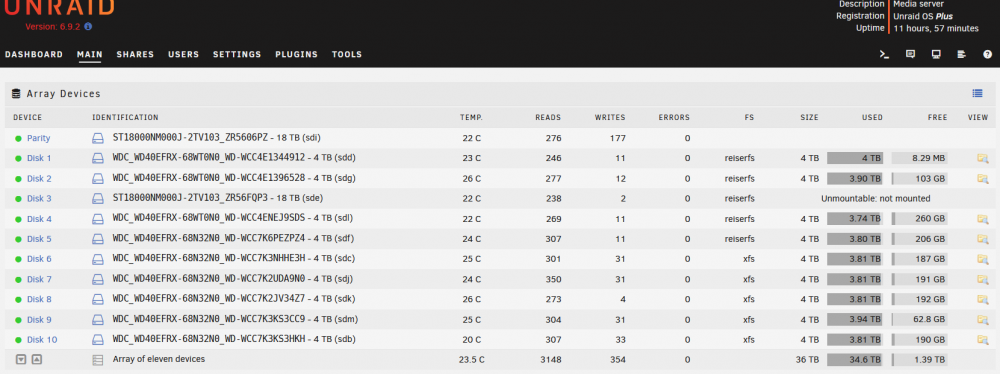
I am in the process of updating my array by replacing some WD Red 4TB drives with Seagate Exos X18 18TB drives. I precleared a new drive, replaced one of the old ones, and let the array start to rebuild the new drive. While this was happening the information listed about the size, used space, and free space was all incorrect for the new drive (size is 408GB, used is 18.4EB!, and Free is 14.1TB which is probably about right). See screenshot "Incorrect sizes." After the drive was rebuilt the information was still wrong so I tried stopping and starting the array. Once I stopped the array it now says "Unmountable: not mounted." See screenshot "Unmountable." I tried restarting the system and rebooting into safe mode and the problem still persists. There are a couple other weird things I noticed. Disk 3 still shows a green dot beside it despite the fact that it has not been mounted. The array itself has not given any errors and still shows a green dot in the tab as well. If I view my array from another computer on the network it shows a total capacity equal to all drives except drive 3. And when I view the drives individually only disk 3 does not show up. Also, disk 3 is still showing as reiserfs under FS when I expected it to be xfs. Any ideas what is going on? Did I run into some major glitches in the software? Under "array operations" I have the ability to format unmountable disks. Should I try that? I would assume that I would then need to rebuild the disk all over again? Thanks for your help. If anyone needs me to try anything/post anything please treat me like a complete beginner and give detailed step-by-step instructions!
-
I think I have found a solution. I think I can just follow the steps at the link below for a new config? Then not check the box that says that parity is valid. https://wiki.unraid.net/Manual/Tools#New_Config Can anyone confirm if this solution will allow me to re-create the array and put the accidentally removed drive back in its place? Thanks.
-
I just got some new larger drives to upgrade some of my existing drives for more storage. The new drives are larger than my parity drive so I started by replacing the parity drive and starting the array. Apparently when I installed the new drive I bumped a cable or something and one of the data drives reported as "unmountable." I have no reason to think that it has failed or anything. I ran a SMART quick test and it had no issues. However, it still showed up as "disabled" even after I reinserted the cables. Being kind of stressed and not being careful enough, I started following instructions for re-enabling a disk (that happened to be instructions for rebuilding a disk, something I cannot do because the parity drive has not been rebuilt yet!). Whoops! I unassigned the disk then started the array. Then I stopped the array and now the disk shows up as a new device. Is there any simple way to undo my mistake? If I reinstall the old parity drive will Unraid recognize it and let me rebuild the disk? Is there a way to make Unraid realize that the "new device" is actually the proper disk that should be there? Thanks for your assistance!

