





mrvoid
Members
-
Joined
-
Last visited
-
Thank you very much ich777. That did the trick!!
-
Having trouble getting the Icarus Docker to update to this weeks update. Have restarted the container as well as deleting and reinstalling the container. Anyone have any suggestions that I can try? Thanks!
-
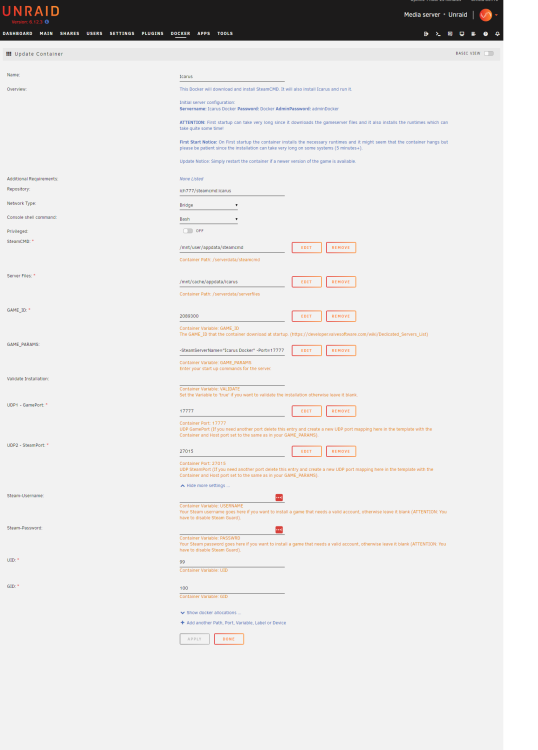
Thanks for the super quick reply. Here is the template. I don't have any adblocking setup, and no special firewall rules either. I didn't change any paths in the template, so maybe that's my issue. Just curious as to why it can't find the exe. Thanks again ich777!
-
I'm trying to run the Icarus docker. I've installed and uninstalled this thing several times. I keep getting this error saying "Something went wrong, can't find the executable, putting the container into sleep mode!" Can anyone tell me what I'm doing wrong? Thanks! Here is the log. ---Update SteamCMD--- Redirecting stderr to '/serverdata/Steam/logs/stderr.txt' [ 0%] Checking for available updates... [----] Verifying installation... Steam Console Client (c) Valve Corporation - version 1691628584 -- type 'quit' to exit -- Loading Steam API...dlmopen steamservice.so failed: steamservice.so: cannot open shared object file: No such file or directory OK Connecting anonymously to Steam Public...OK Waiting for client config...OK Waiting for user info...OK ---Update Server--- Redirecting stderr to '/serverdata/Steam/logs/stderr.txt' [ 0%] Checking for available updates... [----] Verifying installation... Steam Console Client (c) Valve Corporation - version 1691628584 -- type 'quit' to exit -- Loading Steam API...dlmopen steamservice.so failed: steamservice.so: cannot open shared object file: No such file or directory OK "@sSteamCmdForcePlatformType" = "windows" Connecting anonymously to Steam Public...OK Waiting for client config...OK Waiting for user info...OK Update state (0x3) reconfiguring, progress: 0.00 (0 / 0) Update state (0x3) reconfiguring, progress: 0.00 (0 / 0) Error! App '2089300' state is 0x202 after update job. ---Prepare Server--- ---Checking if WINE workdirectory is present--- ---WINE workdirectory found--- ---Checking if WINE is properly installed--- ---WINE properly set up--- ---Checking if runtimes are installed--- ---Runtimes found! Continuing...--- ---Looking 'ServerSettings.ini' file is in place--- ---'ServerSettings.ini' found--- ---Checking for old display lock files--- ---Starting Xvfb server--- ---Server ready--- ---Start Server--- ---Something went wrong, can't find the executable, putting container into sleep mode!---

