





Jorgen
Members
-
Joined
-
Last visited
-
I think unraid does it differently compared to the guide you're referring to. See here for an older example: https://forums.unraid.net/topic/126883-running-a-script-after-shutting-down-a-vm/ Although, it makes sense to separate the scripts for different VMs with the "$vmname" path. Sorry I'm out of my depth here, I was testing hooks for the same purpose a while back but can't remember if I got them working or not. Hopefully someone more knowledgeable will come along and help.
-
Maybe a permission issue? What does this show: ls -l /etc/libvirt/hooks/qemu.d
-
Yes, this seems to be impossible with igpu pass through. I've seen many issues raised around this, but no solutions. I've been meaning to update these guides to point at a much better source of rom files (actively maintained), you might have some luck rasising an issue in there: https://github.com/LongQT-sea/intel-igpu-passthru It's all proxmox based though, so unraid xml templates and config quirks will be confusing for them.
-
Looks like the PIA endpoint you are using have dropped support for port forwarding. Pick another endpoint from the list below and redo the OVPN setup. [info] PIA endpoint 'ca-ontario.privacy.network' is NOT in the list of endpoints that support port forwarding shown below:- From your supervisord.log:
-
Thanks for making me aware of Scrob! I've had Movary on my list of things to install for a while (replacing trakt) but Scrob seems better suited to my needs. I've made a CA template for Scrob and it's working well for me if you want to try it out: https://forums.unraid.net/topic/199294-support-jorgen-scrob-omnibus Looking for feedback!
-
Install guideSearch for Scrob omnibus in CA (Community Applications) and install it from there Adjust Network type and Timezone Set App Data + PostgreSQL Data to the preferred appdata paths Set the Secret Key Generate a key by opening the Unraid terminal (from the web UI) and running openssl rand -hex 32 Copy the output Paste it into the SECRET_KEY variable Leave Enable Registrations as true for the initial run, but set it to false once you have created all required user account in Scrob later. Initial Scrob setupOpen Scrob UI (default is <Unraid IP>:7330 unless you made changes to Network type or port mappings) Click on Register to set up the Admin account Provide email, user name and password for the Scrob admin user and create the account Login with the new credentials Follow the Scrob onboarding guide by clicking Got to Settings Add a TMDB API key Login (or register a new account) on https://www.themoviedb.org/ Create an API key for your account https://developer.themoviedb.org/docs/getting-started) Go to https://www.themoviedb.org/settings/api and copy the API Read Access Token (Note, not the shorter API key, you want to longer Access token) Paste into Scrob setting Optional, add a TVDB API key Login (or register a new account) on https://www.thetvdb.com/ Create an API key for your account https://www.thetvdb.com/api-information Go to https://www.thetvdb.com/dashboard/account/apikey and copy the Key value Paste into Scrob setting Scroll down and click on Save Changes Setup Scrob Media Server connectionUsing Jellyfin as an example, others will be very similar Scroll to Media Server Connections and click Add Connection Name = Jellyfin (example, can be whatever) Server Type = Jellyfin Server URL = typically http://<unraid ip>:8096, but adjust for however your Jellyfin server is configured Token = Generate a new token in Jellyfin Go to Jellyfin UI -> Admin dashboard -> Advanced -> API Keys (e.g. http://<unraid ip[>:8096/web/#/dashboard/keys) Click New API Key and follow the instructions Copy the API Key value and paste it into the Scrob setting User ID = This is the ID (not the name) of the Jellyfin user that is equivalent to the new Scrob admin user. Typically the Jellyfin admin user. Go to Jellyfin UI -> User avatar in top right corner -> Profile From the browser address bar, copy the string after /userproflie?userid= Paste string into Scob setting Click on the Test button, it should return Connection successful! Optional: configure the remaining options (Server -> Scrob, Scrob -> Server and Auto Sync) as you prefer Click on Add button to save settings Media Server Connections should now list Jellyfin with a green Connected status Click on Save changes Expand Jellyfin under Media Server Connections and select which Libraries to sync, then Trigger library scan If everything is set up correctly, you can now navigate to the Movies or Shows menu and your Jellyfin library should be synced and visible. Next stepsAll of this is detailed on Scrob.app and various other guides Set up Library auto-sync schedule Bring in Trakt data (bye bye Trakt!) Add Connections to Radarr, Sonarr etc. Add scrobble functions to other Media players or Media servers Add more users (with their own settings) Set up request functionality Set up reverse proxy for external access
-
reserved
-
[Template only, I am not the container or app author/maintainer] Community-maintained Unraid templates for Scrob,app (omnibus) - a self-hosted media tracker for Jellyfin, Plex, and Emby. These templates are not published by the Scrob author; they wrap the official bellamy/scrob Docker images. Single container with embedded PostgreSQL. Report Unraid template and install issues via this forum thread or GitHub issues on the Unraid template repo: https://github.com/jorgenjanssonlee/unraid-scrob/issues Report Scrob application bugs to https://github.com/ellite/scrob/issues Unraid template: https://github.com/jorgenjanssonlee/unraid-scrob Source project: https://github.com/ellite/scrob Registry: https://hub.docker.com/r/bellamy/scrob
-
Thanks for all your work on this, it is very much appreciated! The native language detection works great now, for both movies and tv shows. I finally managed to run it across my full library, and I guess my (mostly older, 720 or 1080) files were pretty lean already because I ended up with this: Done — processed: 225, no change needed: 4, skipped (already done): 2690, failed: 1. Space saved this session: 54.25 GB (225 file(s) remuxed). Space saved (all sessions): 97.29 GB. But it's not all about size savings for me. Getting rid of embedded subtitles for languages I'll never use will make it a much better experience in the media players when choosing subtitles. Also got rid of a few dubbed default languages which also helps improve the playback experience.
-
This might be the same issues I raised in GitHub yesterday for TV shows: https://github.com/binhex/trimarr/issues/59 https://github.com/binhex/trimarr/issues/58
-
TV directory processing finished, just sharing stats in case anyone is interested: Found 2015 mkv files to process Processed: 930, no change needed: 1085, skipped (already done): 0, failed: 0. Space saved this session: 43.92 GB (930 file(s) remuxed). Total elapsed time 16 hours
-
Successfully tested, permission issue resolved, thanks for the quick turnaround! Now running with backup file disabled across my full TV Show directory. Will report back if I come across anything else but looking very solid right now. Thanks again for making this avialbe, it's very useful!
-
@binhex I've created an issue in Github for the file permission issue: https://github.com/binhex/trimarr/issues/56
-
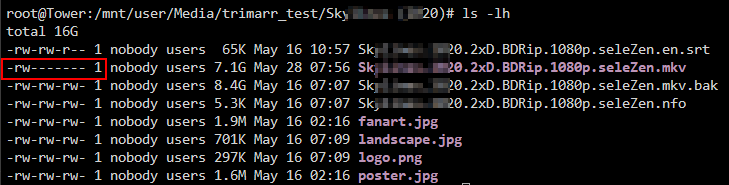
My testing continues, and I need more help! File permissions on the remuxed files are not correct for me, have I missed something in the docker setup? Edit, relevant variables from docker run command: -e 'PUID'='99' -e 'PGID'='100' -e 'UMASK'='000'
-
It appears I have both Radarr/Sonarr set up to save nfo files for kodi, AND I also have Jellyfin save metadata as nfo (no options for output formatthere). Not sure which one is winning out, probably Jellyfin. I should fix this... After some research, it appears they all follow roughly the same standard, established by Kodi in the first place. Especially for basic things like movie/show identification Looks like they should all contain at least the fields below in the same format. I looked at the script code and <title> + <year> should slot in pretty seamlessly? But I think using <uniqueid type="imdb"> or <uniqueid type="tmdb"> would be more precise? <movie> <title>The Dark Knight</title> <originaltitle>The Dark Knight</originaltitle> <year>2008</year> <imdbid>tt0468569</imdbid> <tmdbid>155</tmdbid> <uniqueid type="imdb" default="true">tt0468569</uniqueid> <uniqueid type="tmdb">155</uniqueid> <plot>...</plot> <runtime>152</runtime> <genre>Action</genre> <genre>Crime</genre> <studio>Warner Bros.</studio> </movie><tvshow> <title>Breaking Bad</title> <year>2008</year> <imdbid>tt0903747</imdbid> <tmdbid>1396</tmdbid> <uniqueid type="imdb" default="true">tt0903747</uniqueid> <uniqueid type="tmdb">1396</uniqueid> <uniqueid type="tvdb">81189</uniqueid> <plot>...</plot> <genre>Drama</genre> </tvshow>



