





ives
Members
-
Joined
-
Last visited
Everything posted by ives
-
Hi I have the ResierFS file system on my disks and I'm trying to empty each disk in turn so that I can reformat in xfs. I'm following the steps in these notes: https://docs.unraid.net/unraid-os/using-unraid-to/manage-storage/file-systems/#converting-to-a-new-file-system-type This is what Ive done so far: stopped the array Navigate to Settings → Global Share Settings. In the Emptying disk(s) area, select the disk(s) to empty and Apply start the array On Main → Array Operation click Move Ive done all these steps except on step 4 I don't get a 'Move' button. I have a free disk in my array which is totally empty and of the same size (2tb) that I want to empty so its not like I don't have the free space. Does anyone know what might be going on? There's no read/write access happening on my disks to suggest that mover is working in the backgound. thanks Ives
-
ports on the back
-
yes Im booting froma usb flash drive and no, Ive never tried to use this feature before.
-
Ive tried some USB thumb drives to see if they would show up, but no luck. I've no idea how to run Unraid as a VM, so I guess no.
-
I'll give it a go in about an hour. I'm just finishing off a parity check atm
-
yes, absolutely. Ive also tried with several usb sticks and still nothing comes up
-
hi. yes I plugged it into another port for the second diag. Its a Seagate 1TB model SRD0NF1
-
thanks for looking into this for me here is the new diagnostics. unraidtower-diagnostics-20260406-1634.zip
-
thanks ever so much. Ive attached the diagnostics zip file unraidtower-diagnostics-20260406-1608.zip
-
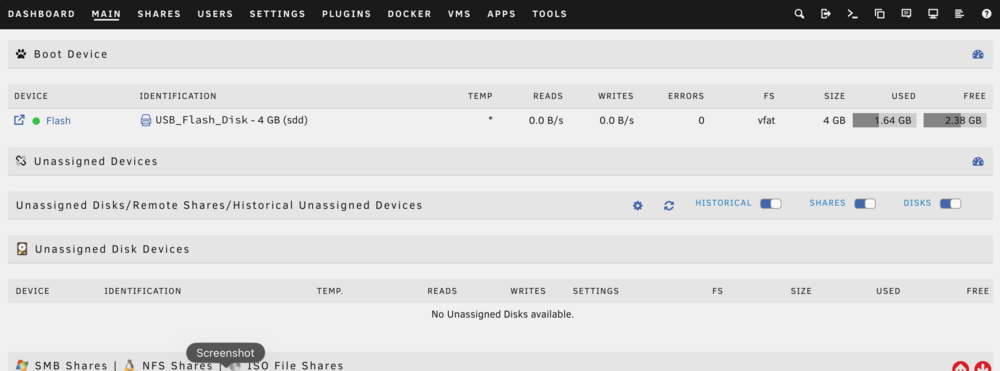
thanks for replying. I'm not sure what you mean by diagnostics,but here is a screenshot I already have the Unassigned Devices Plus plugin
-
HI I'm trying to copy some data from my array to an external usb hard drive. I've installed unassigned devices plugin but my usb hard drive doesn't show up under unassigned devices in the main tab of the gui. Can anyone help me?
-
-
hi one of my 3 HDD's has failed. If I put a new one in, what is the procedure for rebuilding it from parity? thanks
-
brilliant. thanks so much. I was being an idiot and using the IP for the eth0 connection. All good. thanks
-
Ok thanks
-
No. It’s headless. I can only access through the web gui
-
HI, I'm running 7.2.4 and I'm having some trouble that I can't figure out. For reasons I won't go into, I need to move my tower and that means I won't be able to connect it via ethernet: only wifi. I bought a usb WiFi dongle and have set it up in Network setting and it has connected to my wifi so I essentially have both ethernet (eth0) and wifi (wlan0) running. I would have thought that if I unplug my ethernet cable then Unraid would switch to wifi but it doesn't seem to. My web giu just goes blank and won't come back unless I plug the ethernet cable back in. My question is how can I get my tower to run on wifi and not ethernet? Thanks in advance
-
great. thanks guys for your help
-
Thanks. I didn't know there was a built in file manager. Can I find it under the apps tab or is it somewhere else? Sorry for my ignorance
-
I don't think I can post in that section or am I missing something?
-
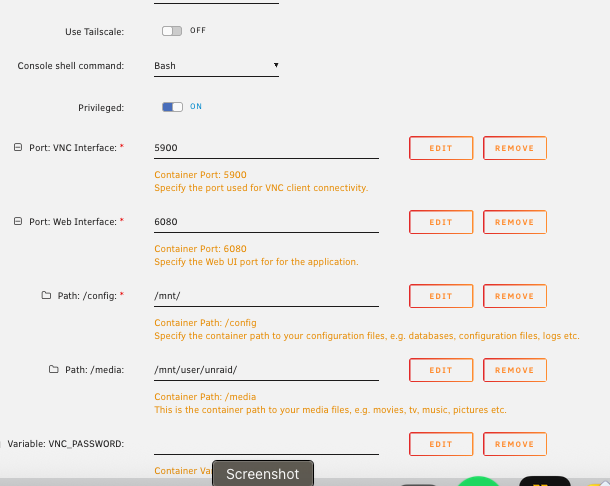
Not sure if this is the right place to post this. Apologies if its not. First time trying to use Krusader. I watched some YT vids but the file system didn't seem to correspond with my latest version, although I might have got that wrong. I installed Krusader with default settings because I wasn't sure what to change in the configuration. WhenI start the web gui it gives me a blank page : https://192.168.1.100:6080/vnc.html?resize=remote&host=192.168.1.100&port=6080&autoconnect=1 I set a static IP a little while ago to 192.168.1.100 Not sure if that might be an issue. Attached is a pic of the configuration Any help much appreciated
-
OK. I fixed it. Yees, I'm stupid LOL It had no of assigned disks for cache set to 1. I clicked it and chose 0 and now my array starts. All good
-
Hi, It was several years ago that I installed unraid and I've completely forgotten all the details around it.I've just been using it and it's been great. I have 3 hard drives and one is parity. However, I today noticed that my version of unraid was 6.8.something and I hit the update OS button. It's now running 7.0.1 and whilst I can log in to the GUI, my array is stopped. When I try and start it I get an error message saying : "Wrong Pool State cache - too many wrong or missing devices" So, I figure it's something to do with the cache. When I look on the main page it says cache unassigned. When I click on it there is no option to choose a drive to assign it to. I'm a bit stuck. I only have 3 drives and I don't remember setting one up for cache when I set the system up. Is there a way to not have a cache ? Can I turn it off or is it required? Sorry for my confusion but I'm at a loss on what to try now. thanks Ives


