





CasanovaFly
Members
-
Joined
-
Last visited
-
I don't, either, but that's the only thing that really jumps out at me. Especially because I could just swap the drives back and the issue would resolve itself. You would think -- or at least I would -- that if adding this 10TB drive (to an existing slot) changed the BIOS boot order, it would stay changed even if I added the 8TB back. The only thing that throws up a flag for me is that I believe Windows used to have an issue back in the day booting from drives larger than a certain size. I think it was 2TB and then it moved to GPT style or something and there were early issues booting from that. But honestly I have no idea at all. I'm about to go ferret around in the BIOS and see if anything jumps out. Edit: upon perusing the BIOS, there's nothing that jumps out. With the USB stick in the front panel (USB2), I can see all the possible boot devices (well, 7-8 of the drives plus the USB) and reorder them and choose a specific boot device. When I put the USB stick in the back (USB3), it disappears completely from the list of bootable devices.
-
I did not leave the old drive connected; hot swapped it out. I did some preliminary checking in the BIOS at the time and couldn't find anything that seemed like it would have explicitly fixed the issue, and all the BIOS boot options available to me were the various hard drives. I also have all the hard drives connected to a few SAS2LP RAID controllers. I'm not doubting your logic, I'm just trying to wrap my head around this. After all, when I just put the 8TB drive back, without changing a thing, it was fine. And, if anything, I removed a drive from the array (and the server) a few months ago so if anything I'm down a drive since I switched the USB out. On the surface, it seems like there were an issue jumping from an 8TB drive to a 10TB drive, as that's the only thing that really changed.
-
Recently had an odd little thing happen with my unRAID server (v6.12.3) and was wondering if anyone could shed some light on it. I recently upgraded my parity drive. For context, I've had zero issues with unRAID save for a hard drive that started to crap out a few months ago. No issues with the server itself. I was upgrading from an 8TB parity to a 10TB parity. I've upgraded my parity maybe a half dozen times, and the time between each upgrade is usually years, so I do it slightly differently each time. I googled how to do it to be sure and found a YouTube video of a guy talking about how to do it and it seemed even easier than I remember. He stopped the array, set parity to "no device," put it in maintenance mode, start the array, stop array, physically swap parity drive. I'm paranoid, so at this point, I did a full shutdown of my server to swap the 8TB drive for the 10TB drive even though I've got hot-swap capabilities. Restarted the server... nothing. I don't have a monitor connected to it constantly, so I couldn't see what was actually happening; instead, I just wait until the web portal is available to know things went fine. After an inordinate amount of time, I went to check the server -- motherboard was giving no error codes on its display, showing only FF for fully functional. Odd. I forced a restart, same thing... except this time the error code was AE which meant there was a problem finding a boot device. The USB stick hadn't moved from its port, and the physical server hadn't moved... just a drive swap. I threw the 8TB drive back in and booted it up... no issues. At this point, I figured I could probably hot swap the drives, so I did even though I figured this portended trouble. Went and swapped the 8TB for the 10TB, refreshed the portal, added the 10TB into the parity slot and started the array, (re)built parity, no issues. When parity finished, I tried a complete shut down just to see, and as I suspected, same issue: won't boot. Hooked up the monitor to eventually get the "unable to enumerate USB device" error. Found another forum post about this and saw there can be issues with USB3 ports, and all I've got on my mobo is USB3. Luckily -- I guess -- my case is old enough that it has a USB2 on the front panel, so I threw the USB in there and no issues, booted right up. So my issue is "fixed" (even though I'd rather have the USB on the back of the case, where it can't get accidentally knocked as easily). I just wanted to make a post here to see if anyone could shed some light on what exactly happened, and why. Thanks in advance! Edit to add: the USB stick is virtually brand new (purchased July 2023, upon further review). Upgraded to a Samsung BAR Plus, presumably after checking whether it was good with unRAID and reliable. Swapped the USBs shortly after purchase and have had zero issues since then.
-
So what if I changed So what if I change it to... [global] hide dot files = no browseable = yes # Auto-generate secure exports for disks [disk1] path = /mnt/disk1 comment = Disk 1 browseable = yes writable = yes public = no valid users = @users create mask = 0666 directory mask = 0777...and repeat for each disk? This should avoid the shuffling of disk paths, no?
-
As I said above, I've got 15 disks and doing it through the GUI isn't a crazy amount of time-consuming, but if I can automate it or batch it, I'd like to do so. Whenever I make a new config it also wipes out the disk shares and I have to re-do them. I figured there was a relatively simple way to do this via extra config and trying to see if that's the case.
-
Thank you for the reply. I think there's some stuff in there that pertains to what I want to do but a lot of this stuff looks like another language to me. Do you think this would work for what I want to do? [global] # Optional global options hide dot files = no browseable = yes # Match all disk shares dynamically [disk*] path = /mnt/%S comment = %S browseable = yes writable = yes public = no valid users = @users create mask = 0666 directory mask = 0777
-
Hello all, Tried searching for this info but not exactly sure if I'm using the proper terminology, so came back with nothing. My "issue:" I like to export all my disk shares on top of my regular shares. I'm using unRAID solely as a file server with a few shares spread across multiple disks. I like to be able to go in to specific disk shares and move things around if I see fit. I've got 15 disk shares, so going into each disk and setting it to export/secure, and then waiting for the refresh to change user access to read/write is not a deal breaker but something I would like to batch, if possible. I think this might be possible to do with the SMB extra configuration options but I'm not a power user by any means so I haven't the faintest idea what to put. If someone could point me in the right direction, that'd be great. What I'd like is to set every disk to... export=yes case-sensitive name=(stays on auto) security=secure And then user access... <user name>=read/write (there's only one user, me) Thanks for any and all help!
-
Occam's Razor. After a night's sleep, seemed to be the most likely. Went back to old hardware that was working before the issue and same thing, same panic. Started trying to great different images/boot versions of unRAID on different flashes, got nowhere. Until I noticed that a fresh overwrite install by the unRAID USB Creator didn't actually overwrite anything. All the same (likely corrupted) files were still there. So I deleted everything, downloaded a .zip of the latest unRAID, copied over to original USB... boots! Copied over my config folder... boots! So I seem to have solved this. Seems like some files on the USB got corrupted along the way. Just to confirm: the only thing I need to copy over to get my "old" server back is the /config folder, correct?
-
Next step from here for the evening (while I hopefully await someone to gallantly spring to my rescue): Succumb to defeat and wallow in self pity -- OR Migrate back to old hardware configuration and see if I get the same kernel panic. Leaning toward the former, as it's getting late and the migration will be a hassle. Might wait until the morning.
-
Hey y'all, Been (blissfully) using unRAID for a few years as a storage server. Finally caught it in the butt, though. Tried to create a new share this AM but couldn't edit any of the settings (even entering a description for the share). Did some Googling and found that my USB could likely be set to read-only mode. Server'd been up for about 110 days without issue at this point. I ran a diagnostic and found in there that the USB was read only. Also read that rebooting could fixing any potential corruptions (read some other unRAID forum posts that indicated this) so, obviously, gave that a shot as it was the easiest thing to try first. I don't have a dedicated screen or keyboard hooked up to my server -- it's sitting in the storage room, doing its thang -- so I never see any of the POST stuff or unRAID loading stuff. I just know it takes a bit to get loaded up. But when it took a bit too long, I went to go check it. Motherboard was giving an AE error code which meant it couldn't find a boot device. Dug out a screen and keyboard and confirmed as much -- no more boot device. Also read that if the USB is corrupted, you can plug it into a Windows PC and chkdsk it, so I did that next. When I plugged it in it did, Windows told me the drive had an issue. So I followed the prompt to fix it. Go back, throw it in the server... no boot device. At this point, I try wiping the USB (after backing up the contents) and reformatting. No dice. New USB that's confirmed working as a boot device. No dice. Panic begins to set in. I'd been meaning to upgrade the hardware for my server (CPU, mobo, RAM, case) with parts I had waiting but didn't want to do it now. But looks like we're doing it now, as the only thing I can think of now is a hardware issue. So I dismantle the thing, put the new mobo/CPU/RAM in the new case, and try. No dice. Perplexing. Try downloading the fancy new unRAID bootable media creator... that gives me an error about not being able to lock as it completes. And it doesn't work, still no boot. More Googling: can use the bootable media creator and run the make_bootable command to get it working. Try that... success! Bootable media recognized. I didn't even bother booting in unRAID, just copied the old files onto this new bootable media (which is the same old USB drive I've used since day one, the old recommended Sandisk) and... kernel panic. And that's where I am now. Kernel panic with the bare essentials: CPU, mobo, RAM, bootable USB, USB keyboard, monitor. Panic with fresh unRAID install or copied-over old unRAID config. I've attached the last diagnostic I ran as well as a picture of the kernel panic error on screen. Sorry for the length; just wanted to be as detailed as possible. I'm lost at this point. Tried to run memtest from the bootable USB but the screen just goes blank and it boots back to the unRAID boot screen (where you choose safe mode, GUI, etc.). I also tried safe mode and that didn't work. I also swapped out the RAM with other previously working RAM, and no dice. Any help will be greatly appreciated. thevelourserver-diagnostics-20230713-0919.zip
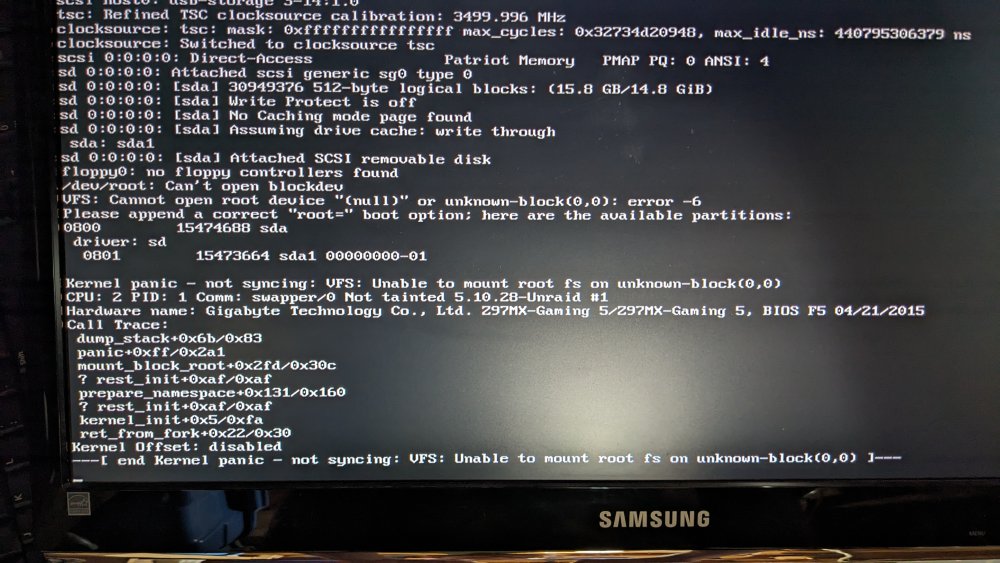
-
I wasn't worried about mis-selecting my parity. It's model name was different enough that I wouldn't be able to confuse it with anything else. But still, so much data to be lost... scary... Again, though, unRAID shines. A great community, too, which makes all the difference.
-
Well, I've done it. Super easy (like everything else unRAID-related) but also terrifying because I don't know my butt from a hole in the ground when it comes to this stuff and I'm terrified I'll lose all my data. But my fear was all for naught. Thanks for the help!
-
So what is retained? The order or the data? From your reply I read that all my data will remain where it is, untouched.
-
Could you elaborate on the retaining? I would just like to reorder my disks without losing any data. What would I need to retain, exactly? Keeping in mind I don't have a cache drive.
-
Preclearing now, but I know how to add a new drive. What I want to do is reorganize my drives as they appear in the GUI. And I want to include the newest drive in that reorganization. So, when the drive is done preclear tomorrow, I'd like to be ready to roll. Ya feel me?

