





cowger
Members
-
Joined
-
Last visited
-
Thank you both for responding. I had tried different flash drives previously (7.2.x) with no result, so I didn't even think to try it again now. But... I'm now booted on 7.3.1, key is transferred, and I'm current on my software for the first time in 2+ years. Woohoo!!!! Thanks again!!!
-
Well, unfortunately 7.3.x did not solve this issue. My system still hangs during reboot, looking for (and not finding) the flash drive. I remain stuck back at 7.1.4. I'm still unsure if a different flash drive will solve this issue or not... and could really use some advice!!! Thanks, Bryan
-
Thank you, Jorge, good to know. I'll wait for 7.3 and give it another try then. Cheers!
-
Okay, thanks. I don't believe that the automated tool is installing the new OS incorrectly. I believe there is something in the OS or, more likely, the bootloader that changed post 7.1.4. That OS boots every time for me. Any later OS doesn't. This happens on the exact same hardware, and others have posted here about the same behavior:
-
Thanks. Can you please elaborate on why you are suggesting this? The (automated) install/upgrade of the OS seems to be fine for a different machine, so does the manual install actually do something different that might fix this issue on my primary NAS server?
-
Thanks for the response. The flash is labeled UNRAID. It works just fine with 7.1.4. And yes, I have a backup. Each time I've tried to upgrade the OS, I need to restore the flash to 7.1.4 and then the system boots. This been very consistent over the past many months and several different post-7.1.4 versions. To your 3rd question, I just tried booting this flash in a different system, and it does, with both 7.1.4 and 7.2.4. I'm not sure what to make of that. This problematic behavior has existed across two different motherboards in my NAS system. I've tried both internal (baseboard) USB ports as well as the front panel ports. Hmmm....
-
I'm in the boat where I'm unable to upgrade beyond 7.1.4. As others have reported, UnRAID can't find the USB drive with anything beyond 7.1.4 on it. A console log of the boot process shows the system looking for a drive called "UNRAID" for 30 seconds and then giving up. It appears that some sort of USB flash incompatibility was introduced post 7.1.4. I'm using a Verbatim 32GB drive, less than a year old. So to my question: Is there a list of approved USB flash drives, since mine doesn't seem to be supported? Thanks! Bryan
-
Just to close this thread out, my system has now been running flawlessly for two weeks. I replaced my 16GB DRAM module and that was the fix. The bottom line on this is that Memtest86+ was unable to find my DRAM errors but Live Memory Tester found them quickly and efficiently. Had I relied solely on Memtest86+, I may never have solved this. Thanks for an awesome plugin!!!!
-
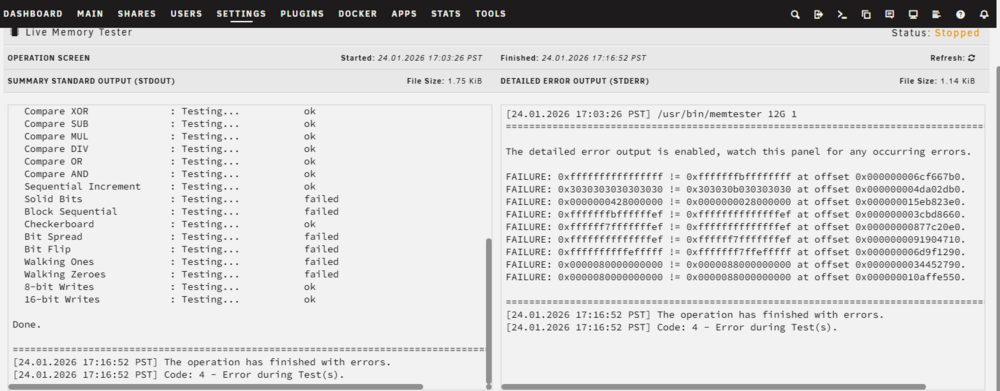
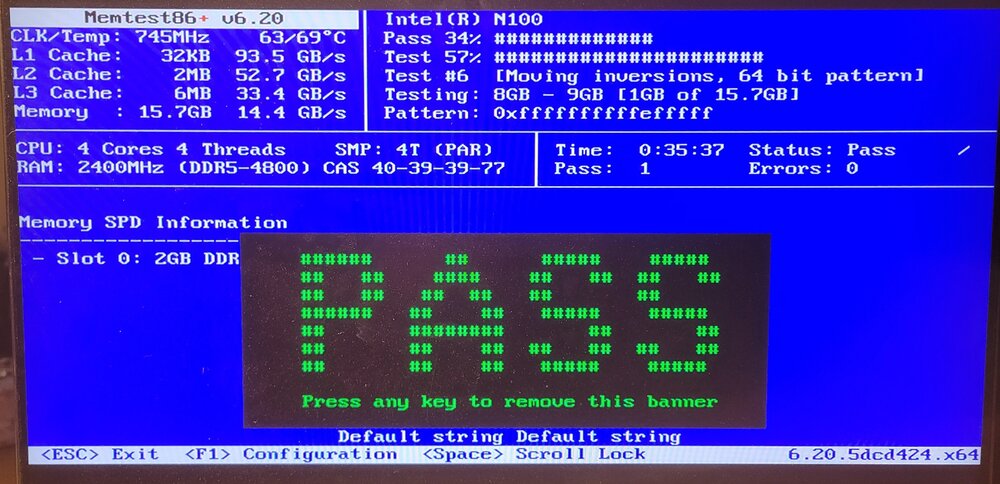
I've posted a couple threads recently seeking help with my system's inability to complete a parity check, memory issues, etc. In short, it's all new hardware but I've never been able to have the system complete a parity check, and it would hang every few days or so. Unbalance would also shorten the time it would run without hanging. Someone suggested I test the memory (which I never had), so I installed Live Memory Tester. It would quickly and readily (within a few minutes) find dozens of memory errors when I would test 12 of my 16GB. Strangely, however, it would run cleanly if I only tested 8GB. Running Memtest86+ for many hours (7 passes completed) produced not a single error, however. I've now replaced the RAM with new, and run both Memtest86+ and Live Memory Tester on it. Zero errors. Just completed a 21 hour parity check, no problem. I'm running the system hard with Unbalanced and so far, no problems. I find it interesting that Memtest86+ was not able to catch the bad memory module, and thought I'd share. Bryan
-
Thank you. I've found that if I run on 8GB (of 16), it will run through a pass without errors. But as soon as I change that to 12GB, it starts failing regularly. So I'm very suspicious of my current RAM. I'll replace that today and see if that fixes things....
-
Thank you, Rysz. Memtest86+ has completed 3 passes without any errors. To clarify, are you saying that I should believe Memtest86+ (zero errors) or Live Memory Tester (many errors)? What started all this is that I'm unable to complete a parity check, but at this point I don't know if that's due to memory or something else...
-
Thank you, trurl and MowMdown. I have Memtest86+ running now and will give it 24 hours. I don't know why the Live Memory Test fails so quickly and so readily, but I'll ask the author of that plugin and get his thoughts. In any case, I have new RAM coming and will continue to try to get this sorted...
-
Thank you for this great tool!! Question: Why could it be that I'm seeing errors when testing 12 of my 16GB of memory, yet Memtest86+ finds nothing?
-
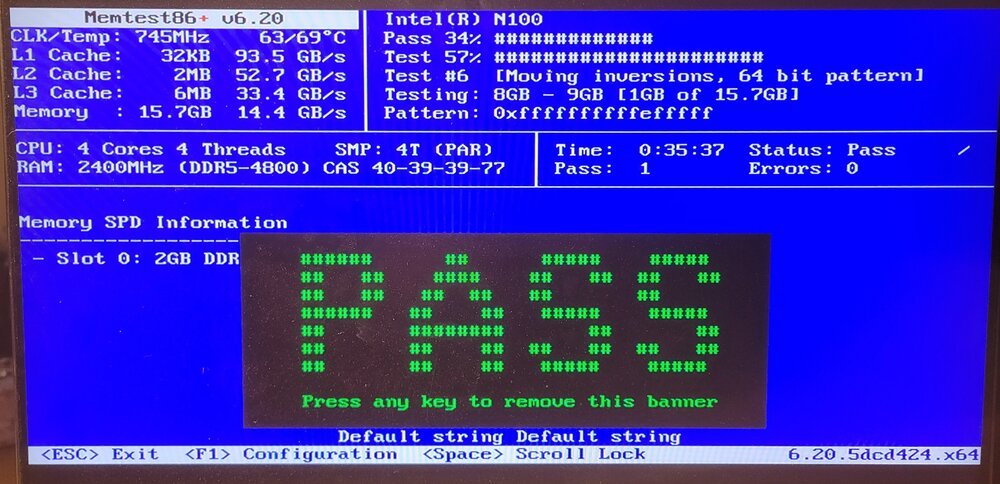
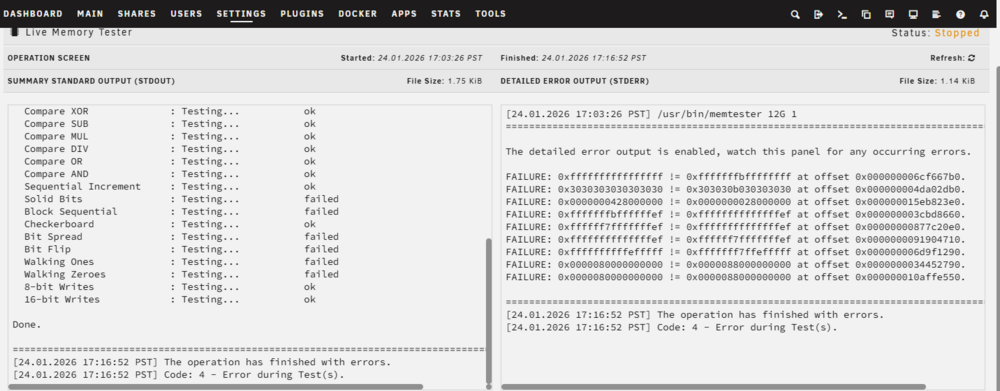
Yesterday I started a thread about my inability to complete a parity check: https://forums.unraid.net/topic/196750-always-hangs-during-parity-check/ One of the responses asked if I had run a Memtest recently, to which I replied that I had never done so. I subsequently installed the Live Memory Tester and had it test 12 of my 16GB of memory. Errors started popping up after just a few minutes and eventually rose to dozens of errors. I then connected a console and ran Memtest86+. It went through a cycle in about 20 minutes and resulted in a PASS. Two questions: 1) Why the difference between the two memory test tools? I would have thought that Memtest86+ is the more thorough tester, since it should be addressing the entire 16GB of RAM. 2) On the Memtest86+ screen, why does it state "Slot 0: 2GB DDR" when it also shows the 15.7GB above?
-
Okay, after running a RAM test for about 10 minutes, yielding 6 errors, I will obviously start by replacing the memory. Thanks for everyone who pitched in on this so quickly. Bryan




