krone6
Members
-
Joined
-
Last visited
-
krone6 changed their profile photo
-
I'm also having connection rejected problems when apache is on port 80. It was listening on 80 earlier yesterday and all of a sudden it stopped. The WebGUI for unraid is on 8080 and nothing else on the network should be on 80. Any ideas on what it could be?
-
Any way to fix this? I have myrianDB installed and the folder is inside the docker's appdata. I'm still trying to wrap my head around how the data flows within multiple virtualized environments on top of a host. http://puu.sh/jyWnk/e9fc22a79b.png
-
First, I am not familiar with setting up docker. Second, I am not sure it can run under docker. Third, It will mean virtualization over virtualization and would probably hurt the VMs performance and probably limit accessability and performance to bare HW. Thanks for the reply. Was was curious about that and didn't think about the whole virtualization on top of virtualization.
-
Is there a reason this isn't in docker form? It seems having every addon in docker would make things simple and convenient in one location.
-
Install the virtualbox guest drivers in the VM's OS. Figured as much, Thanks. Have you ever come across a situation where you were unable to install the addons? For example while you're trying to install an OS and there's an option you're unable to select with your keyboard or mouse. Curious is all.
-
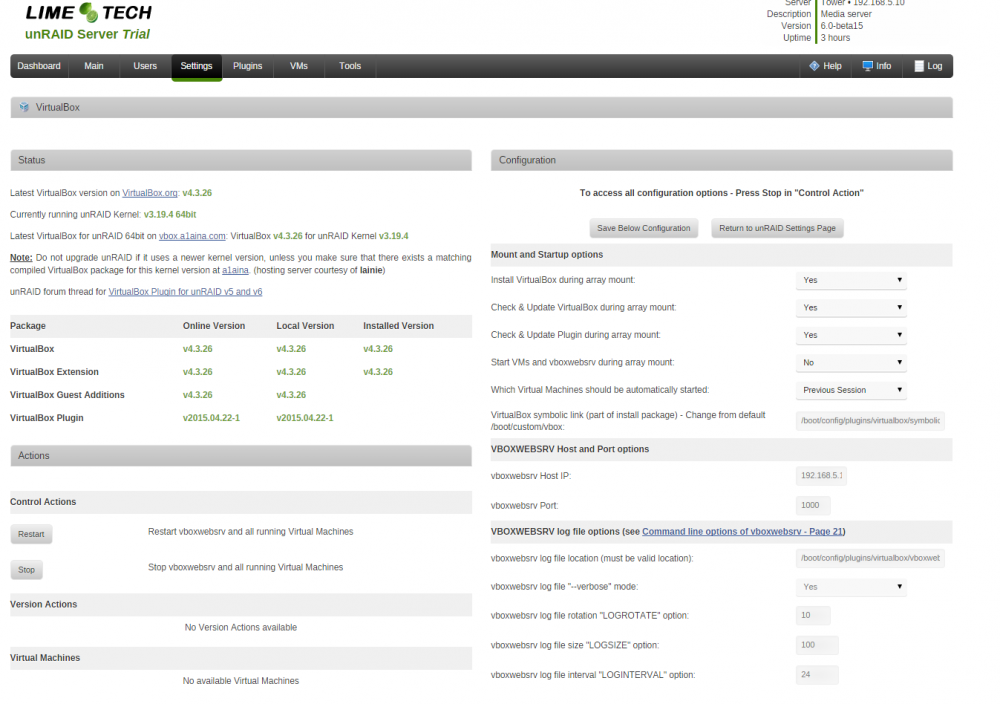
Just to understand: * You run vboxwebsrv? * You have your Apache Webserver enabled and running? is it the latest version (2015.04.21)? * You have phpVirtualbox extracted in your webserver configured folder? * How are you trying to access phpVirtualbox? * Why have you changed the default address and port for vboxwebsrv? EDIT: I changed the virtualbox port to the one phpvirtualbox asked for and turned off auth for now. I was able to connect and install an OS. The odd things is after I connect via RDC my mouse it now in the same place my desktop's mouse is when I move it inside the Vms desktop. The VMs mouse will be in the top right corner while my main mouse is in the middle of the screen. Any idea what's going on? 1: vboxwebsrv is running 2: Both enabled and running and is the latest 3: I extracted the folder containing phpvirtualbox to my apache root. My apache server and I click on the folder in the web browser for now. Once things are working I'll take everything out of the folder and put it in the root for apache 4: I am trying to access it with the same way I access my unraid server. The server's IP is 192.168.5.10 and vboxwebsrv is on port 1000, so I do 192.168.5.10:1000 - I time out. I have tried accessing apache instead and going into phpvirtualbox folder. When I do I get an error using the default login (after editing the file). 5: I did that for testing and it is now 127.0.0.1 If I have to guess my problem is probably how I am trying to access my server as I've only just learned about phpvirtualbox. The built in vm manager doesn't give me much control and I'm hoping virtualbox will allow me more control over my VMs.
-
Though do you have an idea what is causing that xml error when I start the vboxwebserver and how to get around it?
-
I was able to get the plugin to start the webserver however I don't think I have it setup properly. You can see my settings and what happens when I go to the webserver from my computer. Apache was not running at the time and had no different effect with it on. Also to make this plugin even better I'd suggest telling users something is preventing the webserver from starting instead of just blankly refreshing the page as if nothing happened after hitting "start webserver" I'd also suggest refreshing the page when the webserver does start instead of having to close the tab we're on down and going to our unraid on a new tab. Not even typing in the server's IP again will work. They don't stop the plugin from functioning though would be nice QoL changes for the user.