





cargo303
Members
-
Joined
-
Last visited
-
Thank you, it sounds like that may clear up the inconsistent connectivity I've been having.
-
Most of my issues are resolved. The shares were no longer needed anyway so I cut my losses and removed them. And although TOWER doesn't appear under Network, if I type \\TOWER I get in just fine. Not sure what happened that's preventing me from seeing the drive but at least I can get what I need. Thanks all.
-
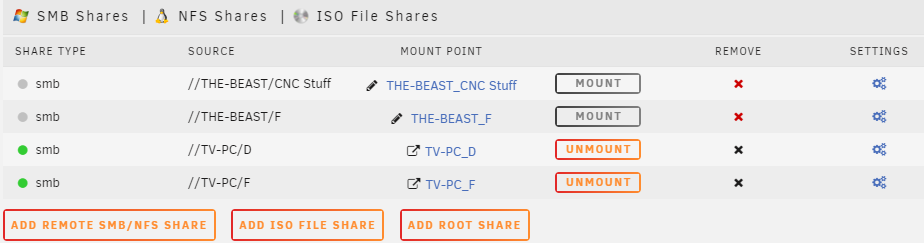
Thanks again Frank. After reboot, I'm able to access via the web gui, but not Windows Explorer. 2 of the shares I had previously setup are offline (see attached screenshot). What do I need to do to mount those again? Do they need to be removed and recreated or something else?
-
Thanks for the reply. Monitor, mouse and keyboard connected to Unraid but no go on getting video to the monitor after hitting <Enter>. Since I have no way to setup the Syslog Server without having access, I'm guessing my only option at this point is a hard shutdown, but I would like to confirm that before I do something I can't un-do. If/when I power down and then restart, other than setting up Syslog Server what should I check? If my network card has gone bad, how can I confirm? I'm totally lost here so I really appreciate the help!
-
I've only been using Unraid for about a month and just purchased the license. Recently I've been noticing that my Unraid server would occasionally be unresponsive when accessing through Windows Explorer. I could see the folders but not be able to open anything and a short time later all's good. Last night I realized the server no longer shows up under Network and the web gui doesn't connect. I replaced the LAN cable and when that didn't work, I thought that maybe the on-board NIC went bad. I just connected a mouse and monitor to see if I could tell what's going on, but I got nothing. The server is still on, I didn't want to reboot and lose the log files before getting advice. Can anyone suggest next steps? I have some files on the server that I need (I realize I should have backups on another machine). Thanks!
-
I was actually able to pre-clear the drives after all. I did a hard reboot last night and when the system came back up the drives were no longer in the array so I was able to continue pre-clearing. I do realize it's not required, but they're brand new drives and so I'd rather allow the stress test to flesh out any potential issues. Thanks!
-
So I just setup my server with (3) 6TB Red drives (1 for parity) and a 500GB WD SSD for cache. I was watching a how-to video from Spaceinvader One on pre-clearing the drives first and adding them to the array, but I didn't realize the pre-clear needed to complete before adding them. Now the drives are all added, but at the bottom of the Main tab under Array Operation it says "Starting". The start button is grayed out and there is no stop button. I've been looking for how to remove the drives from the array so that I could pre-clear them first. On the Dashboard tab all processors are displaying activity but in the "Array" section, all drives are marked as "unassigned". Can someone point me in the right direction? I have no idea what I should be looking for. Thanks! Les
