





koyetsu
Members
-
Joined
-
Last visited
Everything posted by koyetsu
-
that was the problem johnodon. thank you so much for the help. i'm used to vmware/esxi where that is kind of a given. that and it has a bios that you can get into to set that stuff.
-
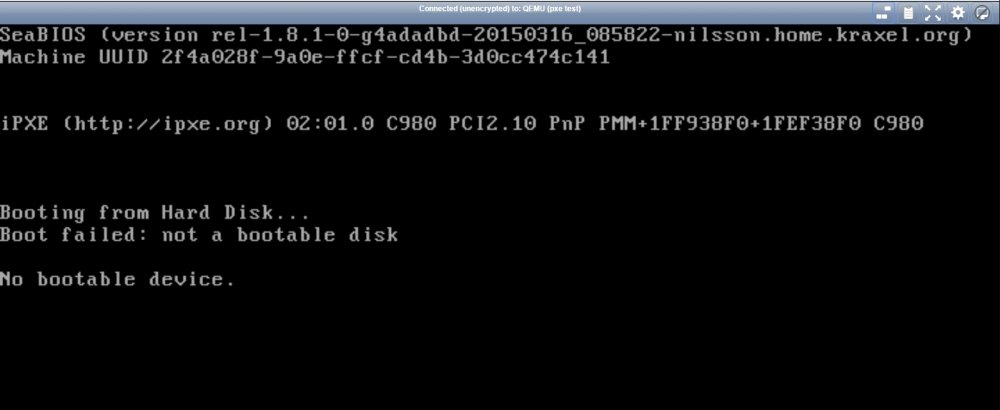
The problem isn't time out it's that it doesn't seem to try for an IP for pxe boot Screenshot attached
-
Ok i don't know if this has been answered or not but haven't had any luck searching. I have a PXE server setup on the network. if i boot the physical machine it will pxe boot. but when i create a VM and try to get it to do the same it will not. i have the bridge reconfigured so that VM's pull an ip from the network not from unraid. i assume this is something super simple but i can't figure it out. below is the XML for my basic test vm. <domain type='kvm'> <name>pxe test</name> <uuid>8f024a2f-0e9a-cfff-cd4b-3d0cc474c141</uuid> <metadata> <vmtemplate name="Custom" icon="ubuntu.png" os="ubuntu"/> </metadata> <memory unit='KiB'>524288</memory> <currentMemory unit='KiB'>524288</currentMemory> <memoryBacking> <nosharepages/> <locked/> </memoryBacking> <vcpu placement='static'>1</vcpu> <cputune> <vcpupin vcpu='0' cpuset='3'/> </cputune> <os> <type arch='x86_64' machine='pc-q35-2.3'>hvm</type> </os> <features> <acpi/> <apic/> </features> <cpu mode='host-passthrough'> <topology sockets='1' cores='1' threads='1'/> </cpu> <clock offset='utc'> <timer name='rtc' tickpolicy='catchup'/> <timer name='pit' tickpolicy='delay'/> <timer name='hpet' present='no'/> </clock> <on_poweroff>destroy</on_poweroff> <on_reboot>restart</on_reboot> <on_crash>restart</on_crash> <devices> <emulator>/usr/bin/qemu-system-x86_64</emulator> <disk type='file' device='disk'> <driver name='qemu' type='raw' cache='writeback'/> <source file='/mnt/disk1/vmachine/pxe test/vdisk1.img'/> <target dev='hda' bus='virtio'/> <boot order='1'/> <address type='pci' domain='0x0000' bus='0x02' slot='0x04' function='0x0'/> </disk> <controller type='usb' index='0' model='ich9-ehci1'> <address type='pci' domain='0x0000' bus='0x02' slot='0x02' function='0x7'/> </controller> <controller type='usb' index='0' model='ich9-uhci1'> <master startport='0'/> <address type='pci' domain='0x0000' bus='0x02' slot='0x02' function='0x0' multifunction='on'/> </controller> <controller type='sata' index='0'> <address type='pci' domain='0x0000' bus='0x00' slot='0x1f' function='0x2'/> </controller> <controller type='pci' index='0' model='pcie-root'/> <controller type='pci' index='1' model='dmi-to-pci-bridge'> <address type='pci' domain='0x0000' bus='0x00' slot='0x1e' function='0x0'/> </controller> <controller type='pci' index='2' model='pci-bridge'> <address type='pci' domain='0x0000' bus='0x01' slot='0x01' function='0x0'/> </controller> <controller type='virtio-serial' index='0'> <address type='pci' domain='0x0000' bus='0x02' slot='0x03' function='0x0'/> </controller> <interface type='bridge'> <mac address='52:54:00:c8:b7:e9'/> <source bridge='br0'/> <model type='virtio'/> <address type='pci' domain='0x0000' bus='0x02' slot='0x01' function='0x0'/> </interface> <serial type='pty'> <target port='0'/> </serial> <console type='pty'> <target type='serial' port='0'/> </console> <channel type='unix'> <source mode='bind' path='/var/lib/libvirt/qemu/channel/target/pxe test.org.qemu.guest_agent.0'/> <target type='virtio' name='org.qemu.guest_agent.0'/> <address type='virtio-serial' controller='0' bus='0' port='1'/> </channel> <input type='tablet' bus='usb'/> <input type='mouse' bus='ps2'/> <input type='keyboard' bus='ps2'/> <graphics type='vnc' port='-1' autoport='yes' websocket='-1' listen='0.0.0.0' keymap='en-us'> <listen type='address' address='0.0.0.0'/> </graphics> <video> <model type='vmvga' vram='16384' heads='1'/> <address type='pci' domain='0x0000' bus='0x00' slot='0x01' function='0x0'/> </video> <memballoon model='virtio'> <address type='pci' domain='0x0000' bus='0x02' slot='0x05' function='0x0'/> </memballoon> </devices> </domain> Thanks in advance for any help and suggestions
