





KRSogaard
Members
-
Joined
-
Last visited
Everything posted by KRSogaard
-
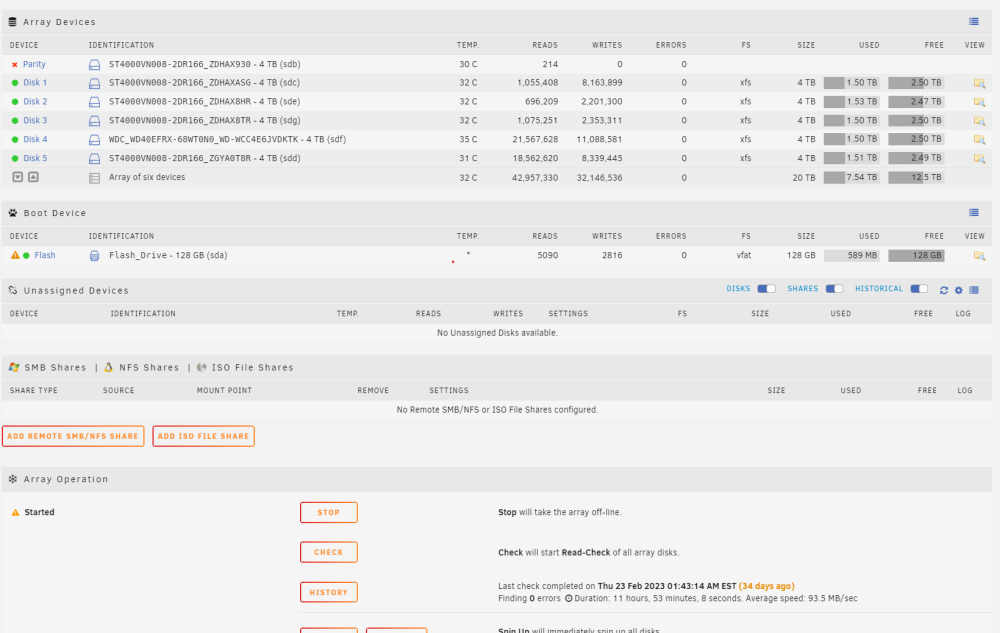
I have noticed my parity disk is disabled, but i don't know how to re-enable it. The disk is rather new only 7 months old so i don't think it has issues. ST4000VN008-2DR166_ZDHAX930-20230329-1550 parity (sdb) - DISK_DSBL.txt harleyquinn-diagnostics-20230329-1550.zip
-
I am in the process of moving many of my websites to my local server. I have a big server with 62 cores and 250GB ram so i got more then enough power to run everything and save on my cloud bill My issues is that i am having issues figure out how to set this up with only a single public IP. I am running Unraid, with a few docker containers, most importantly Plex, NextCloud and chevereto. But i am running all my websites in a kubernetes cluster. I can handle this with my ingress server in kubernetes, but i need something before the kubernetes ingress that can filter out my plex, NextCloud and chevereto domains and send the requests to their dockers, and if nothing matches there send it to my kubernetes ingress. Is there a plugin to Unraid that can do this or a tool i can run in a VM? I have tried NginxProxyManager but that dose not really seem capable of it.
-
I created a 3rd VM and my speed issues was resolved. however the install still crashes. I tried 3 times, all failed. I then change the allocated RAM from 1G to a max to 20G to 10G max of 10G and the install went though without issues. not sure what the actual issue was.
-
I am new to Unraid and am currently trying to set up my first Ubuntu VM. However this has taken me over 4 hours to do so far, as the VM keeps freezing on my or is just generally slow. I am currenty trying to install Ubuntu Server 21.10, and i got stuck 4 times on the profiles page, as it would freeze and become unresponisve to my keyboard inputs (however the curser would blink just fine), i have however gotten though it 2 times. The first time after that it failed at configuring partition: partition-0 after about 30 min. And on my current try i have gotten to configuring partition: partition-1 after about 45 min. I have assigned 5 cores, and a minimum of 1G ram, with a max limit of 20G. <?xml version='1.0' encoding='UTF-8'?> <domain type='kvm' id='4'> <name>Rancher</name> <uuid>0f8bd116-d953-eab2-f801-59e26059cf16</uuid> <metadata> <vmtemplate xmlns="unraid" name="Ubuntu" icon="ubuntu.png" os="ubuntu"/> </metadata> <memory unit='KiB'>20971520</memory> <currentMemory unit='KiB'>1048576</currentMemory> <memoryBacking> <nosharepages/> </memoryBacking> <vcpu placement='static'>10</vcpu> <cputune> <vcpupin vcpu='0' cpuset='0'/> <vcpupin vcpu='1' cpuset='32'/> <vcpupin vcpu='2' cpuset='11'/> <vcpupin vcpu='3' cpuset='43'/> <vcpupin vcpu='4' cpuset='13'/> <vcpupin vcpu='5' cpuset='45'/> <vcpupin vcpu='6' cpuset='15'/> <vcpupin vcpu='7' cpuset='47'/> <vcpupin vcpu='8' cpuset='17'/> <vcpupin vcpu='9' cpuset='49'/> </cputune> <resource> <partition>/machine</partition> </resource> <os> <type arch='x86_64' machine='pc-q35-5.1'>hvm</type> <loader readonly='yes' type='pflash'>/usr/share/qemu/ovmf-x64/OVMF_CODE-pure-efi.fd</loader> <nvram>/etc/libvirt/qemu/nvram/0f8bd116-d953-eab2-f801-59e26059cf16_VARS-pure-efi.fd</nvram> </os> <features> <acpi/> <apic/> </features> <cpu mode='host-passthrough' check='none' migratable='on'> <topology sockets='1' dies='1' cores='5' threads='2'/> <cache mode='passthrough'/> </cpu> <clock offset='utc'> <timer name='rtc' tickpolicy='catchup'/> <timer name='pit' tickpolicy='delay'/> <timer name='hpet' present='no'/> </clock> <on_poweroff>destroy</on_poweroff> <on_reboot>restart</on_reboot> <on_crash>restart</on_crash> <devices> <emulator>/usr/local/sbin/qemu</emulator> <disk type='file' device='disk'> <driver name='qemu' type='raw' cache='writeback'/> <source file='/mnt/user/domains/Rancher/vdisk1.img' index='2'/> <backingStore/> <target dev='hdc' bus='virtio'/> <boot order='1'/> <alias name='virtio-disk2'/> <address type='pci' domain='0x0000' bus='0x03' slot='0x00' function='0x0'/> </disk> <disk type='file' device='cdrom'> <driver name='qemu' type='raw'/> <source file='/mnt/user/isos/ubuntu-21.10-live-server-amd64.iso' index='1'/> <backingStore/> <target dev='hda' bus='sata'/> <readonly/> <boot order='2'/> <alias name='sata0-0-0'/> <address type='drive' controller='0' bus='0' target='0' unit='0'/> </disk> <controller type='sata' index='0'> <alias name='ide'/> <address type='pci' domain='0x0000' bus='0x00' slot='0x1f' function='0x2'/> </controller> <controller type='pci' index='0' model='pcie-root'> <alias name='pcie.0'/> </controller> <controller type='pci' index='1' model='pcie-root-port'> <model name='pcie-root-port'/> <target chassis='1' port='0x10'/> <alias name='pci.1'/> <address type='pci' domain='0x0000' bus='0x00' slot='0x02' function='0x0' multifunction='on'/> </controller> <controller type='pci' index='2' model='pcie-root-port'> <model name='pcie-root-port'/> <target chassis='2' port='0x11'/> <alias name='pci.2'/> <address type='pci' domain='0x0000' bus='0x00' slot='0x02' function='0x1'/> </controller> <controller type='pci' index='3' model='pcie-root-port'> <model name='pcie-root-port'/> <target chassis='3' port='0x12'/> <alias name='pci.3'/> <address type='pci' domain='0x0000' bus='0x00' slot='0x02' function='0x2'/> </controller> <controller type='pci' index='4' model='pcie-root-port'> <model name='pcie-root-port'/> <target chassis='4' port='0x13'/> <alias name='pci.4'/> <address type='pci' domain='0x0000' bus='0x00' slot='0x02' function='0x3'/> </controller> <controller type='pci' index='5' model='pcie-root-port'> <model name='pcie-root-port'/> <target chassis='5' port='0x14'/> <alias name='pci.5'/> <address type='pci' domain='0x0000' bus='0x00' slot='0x02' function='0x4'/> </controller> <controller type='virtio-serial' index='0'> <alias name='virtio-serial0'/> <address type='pci' domain='0x0000' bus='0x02' slot='0x00' function='0x0'/> </controller> <controller type='usb' index='0' model='ich9-ehci1'> <alias name='usb'/> <address type='pci' domain='0x0000' bus='0x00' slot='0x07' function='0x7'/> </controller> <controller type='usb' index='0' model='ich9-uhci1'> <alias name='usb'/> <master startport='0'/> <address type='pci' domain='0x0000' bus='0x00' slot='0x07' function='0x0' multifunction='on'/> </controller> <controller type='usb' index='0' model='ich9-uhci2'> <alias name='usb'/> <master startport='2'/> <address type='pci' domain='0x0000' bus='0x00' slot='0x07' function='0x1'/> </controller> <controller type='usb' index='0' model='ich9-uhci3'> <alias name='usb'/> <master startport='4'/> <address type='pci' domain='0x0000' bus='0x00' slot='0x07' function='0x2'/> </controller> <interface type='bridge'> <mac address='52:54:00:ed:16:b6'/> <source bridge='br0'/> <target dev='vnet0'/> <model type='virtio-net'/> <alias name='net0'/> <address type='pci' domain='0x0000' bus='0x01' slot='0x00' function='0x0'/> </interface> <serial type='pty'> <source path='/dev/pts/0'/> <target type='isa-serial' port='0'> <model name='isa-serial'/> </target> <alias name='serial0'/> </serial> <console type='pty' tty='/dev/pts/0'> <source path='/dev/pts/0'/> <target type='serial' port='0'/> <alias name='serial0'/> </console> <channel type='unix'> <source mode='bind' path='/var/lib/libvirt/qemu/channel/target/domain-4-Rancher/org.qemu.guest_agent.0'/> <target type='virtio' name='org.qemu.guest_agent.0' state='disconnected'/> <alias name='channel0'/> <address type='virtio-serial' controller='0' bus='0' port='1'/> </channel> <input type='tablet' bus='usb'> <alias name='input0'/> <address type='usb' bus='0' port='1'/> </input> <input type='mouse' bus='ps2'> <alias name='input1'/> </input> <input type='keyboard' bus='ps2'> <alias name='input2'/> </input> <graphics type='vnc' port='5900' autoport='yes' websocket='5700' listen='0.0.0.0' keymap='en-us'> <listen type='address' address='0.0.0.0'/> </graphics> <video> <model type='qxl' ram='65536' vram='65536' vgamem='16384' heads='1' primary='yes'/> <alias name='video0'/> <address type='pci' domain='0x0000' bus='0x00' slot='0x01' function='0x0'/> </video> <memballoon model='virtio'> <alias name='balloon0'/> <address type='pci' domain='0x0000' bus='0x04' slot='0x00' function='0x0'/> </memballoon> </devices> <seclabel type='dynamic' model='dac' relabel='yes'> <label>+0:+100</label> <imagelabel>+0:+100</imagelabel> </seclabel> </domain> My server has 2xIntel® Xeon® CPU E5-2683 v4 @ 2.10GHz and 160GB of ram, so it should be more then capable of running this VM. I have 4x4TB Ironwolf NAS as the storage. My VM logs: -nodefaults \ -chardev socket,id=charmonitor,fd=31,server,nowait \ -mon chardev=charmonitor,id=monitor,mode=control \ -rtc base=utc,driftfix=slew \ -global kvm-pit.lost_tick_policy=delay \ -no-hpet \ -no-shutdown \ -boot strict=on \ -device pcie-root-port,port=0x10,chassis=1,id=pci.1,bus=pcie.0,multifunction=on,addr=0x2 \ -device pcie-root-port,port=0x11,chassis=2,id=pci.2,bus=pcie.0,addr=0x2.0x1 \ -device pcie-root-port,port=0x12,chassis=3,id=pci.3,bus=pcie.0,addr=0x2.0x2 \ -device pcie-root-port,port=0x13,chassis=4,id=pci.4,bus=pcie.0,addr=0x2.0x3 \ -device pcie-root-port,port=0x14,chassis=5,id=pci.5,bus=pcie.0,addr=0x2.0x4 \ -device ich9-usb-ehci1,id=usb,bus=pcie.0,addr=0x7.0x7 \ -device ich9-usb-uhci1,masterbus=usb.0,firstport=0,bus=pcie.0,multifunction=on,addr=0x7 \ -device ich9-usb-uhci2,masterbus=usb.0,firstport=2,bus=pcie.0,addr=0x7.0x1 \ -device ich9-usb-uhci3,masterbus=usb.0,firstport=4,bus=pcie.0,addr=0x7.0x2 \ -device virtio-serial-pci,id=virtio-serial0,bus=pci.2,addr=0x0 \ -blockdev '{"driver":"file","filename":"/mnt/user/domains/Rancher/vdisk1.img","node-name":"libvirt-2-storage","cache":{"direct":false,"no-flush":false},"auto-read-only":true,"discard":"unmap"}' \ -blockdev '{"node-name":"libvirt-2-format","read-only":false,"cache":{"direct":false,"no-flush":false},"driver":"raw","file":"libvirt-2-storage"}' \ -device virtio-blk-pci,bus=pci.3,addr=0x0,drive=libvirt-2-format,id=virtio-disk2,bootindex=1,write-cache=on \ -blockdev '{"driver":"file","filename":"/mnt/user/isos/ubuntu-21.10-live-server-amd64.iso","node-name":"libvirt-1-storage","auto-read-only":true,"discard":"unmap"}' \ -blockdev '{"node-name":"libvirt-1-format","read-only":true,"driver":"raw","file":"libvirt-1-storage"}' \ -device ide-cd,bus=ide.0,drive=libvirt-1-format,id=sata0-0-0,bootindex=2 \ -netdev tap,fd=33,id=hostnet0 \ -device virtio-net,netdev=hostnet0,id=net0,mac=52:54:00:ed:16:b6,bus=pci.1,addr=0x0 \ -chardev pty,id=charserial0 \ -device isa-serial,chardev=charserial0,id=serial0 \ -chardev socket,id=charchannel0,fd=34,server,nowait \ -device virtserialport,bus=virtio-serial0.0,nr=1,chardev=charchannel0,id=channel0,name=org.qemu.guest_agent.0 \ -device usb-tablet,id=input0,bus=usb.0,port=1 \ -vnc 0.0.0.0:0,websocket=5700,password \ -k en-us \ -device qxl-vga,id=video0,ram_size=67108864,vram_size=67108864,vram64_size_mb=0,vgamem_mb=16,max_outputs=1,bus=pcie.0,addr=0x1 \ -device virtio-balloon-pci,id=balloon0,bus=pci.4,addr=0x0 \ -sandbox on,obsolete=deny,elevateprivileges=deny,spawn=deny,resourcecontrol=deny \ -msg timestamp=on 2022-01-25 21:32:40.972+0000: Domain id=4 is tainted: high-privileges 2022-01-25 21:32:40.972+0000: Domain id=4 is tainted: host-cpu char device redirected to /dev/pts/0 (label charserial0) All my docker containers is working just fine and my total CPU load is less then 5%, have i set something up wrong?
-
I think i have found the answer, but please correct me if i am worng. When using custom IP, all ports are forwarded directly to the container, therefore is the port mapping ignored.
-
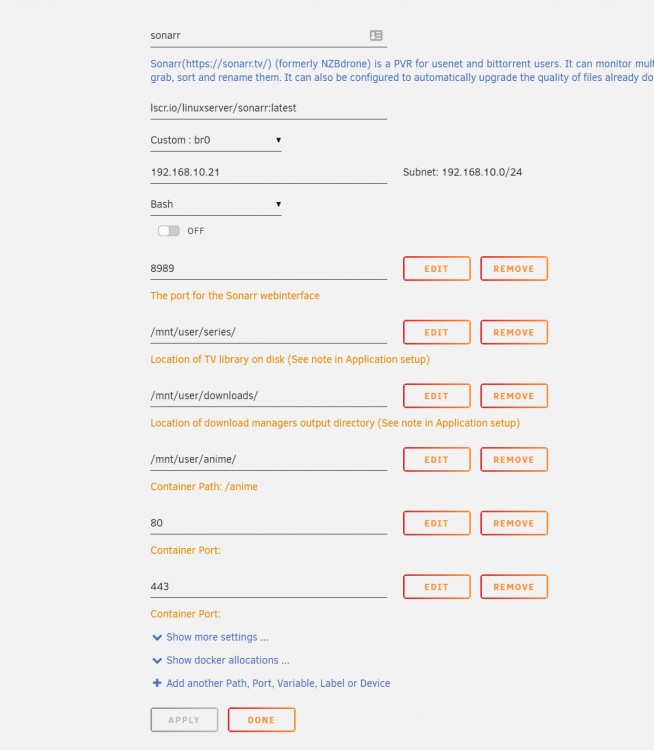
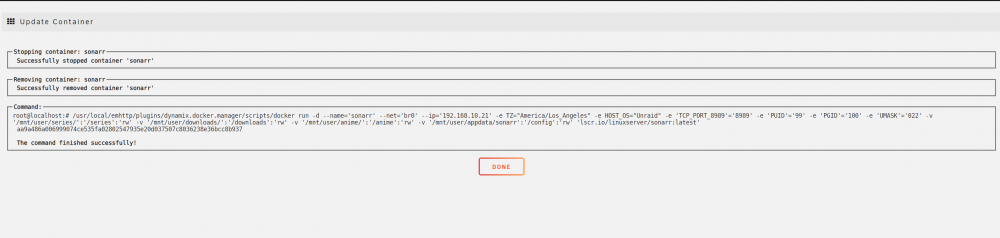
I am new to Unraid so i apologies if this is common knowledge, but a google and forum search did not really provide me an answer. I have a docker container, Sonarr currently running with the network type "Custom: br0" this allows me to provide a dedicated IP for my Sonarr application. I am using the lscr.io/linuxserver/sonarr:latest However Sonarr runs internally in the docker container on port 8989, but as i have a dedicated ip for the container i would like for it to run on port 80 instead. However when i use the network type: "Custom: br0" it won't allow me to change the container port. I have also tried to "Add another port" and added port 80 and 443 like that, but they seems to be ignored when applying the changes.
-
There is no loss i can notice whilst playing but i will be able to do some benchmark comparisions at the weekend. I will post the results here. I am having problems passing though my GT 610, so i am going to try this when i get home. But will it work using the internal graphics? as my motherboard is ITX so it only have 1 pci-e port.


