





blknitro11
Members
-
Joined
-
Last visited
-
Fix for the USB device path changing all the time. No privileged flag needed, here are the directions in case anyone needs it: The ProblemCUPS maps to a specific USB device path like /dev/bus/usb/003/023 which changes on every reboot, causing the printer to disappear. The SolutionCreate a persistent udev symlink for the printer, then map both the symlink and the USB bus into the container. Step 1 — Find Your Printer's USB IDsIn the Unraid terminal run: bash lsusbLook for your printer in the output, e.g.: Bus 003 Device 023: ID 03f0:052a HP, Inc LaserJet M1212nf MFPNote the two values after ID — 03f0 is the vendor ID, 052a is the product ID. Step 2 — Create the udev Rulebash nano /etc/udev/rules.d/99-usb-printer.rulesPaste this (substituting your own vendor/product IDs): SUBSYSTEM=="usb", ATTRS{idVendor}=="03f0", ATTRS{idProduct}=="052a", SYMLINK+="usb_printer", MODE="0666"Ctrl+O → save Enter → confirm Ctrl+X → exit Step 3 — Reload udev and Trigger Itbash udevadm control --reload-rules && udevadm triggerVerify the symlink was created: bash ls -la /dev/usb_printerYou should see something like: lrwxrwxrwx 1 root root ... /dev/usb_printer -> bus/usb/003/023Step 4 — Update CUPS Container in UnraidIn the Unraid Docker tab, click Edit on your CUPS container. Remove any existing USB device mapping (the one pointing to a specific /dev/bus/usb/00x/00x path), then add these two entries: Entry 1 — Device mapping: Field Value Config Type Device Name USB Printer Value /dev/usb_printer Entry 2 — Path mapping: Field Value Config Type Path Name USB Bus Container Path /dev/bus/usb Host Path /dev/bus/usb Access Mode Read/Write Default Value (leave blank) Click Apply and let the container restart. Step 5 — VerifyOpen the CUPS web UI at http://[unraid-ip]:631, go to Printers → your printer → dropdown → Print Test Page. The job should process and print successfully.
-
Anyone have any recommended sites?
-
Hi all, Its been a long time since I have been on this site. My UnRaid server of about 8 - 9 years died, and I am looking to rebuild. When I built my original server I purchased all the server parts used from a site that was at the time recommended in the forums. I do not remember the site or know if it still exists. What are the recommended places to buy used server parts and is there a latest supported hardware list available that I can reference so I know I am purchasing supported parts? Thank you in advance for the help!
-
I'm not sure I follow, sorry. I'm a bit of a noob,I really appreciate the help.
-
Hi all, So my Plex server on my unraid box for some reason says that it can't connect to my unraid server. Plex itself launches and I am able to login but it just can't get the media on my unraid server. It was working before, now suddenly this is happening. I even wiped the appdata for this and started from scratch but still no luck. any help would be much appreciated.
-
ok sonarr started working fine all of a sudden. I am wondering why Plex still gives me a 502 error though. Any thoughts?
-
havent changed any firewall rules recently. Last time i did was when i was getting Nginx setup initially. It was working great up until a week ago I can get to sonarr directly, yes (now that port is corrected) UPDATE: So i just realized I had the port flipped....it should have been 8989. Plex still give me the 502 error. When i go to Sonarr now, It just says "Sonarr Ver"
-
Anyone able to help me out with the 502 error i am getting? It would be greatly appreciated.
-
Hi all, I had this working all up until a week ago. Now any time i try I receive an error "502 Bad Gateway". I am not sure what is causing it. Please see my config below. THanks! UPDATE: If this helps, I am seeing this in the error.log file 2017/07/13 12:21:29 [error] 340#340: *1 upstream prematurely closed connection while reading response header from upstream, client: 192.168.2.60, server: _, request: "GET /plex HTTP/1.1", upstream: "http://192.168.2.90:32400/web", host: "MYSUBDOMAIN.duckdns.org" 2017/07/13 12:23:19 [error] 338#338: *1 connect() failed (111: Connection refused) while connecting to upstream, client: 192.168.2.60, server: _, request: "GET /sonarr HTTP/1.1", upstream: "http://192.168.2.90:9898/sonarr", host: "MYSUBDOMAIN.duckdns.org" upstream backend { server 192.168.2.90:19999; keepalive 64; } server { listen 443 ssl default_server; listen 80 default_server; #listen 443 ssl; #server_name MYSUBDOMAIN.duckdns.org; #listen 80; root /config/www; index index.html index.htm index.php; server_name _; ssl_certificate /config/keys/letsencrypt/fullchain.pem; ssl_certificate_key /config/keys/letsencrypt/privkey.pem; ssl_dhparam /config/nginx/dhparams.pem; ssl_ciphers 'ECDHE-RSA-AES128-GCM-SHA256:ECDHE-ECDSA-AES128-GCM-SHA256:ECDHE-RSA-AES256-GCM-SHA384:ECDHE-ECDSA-AES256-GCM-SHA384:DHE-RSA-AES128-GCM-SHA256:DHE-DSS-AES128-GCM-SHA256:kEDH+AESGCM:ECDHE-RSA-AES128-SHA256:ECDHE-ECDSA-AES128-SHA256:ECDHE-RSA-AES128-SHA:ECDHE-ECDSA-AES128-SHA:ECDHE-RSA-AES256-SHA384:ECDHE-ECDSA-AES256-SHA384:ECDHE-RSA-AES256-SHA:ECDHE-ECDSA-AES256-SHA:DHE-RSA-AES128-SHA256:DHE-RSA-AES128-SHA:DHE-DSS-AES128-SHA256:DHE-RSA-AES256-SHA256:DHE-DSS-AES256-SHA:DHE-RSA-AES256-SHA:AES128-GCM-SHA256:AES256-GCM-SHA384:AES128-SHA256:AES256-SHA256:AES128-SHA:AES256-SHA:AES:CAMELLIA:DES-CBC3-SHA:!aNULL:!eNULL:!EXPORT:!DES:!RC4:!MD5:!PSK:!aECDH:!EDH-DSS-DES-CBC3-SHA:!EDH-RSA-DES-CBC3-SHA:!KRB5-DES-CBC3-SHA'; ssl_prefer_server_ciphers on; client_max_body_size 0; location = / { return 301 /plex; } # Sonarr location /sonarr { satisfy any; #allow 192.168.2.90/24; #deny all; proxy_pass http://192.168.2.90:9898/sonarr; proxy_set_header Host $http_host; proxy_set_header X-Real-IP $remote_addr; proxy_set_header X-Forwarded-For $proxy_add_x_forwarded_for; proxy_set_header X-Forwarded-Proto $scheme; } #location /sonarr { # auth_basic "Restricted"; # auth_basic_user_file /config/nginx/.htpasswd; # include /config/nginx/proxy.conf; # proxy_pass http://192.168.2.90:9898/sonarr; #} #location /sonarr { # include /config/nginx/proxy.conf; # proxy_pass http://192.168.2.90:9898/sonarr; #} #location /cp { # include /config/nginx/proxy.conf; # proxy_pass http://192.168.2.90:5050/cp; #} #Zoneminder location /zm { include /config/nginx/proxy.conf; proxy_pass http://192.168.2.90:8082/zm; #proxy_connect_timeout 300; #proxy_send_timeout 300; #proxy_read_timeout 300; #send_timeout 300; } #location /zm/api/ { # alias /usr/share/zoneminder/api; # rewrite ^/zm/api(.+)$ /zm/api/index.php?p=$1 last; #} #PLEX location /web { # serve the CSS code proxy_pass http://192.168.2.90:32400; } # Main /plex rewrite location /plex { # proxy request to plex server proxy_pass http://192.168.2.90:32400/web; } #location /nextcloud { # include /config/nginx/proxy.conf; # proxy_pass https://192.168.2.90:444/nextcloud; #} location ~ /netdata/(?<ndpath>.*) { proxy_set_header X-Forwarded-Host $host; proxy_set_header X-Forwarded-Server $host; proxy_set_header X-Forwarded-For $proxy_add_x_forwarded_for; proxy_pass http://backend/$ndpath$is_args$args; proxy_http_version 1.1; proxy_pass_request_headers on; proxy_set_header Connection "keep-alive"; proxy_store off; } }
-
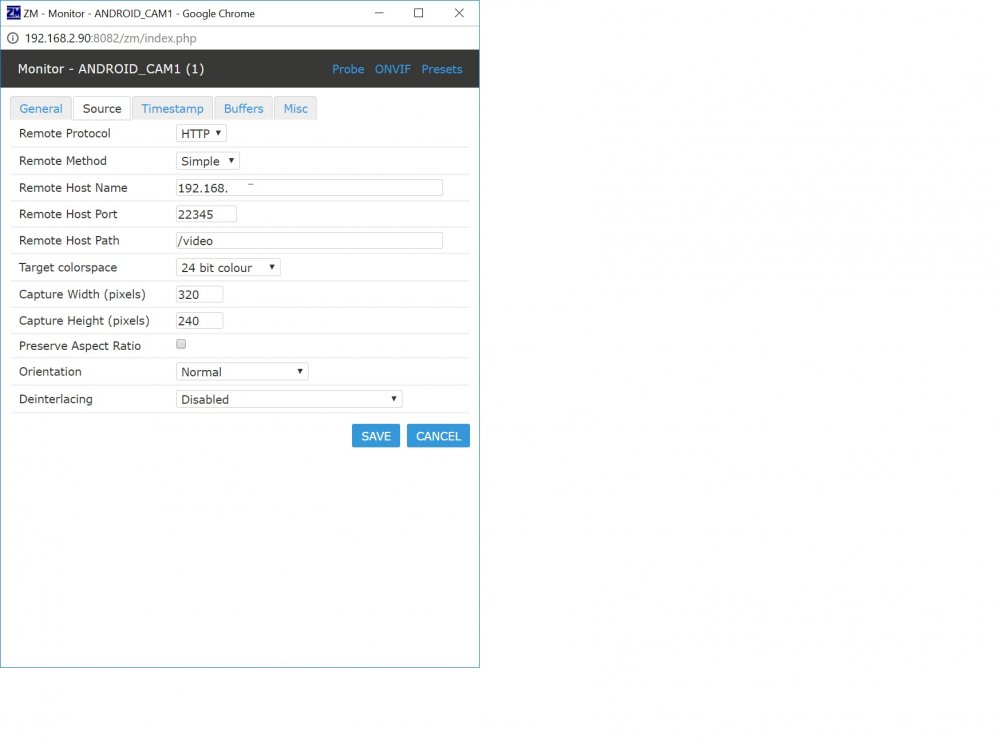
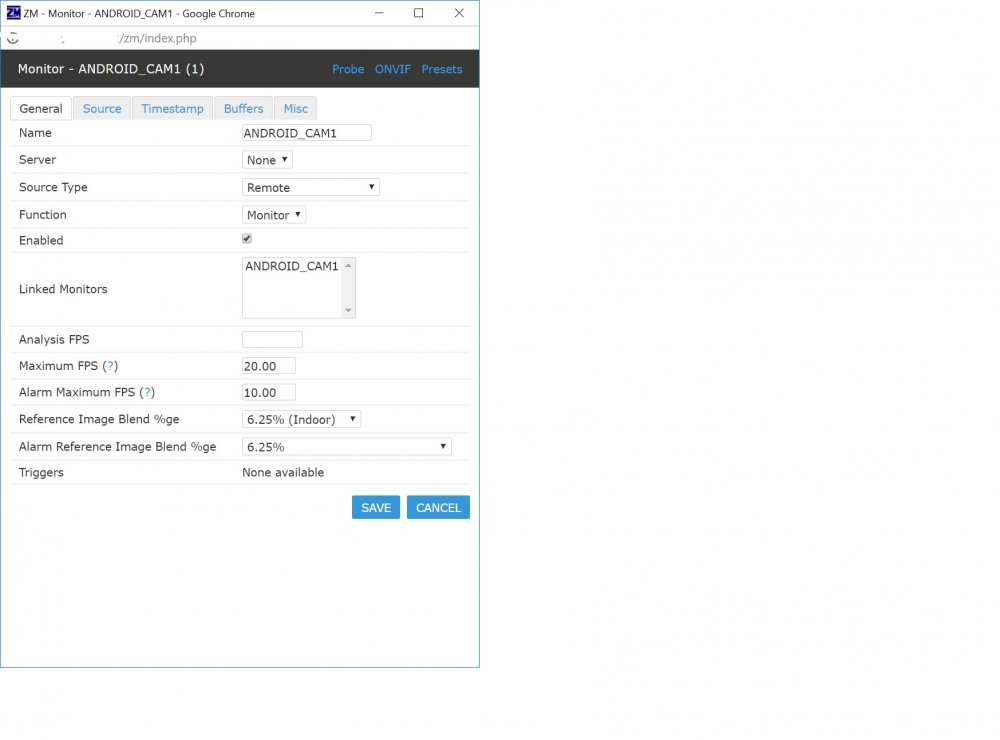
Hi guys, so i am using an old Android phone to test out ZM using IP Webcam app. For some reason i can not get a picture. I am seeing a ton of errors in the logs for m1. I am not sure what to do to correct this. Any help would be greatly appreciated? I have also included screen shots of the monitor config. Thanks! zm-log.html
-
Hi! I am trying to us the tv_grab_na_tvmedia EPG Module, but it keeps saying that i need to run --configure first. How do i go about doing that? Is this something i need to do using docker exec, if so could someone tell me how the command should look? Thanks!
-
I barely understand what you're trying to say, let alone have seen it before. You got autocorrect on or something? Oh my lord, lol that's too funny! Sorry, auto correct strikes again lol. Let's try this again Basically, couchpotato downloads the .nzb files properly, but sabnzb never starts the download. This is only happening with couchpotato. There are no errors in the logs for with CP or Sabnzb. Just was wondering if anyone has ever seen this issue. Thanks Yeah, I have seen this before, but it's always been caused by a configuration error somewhere. You need to post your folder mappings and how you have sabnzbd and couchpotato setup, including the mappings in the webui of both. Thank you! You made a light bulb turn on. Forgot I made folder changes but didn't make the changes to my sabnzb container. Doh!!! Weird that sonarr was still working though. Oh well at least I'm back up and running. Cheers!!
-
I barely understand what you're trying to say, let alone have seen it before. You got autocorrect on or something? Oh my lord, lol that's too funny! Sorry, auto correct strikes again lol. Let's try this again Basically, couchpotato downloads the .nzb files properly, but sabnzb never starts the download. This is only happening with couchpotato. There are no errors in the logs for with CP or Sabnzb. Just was wondering if anyone has ever seen this issue. Thanks
-
Hi all, Been using couchpotato for sometime now with zero issues up until yesterday. CP connects to sabnzb successfully, but for some reason when it Sanchez a .nah, outs it in my /downloads/incomplete folder, sabnzb doesn't start the download. If I have it scan the watch folder which is the directory I listed a second ago, it still doesn't download. Sabnzb seems to work totally fine with sonarr downloads.....not sure what happened. Checked the logs in both, zero errors. Has anyone else seen this?
-
Hi all, I am using the OpenVPN client plugin on my Unraid 6.2.3 server. I am testing out Emby Server and Plex and would like to be able to access them from the outside. I have the firewall rules setup properly on my Sophos UTM (using that as my router) because i can get to Emby and plex when i have OpenVPN stopped. How do i have the Emby and Plex traffic bypass OpenVPN but leave everything else going through the OpenVPN tunnel? Please keep in mind i dont know to much about OpenVPN or how to do special routing, so if someone would be kind enough to walk me through it, it would be GREATLY appreciated! Thanks! NOTE: using Docker for both Emby and Plex

