






bubbl3
Members
-
Joined
-
Last visited
-
Version 0.16 released: https://github.com/emaspa/wireview-hwmon-unraid/releases/tag/v0.16 Support for unRAID versions: 7.2.x (kernel 6.12.54 builds), 7.2.5, 7.2.6, 7.2.7, 7.2.8, 7.3.0, 7.3.1, 7.3.2, 7.4.0-beta.3
-
v0.1.34 improvements to logging and handling of a full /var/log
-
v0.1.33 adds an optional MCP endpoint so Claude Code, Codex and other MCP clients can use the same 55 tools as the OpenClaw plugin, and ships a new unraidclaw command-line client for the server and for remote machines. Docker, VM, array, parity, share and notification actions now validate their input more strictly and check the real state before reporting success. TLS certificates gain alternative names so clients can verify the host, and a few login and logging bugs are fixed.
-
v0.1.32 released with a small fix, new features for Community Apps and Plugins, support for Unraid 7.4
-
@Mrtj18 you may want to update the OpenClaw plugin (assuming you are on a June build of OpenClaw), the new version of the NPM package takes advantage of the new features to better declare the tools available: https://github.com/emaspa/unraidclaw/issues/15#issuecomment-4698083784
-
That was actually a very good suggestion, I never considered it, made the change and released v0.1.31: https://github.com/emaspa/unraidclaw/releases/tag/v0.1.31
-
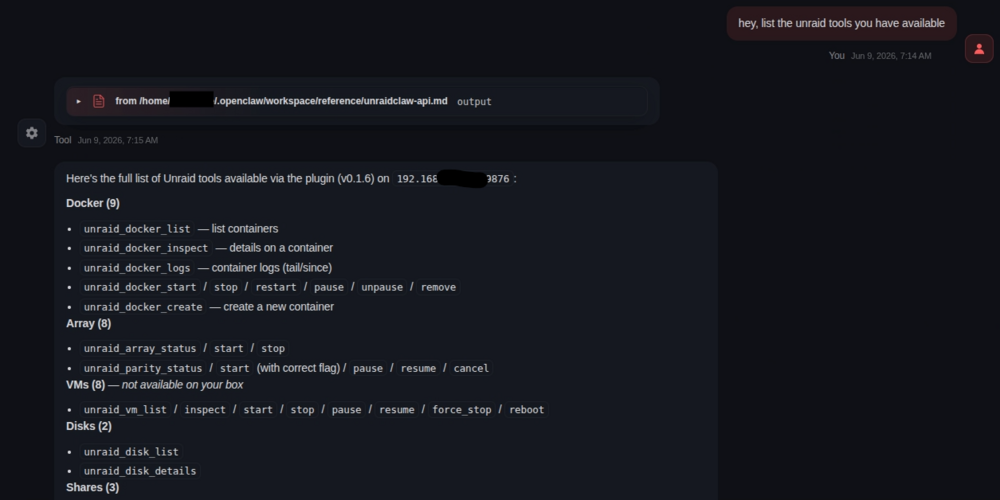
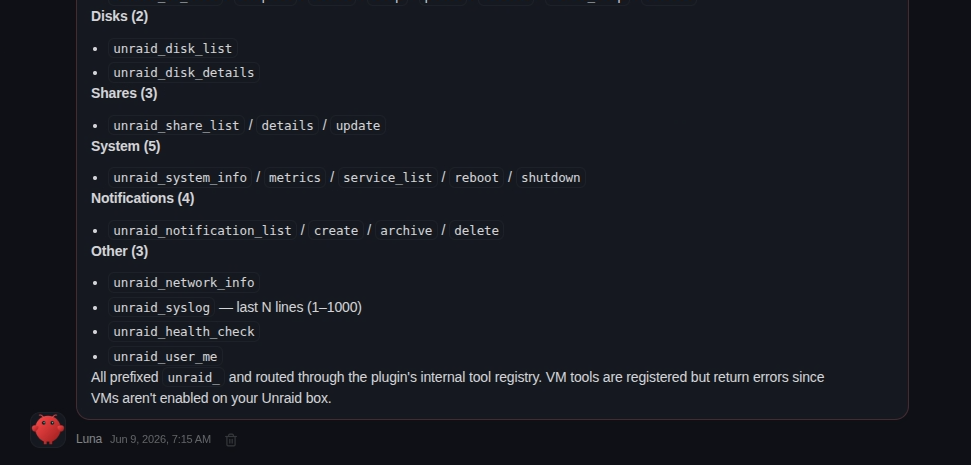
Ask Openclaw about the unraid tools available, this is the kind of answer you should be getting: If it says can't find the tools, ask to look in its configuration file and build a reference for itself so it can easily find them. If it really can't find them then there's an issue with your config.
-
Plugin now has support for unRAID 7.3.1: https://github.com/emaspa/wireview-hwmon-unraid/releases/tag/v0.6 Supported Unraid versions Unraid Kernel Package 7.2.x 6.12.54-Unraid wireview-hwmon-0.6-x86_64-6.12.54-Unraid.txz 7.3.0 6.18.29-Unraid wireview-hwmon-0.6-x86_64-6.18.29-Unraid.txz 7.3.1 6.18.33-Unraid wireview-hwmon-0.6-x86_64-6.18.33-Unraid.txz
-
What I mean is that the calls in the logs are not API calls, they are simple http calls like the ones you just showed in the screenshot from your phone. This is not how the service is supposed to be accessed so the error is expected.
-
From the screenshot you can see the calls are not API calls but just http requests for the index page and it's favicon. Basically your OpenClaw instance is trying to open a webpage, not making API calls.
-
You have a trailing comma there: "plugins": { "unraidclaw": { "serverUrl": "http://192.168.50.122:9876", "apiKey": "7f3fa56ce...", ← trailing comma },It should be: "plugins": { "unraidclaw": { "serverUrl": "http://192.168.50.122:9876", "apiKey": "7f3fa56ce..." }, In general you seems a bit inexperienced here, would suggest reading docs and asking for help in the OpenClaw subreddit, having an LLM writing your config means you won't really know how it works. Also not sure what LLM you're using, it should have catched the trailing comma, it's basic JSON.
-
Interesting suggestion, will keep it in mind, atm I can't spend much time on this aside essential fixes as I'm traveling for work, but will look into it sometime in June.
-
The OpenClaw logs don't say much unfortunately, from your screenshot doesn't seem like there has been any request to UnraidClaw server, you should see both successful and failed ones there under activity. Can you share the related OpenClaw config (minus the API key of course).
-
Sorry for the late reply, I was on holiday. Would suggest pointed Herms to the repo and ask to build a skill, it should be able to do it by itself: https://github.com/emaspa/unraidclaw
-
Aside of general automation and orchestration, here's just a few scenarios: Monitoring and alerts -- Ask your AI agent "how are my disks doing?" and get back temperatures, SMART status, array health, and parity check progress in plain English. No need to open the WebGUI. Docker management -- "Stop the Plex container, update it, and start it again" or "spin up a new Nginx container on port 8080 with these volume mounts" -- all through natural language. Troubleshooting -- "Show me the last 200 lines of syslog filtered for errors" or "which containers are using the most resources?" -- get answers without SSH-ing in. Multi-server oversight -- If you run multiple Unraid boxes (home NAS + media server, or home + offsite backup), you can manage them all from one AI conversation: "compare disk usage across my home and backup servers." Scheduled checks -- Have your AI agent run a morning briefing: array status, any failed disks, parity errors, Docker containers that crashed overnight, unread notifications. Quick actions from anywhere -- Reboot the server, start/stop VMs, pause a parity check -- all from your phone through whatever chat interface your AI agent uses (Telegram, Discord, etc.), without opening a browser. The key value is turning Unraid management into a conversation instead of clicking through the WebGUI. The permission matrix means you control exactly what the agent can and can't do.




