






bubbl3
Members
-
Joined
-
Last visited
-
Support thread for Windows Dynamic Disks, a plugin that reads Windows dynamic disks (LDM) on Unraid. When Windows makes a spanned, striped or mirrored volume it converts the disks to "dynamic". Unassigned Devices only sees the raw pieces of those, so the volume can't be mounted. This plugin reads the LDM database Windows keeps on each disk, rebuilds the volume with device-mapper and mounts it under /mnt/disks. What it does Simple, spanned and striped volumes on MBR or GPT disks Mirrored volumes, read from one copy (works with one disk missing) Read-only by default, read-write if you ask for it Optional SMB share per volume, public or per user A section on the Main page plus the ldmctl command-line tool Not supported: RAID-5 volumes (Unraid's kernel has no dm-raid) and ReFS. Plug in all the disks of the volume and it shows up under Main, Windows Dynamic Disks. One warning: don't mount the individual pieces in Unassigned Devices. The first piece of a spanned volume looks like a complete NTFS volume, and writing to it will damage the real one. Source, README and issues: https://github.com/emaspa/ldm-unraid When reporting a problem, please include the output of ldmctl status --json, your Unraid version, and what Windows showed for the volume in Disk Management.
-
Version 0.16 released: https://github.com/emaspa/wireview-hwmon-unraid/releases/tag/v0.16 Support for unRAID versions: 7.2.x (kernel 6.12.54 builds), 7.2.5, 7.2.6, 7.2.7, 7.2.8, 7.3.0, 7.3.1, 7.3.2, 7.4.0-beta.3
-
v0.1.34 improvements to logging and handling of a full /var/log
-
v0.1.33 adds an optional MCP endpoint so Claude Code, Codex and other MCP clients can use the same 55 tools as the OpenClaw plugin, and ships a new unraidclaw command-line client for the server and for remote machines. Docker, VM, array, parity, share and notification actions now validate their input more strictly and check the real state before reporting success. TLS certificates gain alternative names so clients can verify the host, and a few login and logging bugs are fixed.
-
v0.1.32 released with a small fix, new features for Community Apps and Plugins, support for Unraid 7.4
-
@Mrtj18 you may want to update the OpenClaw plugin (assuming you are on a June build of OpenClaw), the new version of the NPM package takes advantage of the new features to better declare the tools available: https://github.com/emaspa/unraidclaw/issues/15#issuecomment-4698083784
-
That was actually a very good suggestion, I never considered it, made the change and released v0.1.31: https://github.com/emaspa/unraidclaw/releases/tag/v0.1.31
-
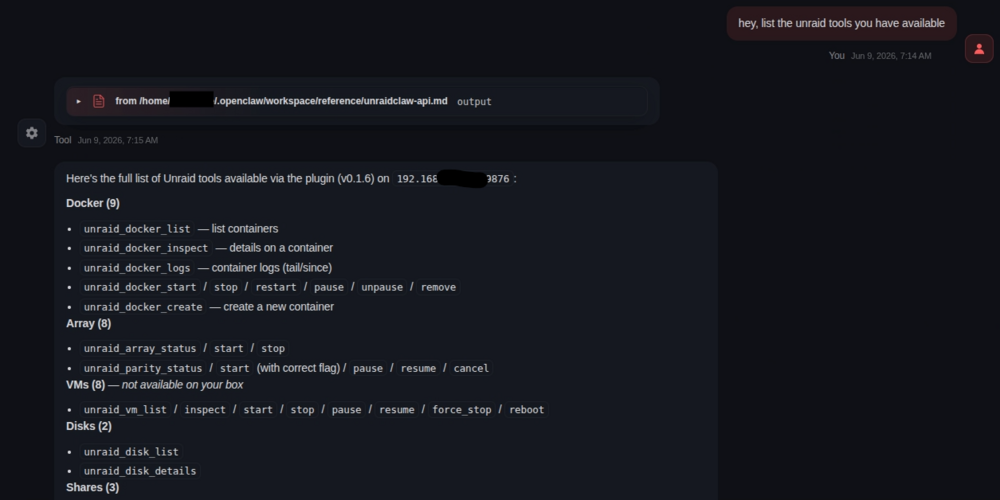
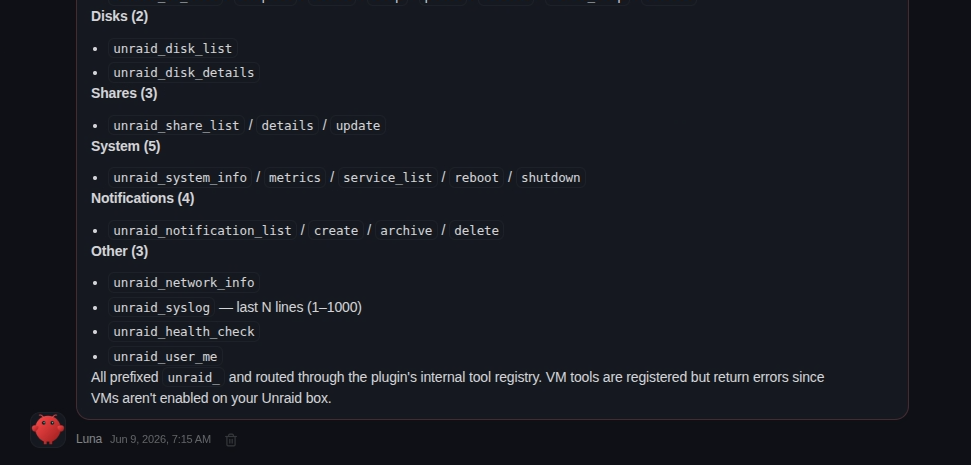
Ask Openclaw about the unraid tools available, this is the kind of answer you should be getting: If it says can't find the tools, ask to look in its configuration file and build a reference for itself so it can easily find them. If it really can't find them then there's an issue with your config.
-
Plugin now has support for unRAID 7.3.1: https://github.com/emaspa/wireview-hwmon-unraid/releases/tag/v0.6 Supported Unraid versions Unraid Kernel Package 7.2.x 6.12.54-Unraid wireview-hwmon-0.6-x86_64-6.12.54-Unraid.txz 7.3.0 6.18.29-Unraid wireview-hwmon-0.6-x86_64-6.18.29-Unraid.txz 7.3.1 6.18.33-Unraid wireview-hwmon-0.6-x86_64-6.18.33-Unraid.txz
-
What I mean is that the calls in the logs are not API calls, they are simple http calls like the ones you just showed in the screenshot from your phone. This is not how the service is supposed to be accessed so the error is expected.
-
From the screenshot you can see the calls are not API calls but just http requests for the index page and it's favicon. Basically your OpenClaw instance is trying to open a webpage, not making API calls.
-
You have a trailing comma there: "plugins": { "unraidclaw": { "serverUrl": "http://192.168.50.122:9876", "apiKey": "7f3fa56ce...", ← trailing comma },It should be: "plugins": { "unraidclaw": { "serverUrl": "http://192.168.50.122:9876", "apiKey": "7f3fa56ce..." }, In general you seems a bit inexperienced here, would suggest reading docs and asking for help in the OpenClaw subreddit, having an LLM writing your config means you won't really know how it works. Also not sure what LLM you're using, it should have catched the trailing comma, it's basic JSON.
-
Interesting suggestion, will keep it in mind, atm I can't spend much time on this aside essential fixes as I'm traveling for work, but will look into it sometime in June.
-
The OpenClaw logs don't say much unfortunately, from your screenshot doesn't seem like there has been any request to UnraidClaw server, you should see both successful and failed ones there under activity. Can you share the related OpenClaw config (minus the API key of course).
-
Sorry for the late reply, I was on holiday. Would suggest pointed Herms to the repo and ask to build a skill, it should be able to do it by itself: https://github.com/emaspa/unraidclaw




