





FestivusOz
Members
-
Joined
-
Last visited
-
Actually i tried using my config folder from the v7.1.2 backup and received the same outcome. No loading of IPv4 address. i tried renaming of the network.cfg file and I received access. Reverted to v7.1.4 config file and renamed network.cfg. A simple fix in the end. It took a long time to write / delete files to USB and I got the FSCK000x.REC files. Do you think that the USB could be on its way out? I am yet to start the array as its well passed midnight. Thanks for your help @JorgeB .
-
Hello @JorgeB Thank you for your help. I did not have a Windows or Mac PC handy to use the USB tool. I tried installing the debian tool on my chromebook but it failed. I have no real linux experience but expect the VM has limitations. I did make a backup of the USB. I then unpacked the v7.1.4.zip and copied the files over the existing to the USB, leaving the folders LOGS, PREVIOUS, BACKUP & PRECLEAR-REPORTS. I assumed i didn't have to run the make bootable script as this was done previously. The drive booted and picked up an IP address and on logging in I got a fresh install screen with Tower and asking me to enter credentials. Though it did create a lot of FSCK0000x.REC files in the root folder of the USB drive On copying over the my config folder as suggested I get the orginal error of not being able to boot up and not resolving an IPv4 address. I think somehow the config folder has corrupted. Not sure how as i gracefully shutdown my PC the last time. I have a config folder from v7.1.2 from August 2nd that I am confident is the same / similar to the v7.1.4. Could I try and use that with the v7.1.4 or am I better off getting hold of a Windows PC and creating a v7.1.2 clean disk then restoring the config folder from that? Again your help would be very much appreciated.
-
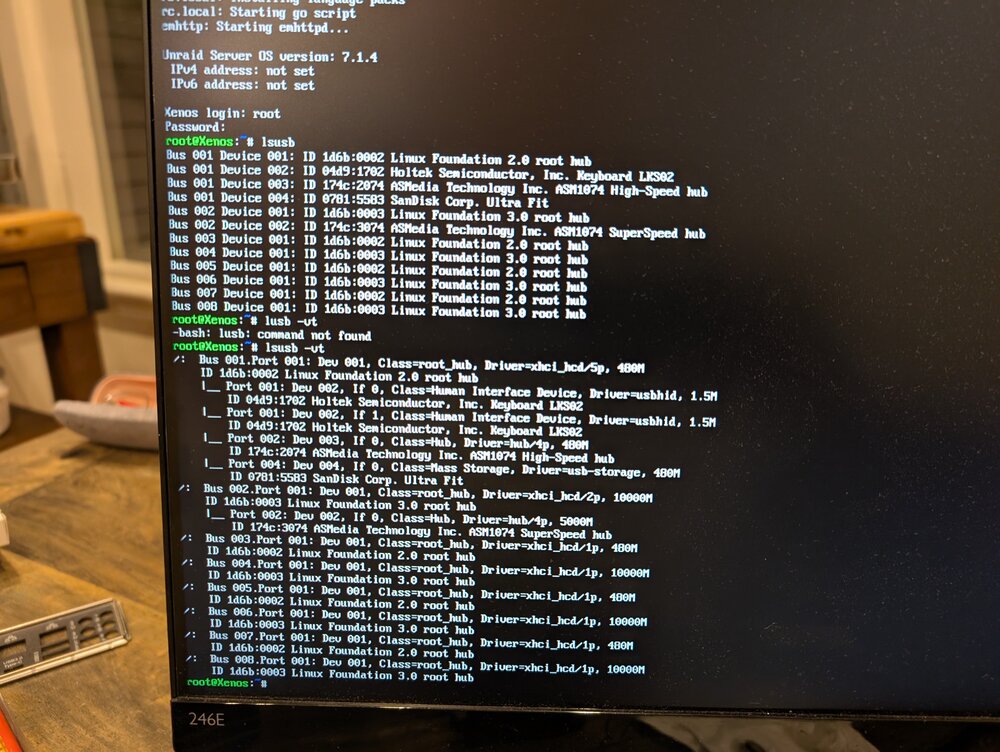
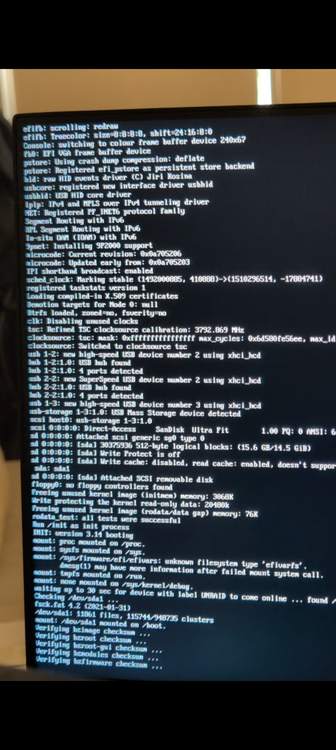
Hello, I need the communities help please. I upgraded to v7.1.4 on August 2nd 2025 from v7.1.2. I had not performed a reboot. I shut down my system today to upgrade to a new Jonsbo N3 case unsuccessfully as my PSU didn't fit. I put my PSU back in my case and unraid failed to boot with the following From the above my USB is detected as sda but not loading the EFI folder. Further down neither SATA drives nor IPv4 address is assigned. This is similar to the following pages: I did log in locally and the lsusb command results are below: When on v6.1.12 or v7.01 I upgraded my motherboard / CPU / RAM / NVME drives so have been using the current setup for 3-4 upgrades. To diagnose my issue i have performed the following: Tried moving the USB drive to all other USB ports on the motherboard Confirmed in BIOS that no settings changed i.e. fastboot and drive boot sequence with only UEFI / USB as an option. RAM is detected by the MB but I did not perform a RAM test Reverted to old motherboard / CPU / RAM and it booted (minus 1 NVME cache drive as there are not sufficient ports on the old motherboard). This eliminated in my mind corruption of the USB drive or PSU failure Reassembled to the new setup with the same failures I am unsure what to do next. Some things considered: I have a local flash backup .zip (not in Unraid Connect) of v7.1.2. Should I revert to that? I am also not sure how to do that. Help woudl be appreciated if this is a good idea. Also could I do a file copy of the v7.1.4 file setup and file copy this back later if needed? Buy a new USB drive and create a trial edition to confirm new hardware has somehow not died. If this works swap drives? Should I buy another SANDISK ULTRA or a different brand? Something else? I am not overly technical or familiar with linux so please keep this in mind when suggesting things to me please.
-
Hi Team Trying to set up Email notifications in Unifi Controller :latest. When trying to use either gmail or hotmail with the following credentials i am unable to send out. smtp.gmail.com > all combinations of ports 25, 465 and 587 with SSL checked / unchecked smtp.office365.com > all combinations of ports 25, 465 and 587 with SSL checked / unchecked I am wondering if this an issue with SMTP issue with GMAIL/HOTMAIL as they routinely use 2FA now, or a docker communications limitation? My technical skills are limited. Some help would be appreciated.
-
Hello all, A quick update on this. Since this I figured out how to get passed the above. This may help others. 1. Skipped 5.7.x tree and went to 5.8.x 2. Rather than just changing the tag and pulling 5.8.30 I had: a. created a backup via the Unifi controller in 5.6.40 b. created a new 5.8.x docker (with new appdata folder) in the Unraid UI c. Walk through new docker settings in 5.8.30 d. Once in the Unifi UI reesore the backup created 3. To then move to 5.9.x just edit the docker in Unraid GUI, change the tage to "5.9" then pull updated instance 4. Log in All just worked.
-
Hello All A bit of a novice here. I tried the following: 1. Backing up appdata foler for the old Unifi Linuxserver IO docker (v5.6.40) 2. Stopping the old docker 3. Installing this new docker v5.7.x branch (getting this error message on the splash screen) 4. Reinstalled new docker using LTS branch with success (config present devices adopted) 5. Retried pulling the v5.7.x branch and receivedd the same error message by editng the repository parameter in the docker Please help me with how to upgrade to 5.7.x and above. Thanks FestivusOz

-
Hi team Silly question but how do I back up my old instance of the Unifi controller before migrating. Do i do this within the controller or make a backup of my appdata foler? Also with this new docker can i easily move to 5.9.x then back to 5.8.x if there are issues? Cheers FestivusOz



