





Mistershiverz
Members
-
Joined
-
Last visited
Everything posted by Mistershiverz
-
@PSYCHOPATHiO will do thank you that is what i will test next before looking at potential new Mobo or CPU.
-
@Jarskyappreciate the feedback. Yes amongst the troubleshooting and after running the memtest i did update the boards bios in hope that it would resolve some of the errors. No this is worth a look but when in this board's bios i could not see any mention of the RAM using an XMP Profile. Hmm ok i may have to start looking at hardware replacements as all the feedback looks to be failing hardware.
-
@Lavoslav cool appreciate the feedback. Similar story here the Server was rock solid for 12 Months now struggling to get a 48 hours of uptime.
-
@PSYCHOPATHiO thanks for that i have also replaced the Boot USB during this troubleshooting process as i also had read another thread where a user with similar errors reported that resolved it for them. Unfortunately in my case has made no change.
-
@JorgeB @Lavoslav Thanks for the feedback. I'm beginning to share the same suspicion, but I want to understand these errors thoroughly before investing in new hardware. Is it safe to conclude that segfault errors are typically indicative of failing hardware? I've noticed that when I decrease the number of dockers running, the crashes happen less frequently. However, could this simply be because there's less strain on the hardware?
-
Hey everyone, I'm dealing with frequent server crashes and having a tough time figuring out what's causing them. When the server crashes, I'm left with no choice but to hard reboot it. Sometimes, the unRaid GUI remains responsive, but basic functions like stopping dockers or rebooting the server don't work or get stuck. I've been going through the server's syslogs and noticed some common errors, mainly segfault errors, whenever the crashes happen. After looking around this forum, I found that many people suggest running a memtest on the server's RAM when encountering these errors. I've already done this, and it didn't report any issues. I even tried replacing the RAM with new ones, but the problem persists. So far, I've tried: 1. Running a memtest on the previous RAM, which showed no errors. 2. Buying new RAM, but it didn't solve the issue. 3. Removing all unRaid plugins except the essential ones (like CA Plugins). 4. Disabling all Docker containers except for essential ones like Plex. Despite these steps, I'm still struggling to identify the root cause of the problem. I'm not sure if it's related to a specific docker/plugin, an unraid function, or failing hardware. Any advice or insight into this issue would be greatly appreciated. I've attached the server's diagnostics and a couple of recent syslogs showing the common errors I'm encountering. Thanks in advance for any help with this issue. tower-diagnostics-20240421-0738.zip syslog.txt syslog2.txt syslog-previous.txt
-
This can be marked as Solved. Thanks again.
-
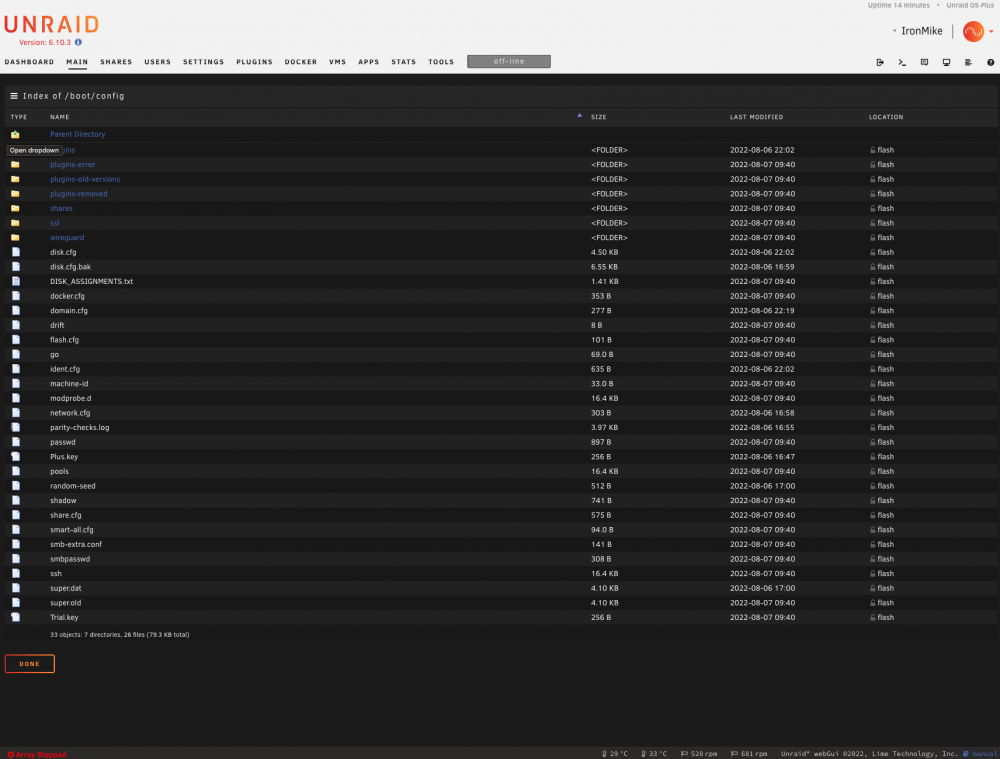
That was it thank you. Removing the "Pools" File resolved the issue. Again thank you all for your help resolved in under 24hours and much appreciated.
-
Navigating the the /boot/config/ i can see a file tabled pools but no folder is this the issue?
-
Unfortunately the same issue i cannot create a pool with the newly created USB Drive. I have attached the diagnostics again just to be sure. Can i manually create the Pool directory on the USB Drive? ironmike-diagnostics-20220806-2159.zip
-
Ok i will try that and keep you posted thank you for the help.
-
@JorgeB ok what would you recommend in this situation can i manually create this directory? Or do i need to look into replacing repairing USB Drive? Permissions?
-
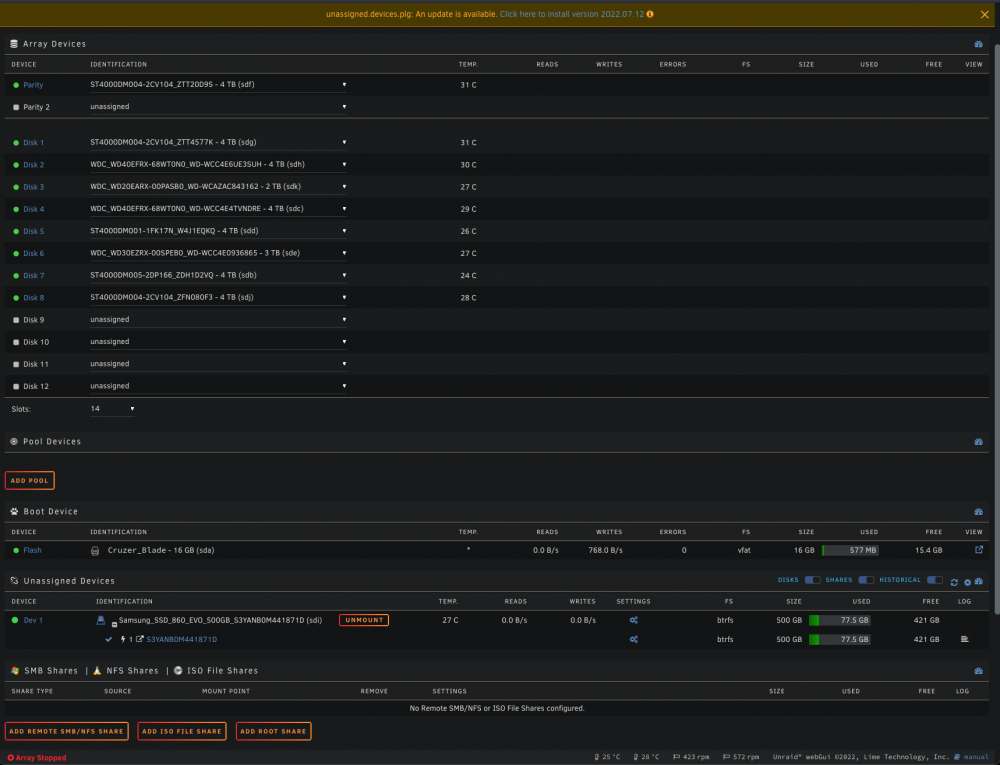
Yes i have tried that it is mounted in the screenshot as i thought that it may help with creating the pool.
-
Done thank you let me know if there is any other info you need.
-
Hey Team I am unable to create a cache pool after updating to 6.10.3 coming from 6.8.3. I have selected the "Add Pool" and once i have created the pool i get no option on the UI to add my previous cache drive. I can see my SSD as a unassigned drive but without being able to create a pool i cannot assign this to a cache pool. Im getting no error or output on why i cannot create a pool so any help would be appreciated. ironmike-diagnostics-20220806-0816.zip
-
Hey Team I am having issues with Ombi using large amounts of memory at the moment it is using 4gb or ram is this to be expected as by the end of the day it will have used all 8gb of the ram in my system. I would just like to know if this is to be expected or if there is something wrong with my docker or if i have enabled some setting in Ombi to cause this issue. Any help would be much appreciated.
-
Im in the same boat as you wgstarks how did you get on?


