





dominicmck
Members
-
Joined
-
Last visited
Everything posted by dominicmck
-
Hi all. Sorry for the delay, but I believe I'm finally back to a good place where I trust my data is healthy! Though it took some time to get there. Thanks as always for your support. I ordered a new drive (which took a while to arrive), ran a pre-clear (unbelievably slow), and rebuilt onto the new disk (also slower than expected). Finally, I used BLAKE2 hashing to verify the rebuilt data against the old drive, all matched perfectly. I'm now looking into the Dynamix File Integrity plugin to give me peace of mind more quickly in future, though I still have a bit of research to do there. One final question, people seem to speak highly of ZFS for error correction, as opposed to XFS which only offers error detection. I’ll need to do some research before considering the switch, are there any good resources people can recommend to help me understand whether it’s worth it?
-
Thanks for the quick reply. I guess my concern is the initial parity drive error: 09/22/2025 at 3:01 AM Alert [TOWER] - Parity disk in error state (disk dsbl) ST4000VN008-2DR166_ZGY6SXTF (sdd) Warning [TOWER] - array has errors Array has 2 disks with read errors Followed by the sync with all the errors. 09/23/2025 at 2:56 PM Notice [TOWER] - Parity disk returned to normal operation ST4000VN008-2DR166_ZGY6SXTF (sdd) Notice [TOWER] - Parity-Sync finished (541656284 errors) Duration: 7 hours, 17 minutes, 33 seconds. Average speed: 152.4 MB/s Can I trust that the data on the parity drive is reliable enough to justify overwriting Disk 1? Instead, I’m considering rebuilding to a new disk (due to arrive in a few days), so I can attempt data recovery from the current Disk 1 (not sure how yet). My critical data is backed up elsewhere, but there is some nice-to-have data I'd like to minimise the risk of losing.
-
Thanks for taking a look. For additional context, the server is an HP ProLiant MicroServer Gen8, so cable replacement options are limited. I’ve given the system a thorough clean and reseated all the cables to ensure proper contact. I did the same with the HDD backplane, removed all drives and reseated them. I even moved Disk 1 to a different bay, just to be thorough. Here’s the current state after startup. Do I need to do something to try enable the disk? Fresh diagnostics. tower-diagnostics-20250924-0953.zip Cheers.

-
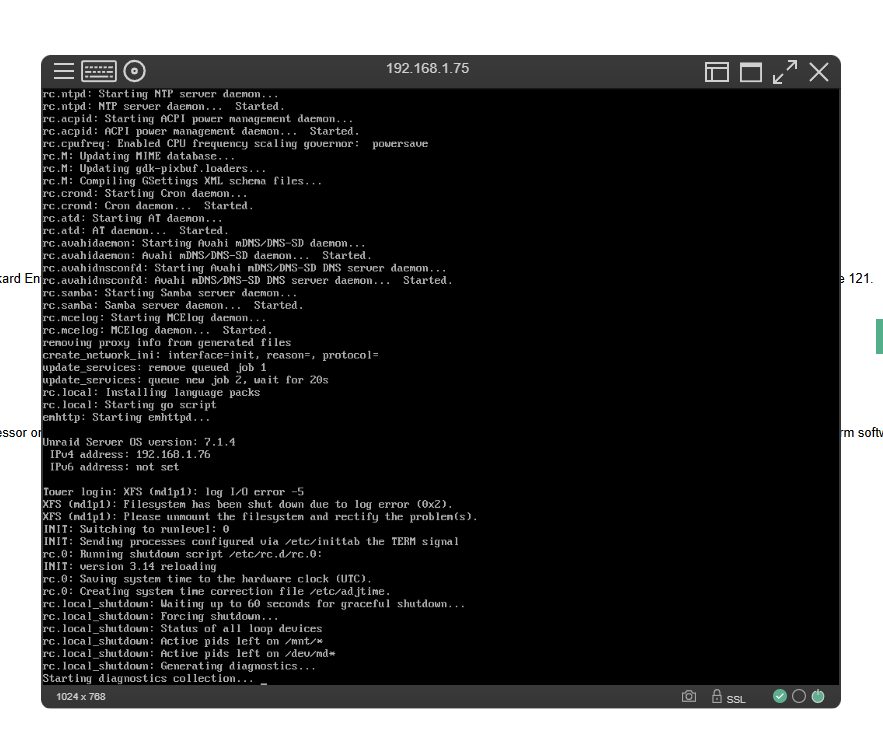
Hi all, I suspect I’ve made a mistake during a disk failure and could use some guidance to minimise data loss. I have two data disks and one parity drive. Below is the notification history and some screenshots I captured, which I hope help paint a clearer picture: The start of the month parity check was fine: 09/01/2025 Notice [TOWER] - Parity-Check finished (0 errors) Duration: 7 hours, 19 minutes, 42 seconds. Average speed: 151.6 MB/s Then I started getting errors. 09/22/2025 at 3:01 AM Alert [TOWER] - Parity disk in error state (disk dsbl) ST4000VN008-2DR166_ZGY6SXTF (sdd) Warning [TOWER] - array has errors Array has 2 disks with read errors I logged in to investigate, but the server was barely responsive. The GUI eventually froze, and I couldn’t retrieve diagnostics. Screenshot 2025-09-22 08:18 AM. I pressed the power button to shut down the server, it took a while, and I believe it performed a clean shutdown. Though it hung at the diagnostics collection stage, I eventually had to do a hard power off. Screenshot 2025-09-22 11:26am. I attempted to retrieve logs from the USB drive, but my only other computer didn’t recognise it. Upon restarting the server, the parity drive was disabled and marked with a red cross. After a quick browse through the forums, I thought the correct action was to remove and re-add the parity drive to trigger a rebuild. 09/22/2025at 7:04 PM Notice [TOWER] - array turned good Array has 0 disks with read errors Thinking the issue lay with the parity drive, I ran a full SMART test overnight. It completed successfully. I then ran short SMART tests on the other two disks, both passed. Confident things were stable, I initiated a parity rebuild before heading to work. 09/23/2025 at 7:38 AM Notice [TOWER] - Parity disk, parity-sync in progress ST4000VN008-2DR166_ZGY6SXTF (sdd) Notice [TOWER] - Parity-Sync started Size: 4 TB 09/23/2025 at 10:28 AM Warning [TOWER] - array has errors Array has 1 disk with read errors 09/23/2025 at 2:56 PM Notice [TOWER] - Parity disk returned to normal operation ST4000VN008-2DR166_ZGY6SXTF (sdd) Notice [TOWER] - Parity-Sync finished (541656284 errors) Duration: 7 hours, 17 minutes, 33 seconds. Average speed: 152.4 MB/s 09/23/2025 at 3:25 PM Alert [TOWER] - Disk 1 in error state (disk dsbl) ST4000VN008-2DR166_ZGY715JZ (sdc) This is the current state, Screenshot 2025-09-23 205210. Fresh diagnostics are attached. How can I determine what data has been lost, and what can be recovered? Thanks in advance for your help. tower-diagnostics-20250922-2035.zip


-
Re-sync worked as expected. All working now. @JorgeB Thanks so much for your help!
-
Results look promising. Drive can be mounded by starting the array, and I can browse the file system. However, parity drive is still disabled, even after a reboot. Any suggestions? Thanks. root@Tower:~# xfs_repair -vL /dev/md1p1 Phase 1 - find and verify superblock... - block cache size set to 539608 entries Phase 2 - using internal log - zero log... zero_log: head block 2425326 tail block 2425301 ALERT: The filesystem has valuable metadata changes in a log which is being destroyed because the -L option was used. - scan filesystem freespace and inode maps... clearing needsrepair flag and regenerating metadata sb_fdblocks 114794426, counted 115775119 - found root inode chunk Phase 3 - for each AG... - scan and clear agi unlinked lists... - process known inodes and perform inode discovery... - agno = 0 - agno = 1 - agno = 2 - agno = 3 - agno = 4 - agno = 5 - process newly discovered inodes... Phase 4 - check for duplicate blocks... - setting up duplicate extent list... - check for inodes claiming duplicate blocks... - agno = 0 - agno = 1 - agno = 2 - agno = 3 - agno = 5 - agno = 4 Phase 5 - rebuild AG headers and trees... - agno = 0 - agno = 1 - agno = 2 - agno = 3 - agno = 4 - agno = 5 - reset superblock... Phase 6 - check inode connectivity... - resetting contents of realtime bitmap and summary inodes - traversing filesystem ... - agno = 0 - agno = 1 - agno = 2 - agno = 3 - agno = 4 - agno = 5 - traversal finished ... - moving disconnected inodes to lost+found ... Phase 7 - verify and correct link counts... Maximum metadata LSN (11:2428865) is ahead of log (1:2). Format log to cycle 14. XFS_REPAIR Summary Mon Oct 9 12:28:03 2023 Phase Start End Duration Phase 1: 10/09 12:25:59 10/09 12:25:59 Phase 2: 10/09 12:25:59 10/09 12:26:09 10 seconds Phase 3: 10/09 12:26:09 10/09 12:26:34 25 seconds Phase 4: 10/09 12:26:34 10/09 12:26:35 1 second Phase 5: 10/09 12:26:35 10/09 12:26:36 1 second Phase 6: 10/09 12:26:36 10/09 12:26:49 13 seconds Phase 7: 10/09 12:26:49 10/09 12:26:49 Total run time: 50 seconds done tower-diagnostics-20231009-1244.zip
-
Apologies. Started in maintenance mode this time. root@Tower:~# xfs_repair -v /dev/md1p1 Phase 1 - find and verify superblock... - block cache size set to 539608 entries Phase 2 - using internal log - zero log... zero_log: head block 2425326 tail block 2425301 ERROR: The filesystem has valuable metadata changes in a log which needs to be replayed. Mount the filesystem to replay the log, and unmount it before re-running xfs_repair. If you are unable to mount the filesystem, then use the -L option to destroy the log and attempt a repair. Note that destroying the log may cause corruption -- please attempt a mount of the filesystem before doing this. root@Tower:~# Reading the error, I tried starting the array (to "Mount the filesystem"), but nothing changed. If I destroy the log, how much data might be lost and is there a way to identify it so I can recover it from backup? Thanks. tower-diagnostics-20231009-1149.zip
-
Thanks @JorgeB Run again with your correction: root@Tower:~# xfs_repair -v /dev/md1p1 /dev/md1p1: No such file or directory /dev/md1p1: No such file or directory fatal error -- couldn't initialize XFS library Fresh diags attached. tower-diagnostics-20231009-1104.zip
-
Hi all, I was trying to make some changes to my server and I noticed that no changes were being saved. When I click Apply my browser just says waiting for 192.168… after a while the values change back to what they were. This happened in Shares, Users, and Disk Settings. So I restarted my server only to be met with Disk1 “Unmountable: Unsupported or no file system”. I have run short and full SMART tests and both are fine. I’ve had no errors on the disk before (3-year-old 4 TB Ironwolf in a HP gen8 microserver). Looking in the logs I see: Oct 8 14:20:31 Tower kernel: XFS (md1p1): Mounting V5 Filesystem Oct 8 14:20:31 Tower root: mount: /mnt/disk1: wrong fs type, bad option, bad superblock on /dev/md1p1, missing codepage or helper program, or other error. Oct 8 14:20:31 Tower root: dmesg(1) may have more information after failed mount system call. Oct 8 14:20:31 Tower kernel: XFS (md1p1): Corruption warning: Metadata has LSN (11:2428865) ahead of current LSN (11:2425326). Please unmount and run xfs_repair (>= v4.3) to resolve. Oct 8 14:20:31 Tower kernel: XFS (md1p1): log mount/recovery failed: error -22 Oct 8 14:20:31 Tower kernel: XFS (md1p1): log mount failed Oct 8 14:20:31 Tower emhttpd: shcmd (34): exit status: 32 Oct 8 14:20:31 Tower emhttpd: /mnt/disk1 mount error: Unsupported or no file system Oct 8 14:20:31 Tower emhttpd: shcmd (35): rmdir /mnt/disk1 Using the GUI Check Filesystem Status I got: Phase 1 - find and verify superblock... superblock read failed, offset 0, size 524288, ag 0, rval -1 fatal error -- Input/output error I also tried: root@Tower:~# xfs_repair -v /dev/md1 /dev/md1: No such file or directory /dev/md1: No such file or directory fatal error -- couldn't initialize XFS library I’ve reseated all the drives. But no change. Can someone please point me in the right direction for the next steps? Diagnostics attached. Thanks for your help. Dom tower-diagnostics-20231009-0716.zip


