




-
I've solved the problem... the repository setting needed to be changed to "ghcr.io/hotio/sonarr:latest"
-
anyone have any ideas how to fix this?
-
-
syslog server is already disabled...
-
Thank you! that fixed the issue!
-
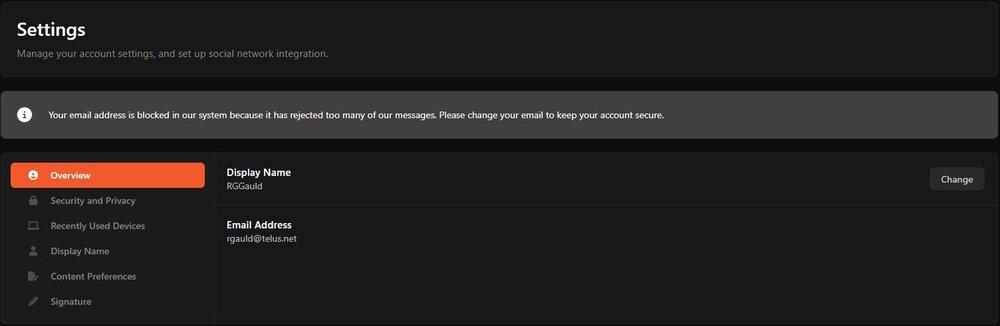
just noticed this when I logged into my account: "Your email address is blocked in our system because it has rejected too many of our messages. Please change your email to keep your account secure." How do I fix this?
-
Is there any way to fix this? I've been having this issue for a very long time.... Jul 19 03:00:08 RG-Server webgui: Sonarr-TV-Current: Could not download icon https://raw.githubusercontent.com/hotio/unraid-templates/master/hotio/img/sonarr.png Jul 19 03:00:09 RG-Server webgui: Sonarr-TV-Current: Could not download icon https://raw.githubusercontent.com/hotio/unraid-templates/master/hotio/img/sonarr.png
-
I see this a lot when checking my system log.... "Jul 18 12:33:24 RG-Server rsyslogd: omfwd: socket 2: error 101 sending via udp: Network is unreachable [v8.2102.0 try https://www.rsyslog.com/e/2354 ]" Is this something I can fix? rg-server-diagnostics-20250719-0743.zip
-
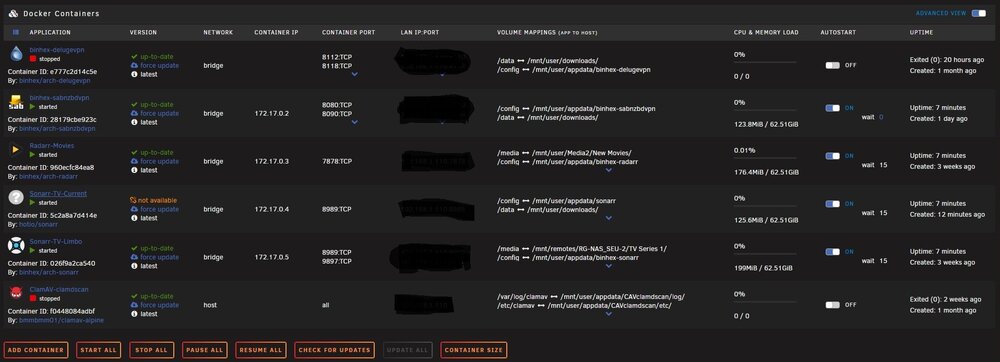
I just noticed a problem with one of my docker containers showing "update not available". I've tried forcing an update, restarting the system, etc. I'm unable to fix the problem... Am I missing something? I'm including a screenshot as well as the diagnostics. rg-server-diagnostics-20250719-0743.zip
-
Actually, I figured it out... I forgot I have to add a delay to the autostart for each container.. problem solved!
-
anyone?
-
I seem to be having a problem with drives connected to several dockers... After every boot, all the dockers lose access to configured drives, and have to be manually triggered via edit, to read/write "slave" (already configured as), and the docker restarted for it to work again... Something I'm missing? rg-server-syslog-20241212-0122.zip
-
thank you, that did the trick!
-
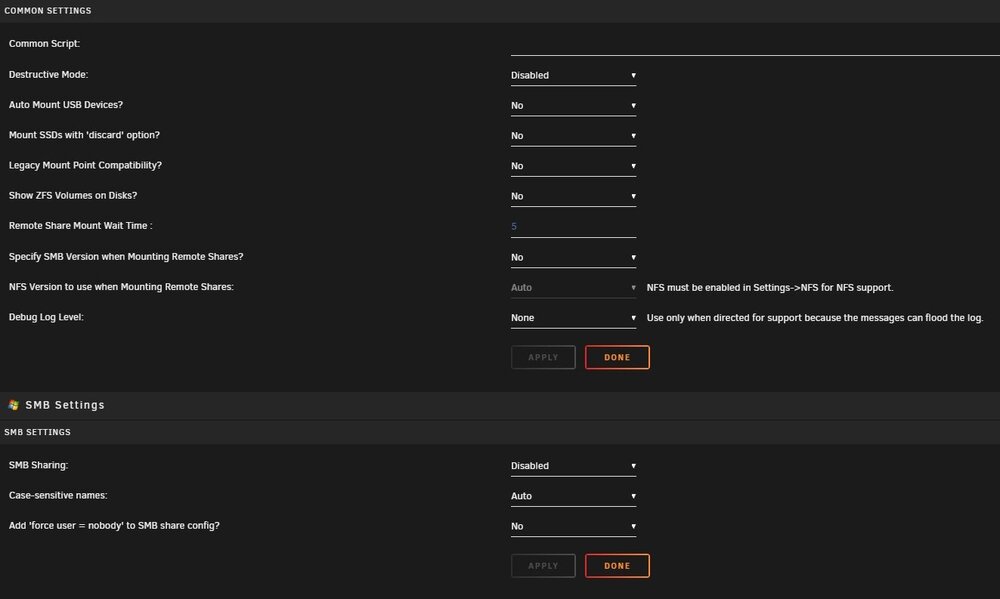
I'm running into some problems with the "Unassigned Devices Settings" where I can't make any changes to the settings... When I make a change to a setting, and hit "Apply", the setting just goes back to what it was... For instance, when I try to enable "Destructive Mode", after hitting "Apply", it just goes back to "Disabled". I have the same problem trying to enable "SMB Sharing", etc.
-
yes. reboot works fine...

View in the app
A better way to browse. Learn more.



