





CiSCOTM
Members
-
Joined
-
Last visited
-
Just checking in on this. Maybe we could have 3 branches? EOL, Stable, Beta. As of now, we have 2 beta versions, 5.8.16 Stable Candidate & 5.9.4 Unstable. And 5.7.23 for Stable Release. And with 5.9.x out now, we're looking at 5.8.x going to Stable Release & 5.9.x being the betas. Maybe in the meantime, we could have 5.7.23 go to betas? Would that be possible? I understand you use this docker for your personal use, but there is a lot of people that use your dockers over other because of the betas and would be very appreciative, including my self.
-
Just FYI 5.7.20 went stable a few hours ago! Can we get 5.8.x as beta? https://community.ubnt.com/t5/UniFi-Wireless/UniFi-5-7-20-Stable-has-been-released/m-p/2271532#M283063
-
Yeah, check your sites preferences. Click the 3 dots in the top right. Prob set to UTC time.
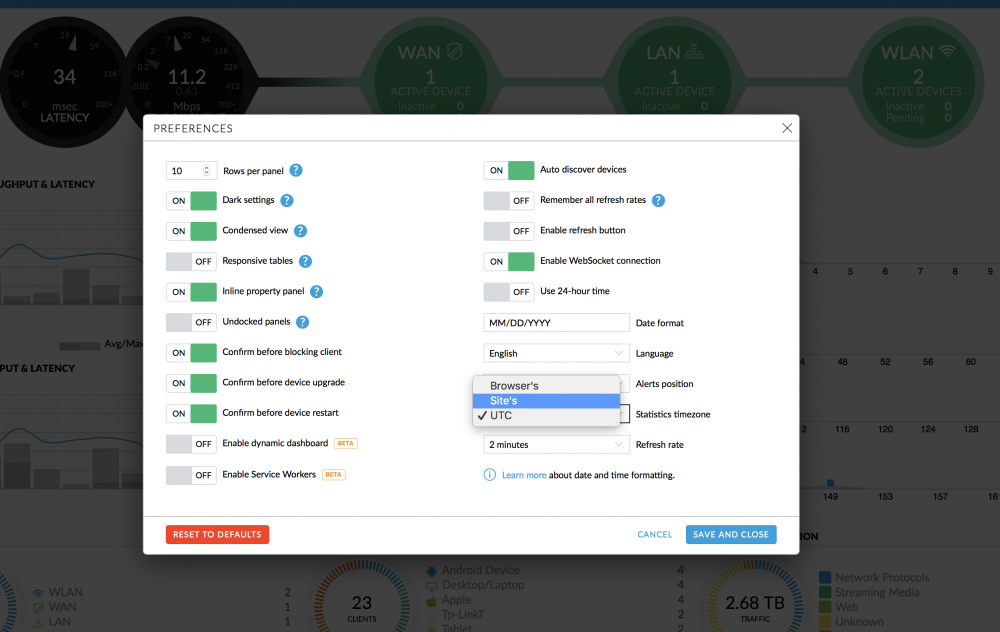
-
3.9.2 beta 1 unifi video just released too
-
The latest beta 5.7.19 is close to being stable. They already have 5.8.3 testing out. I would install the beta but that’s my thought.
-
Yup. My old docker I had set to auto backup at 4 am. I just took that backup one morning and switched to pducharme docker. And restored the backup.
-
Make sure you have a recent UniFi backup, remove the old docker install the new, during the wizard restore the backup. I did the same thing a few months back because of the betas
-
5.8.3 testing beta has just been released! https://community.ubnt.com/t5/UniFi-Beta-Blog/UniFi-5-8-3-Testing-has-been-released/ba-p/2241766
-
Hi there @Pducharme, could unifi beta get an update to 5.7.15 from 5.7.11, thank you in advance! https://community.ubnt.com/t5/UniFi-Wireless-Beta/UniFi-5-7-15-Stable-Candidate-has-been-released/m-p/2203644#M61877
-
Awesome! Thank you so much!! Cant wait to get everything running on my unraid server from the cloud key! Will copy over the update that runs on the CK at 4 am and test in the AM.
-
Actually I just found out that the beta Unifi Video has a update option. I figured this would be disabled similar to the controller version. Still need to get an updated beta of the controller.
-
Sounds good. Yes I received a G3-Pro and need to use the new updated supported docker for it, 3.9.0b6. I would prefer to use dockers so I dont need to install a linux vm.
-
I have, mine is running 3.8.0b5
-
Hello @Pducharme I was wondering if you planed to update these plugins to support the latest betas, and curent stable clients. As betas frequently require updates, especially with UBNT. As of today... Unifi Controller Stable is at 5.6.29 beta is at 5.7.11 Unifi Video Stable 3.8.5 Beta 3.9.0 Beta 6 Would it be possible to update the betas? I will be moving over from the small NVR Unifi sells & their cloud key to my beefy unraid server, but I wont be able to use controller beta versions that are months out of date. With that said, I greatly appreciate you doing what you are doing for the unraid & ubnt community. You may also want to join the ubnt discord too! They post a lot of updates, as some big features have came to Unifi recently, like IPV6, IDS/IPS, and this month we will see 5.8.X as promised by the UBNT staff. Thanks in advance.

