



Skip to content
View in the app

A better way to browse. Learn more.

Unraid

A full-screen app on your home screen with push notifications, badges and more.

To install this app on iOS and iPadOS
  1. Tap the Share icon in Safari
  2. Scroll the menu and tap Add to Home Screen.
  3. Tap Add in the top-right corner.
To install this app on Android
  1. Tap the 3-dot menu (⋮) in the top-right corner of the browser.
  2. Tap Add to Home screen or Install app.
  3. Confirm by tapping Install.

Camilla

Members
  • Joined

  • Last visited

  1. I don't know how to use MC although maybe I could try... Thanks
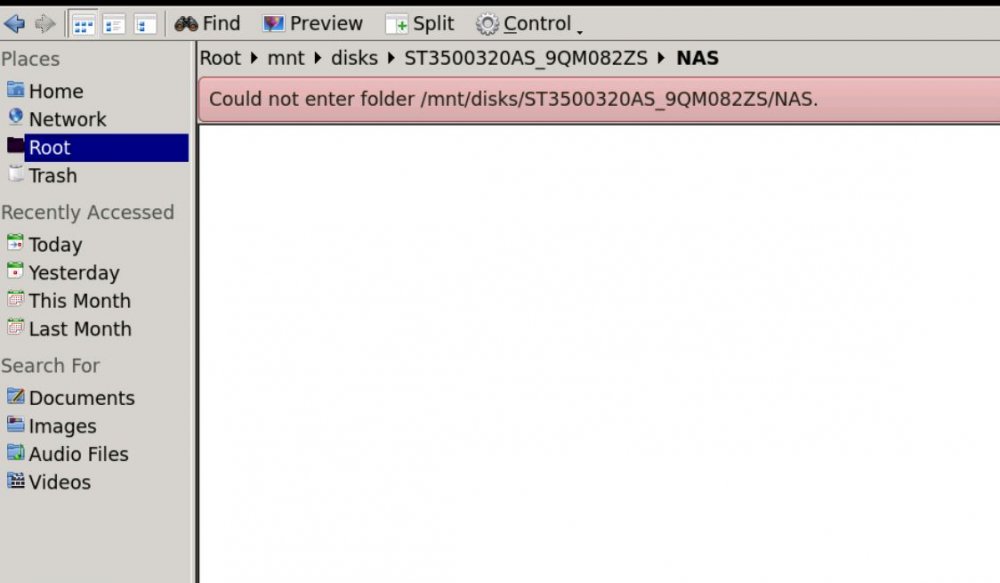
  2. Hello. I am trying to copy the data from the Hdds of an Unraid 4.7 server that the motherboard died. Since I have a new Unraid 6.3.2 system I installed the drives in that and I am trying to copy the data using the unassigned devices. The drives mount correctly as unassigned and Dolphin, file manager in docker, sees them. Problem is when I try to browse the contents of the drives so that I can copy them it asks for user name and password that obviously I don't have unless they exist in the usb stick of the Unraid 4.7 where the drives belonged. Any suggestion? Thanks
Account

Navigation

Search

Search

Configure browser push notifications

Chrome (Android)
  1. Tap the lock icon next to the address bar.
  2. Tap Permissions → Notifications.
  3. Adjust your preference.
Chrome (Desktop)
  1. Click the padlock icon in the address bar.
  2. Select Site settings.
  3. Find Notifications and adjust your preference.