





cdevlin
Members
-
Joined
-
Last visited
-
cdevlin changed their profile photo
-
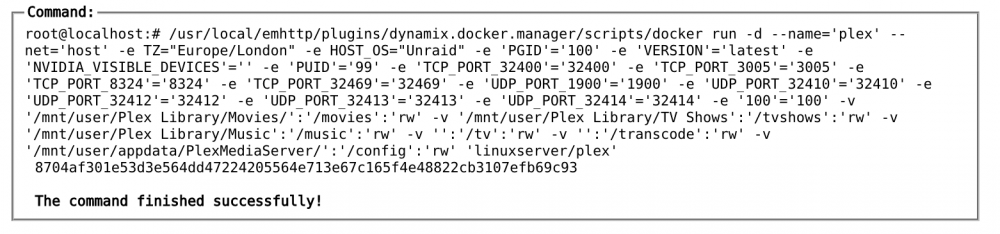
Apologies, Both attached. Docker Log.txt
-
Yeah, I don't doubt there is, but I learn as I go with these things so I never really know what to look for. I've not tried cloning, not sure what's involved to do that. I did setup CA backup but upon checking it was set to delete old backups after 1 day so the only backup is of current appdata I would assume. In relation to logs, which ones? That may sound silly but there are various different ones. I've looked in some but I wouldn't necessarily know what would be abnormal.
-
Yes, I upgraded and downgraded BIOS. The downgrade solved my fan issue so I was sure I was back to normality. There is no access to gui just says "192.168.0.25 refused to connect" I haven't just changed to the linuxserver container. I did this well over a year ago and has been working perfectly. It just stopped working after BIOS scenario. What I was pointing out was that when I originally changed over to the linuxserver container I used the appdata from the original container but as I just mentioned this has been working successfully for a very long time since I did the change. But if i change the appdata back to the one that is created with the container it will allow me to access gui, but of course this doesn't have my saved settings etc so asks to 'claim the server'. Hope that makes more sense, sorry for any confusion. Just trying to understand if BIOS up/downgrade is at fault.
-
I posted this over on Reddit, but wondered if anyone could help here. I suppose I should have listened to the old saying "If it ain't broke don't fix it", but I didn't and decided to update the BIOS on my MSI motherboard. After experiencing an issue with the system fans all running at full speed after the update I decided to revert back to the original BIOS version. Upon restarting Unraid everything looked fine and sounded fine too! But upon trying to open the Unraid GUI I am faced with the error page "The site can't be reached". I can't even access it through the web either via plex.tv/desktop. I use to use a different docker for Plex and eventually changed over to linuxservers Plex docker, so I used the old appdata (PlexMediaServer) directory on linuxserver Plex docker to keep all my metadata and the like. Now if I use the original appdata directory (plex) it will let me show a plex related page but only for claiming my server, but of course, I have already done this. So it seems that when using the PlexMediaServer directory nothing works but the standard one does. All my other dockers work fine and as expected I even tried uninstalling the docker and reinstalling, but still to no avail. Does anyway have any helpful tips for this issue? Thanks in advance! (Not sure best place to find logs to post either to help pinpoint issues)
-
Ahh, thanks for that natecook. Worked a treat.
-
I've just updated to version to 2.94 of Transmission but need to go back to version 2.93. Is there any way of doing this? Thanks for any help.

