





andyps
Members
-
Joined
-
Last visited
Everything posted by andyps
-
Can confirm all seems to be working well this morning. My cache is no longer full. Thanks @trurl, I used your paypal link. Appreciate the time.
-
Looks like I am unable to rename it for some reason. I deleted it and saved the correct settings again, and I believe it is working now. Thank you for the help @trurl I will post back if I run into an issue, but it's looking good so far.
-
Would renaming it to match "Media" potentially fix or is deleting the only fix? Does this just delete the settings if I delete the .cfg file?
-
Attached home-server-diagnostics-20260414-2047.zip
-
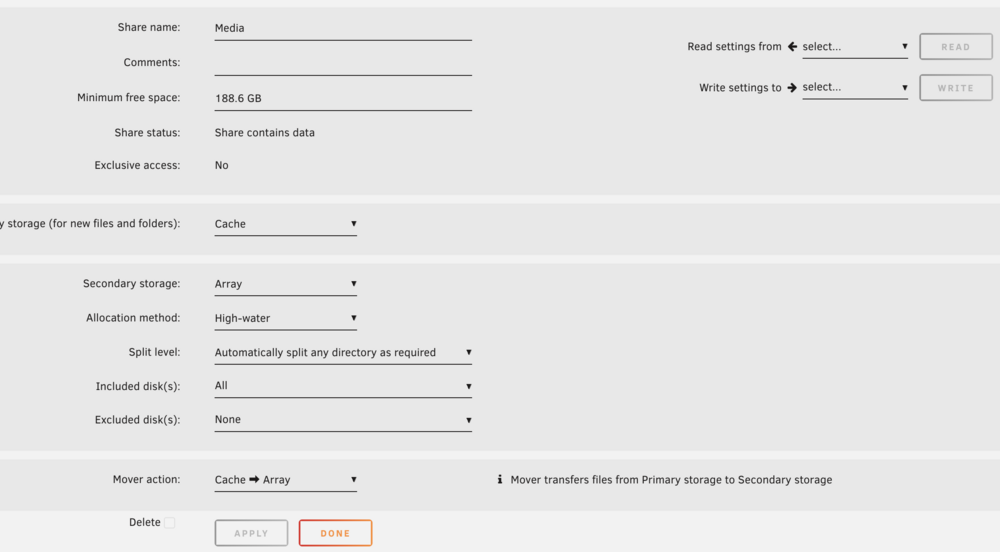
What do you mean by "make settings for your Downloads and Media shares." Do you mean under shares, click the specific shares and confirm the settings? If that's the case, then "Media" already has the settings in place. Even after doing the clean up.
-
I could try upgrading my OS
-
I did run the clean up function after deleting the "downloads" share. Are you saying that the share settings (in my screenshot) that are under the "Media" share are actually for "media" ? I wonder why this is an issue. Before I did a hardware upgrade in the past year, this config worked just fine with that share using mover. If that is the case and I've already run "clean up" and mover still isn't moving, what can be done?
-
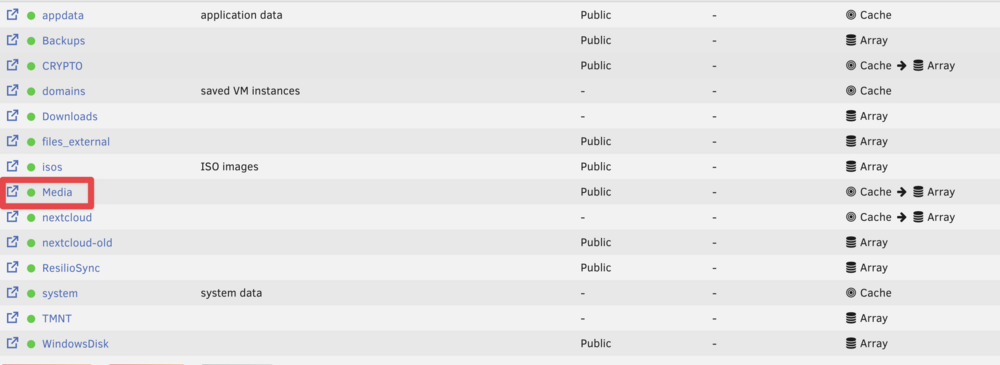
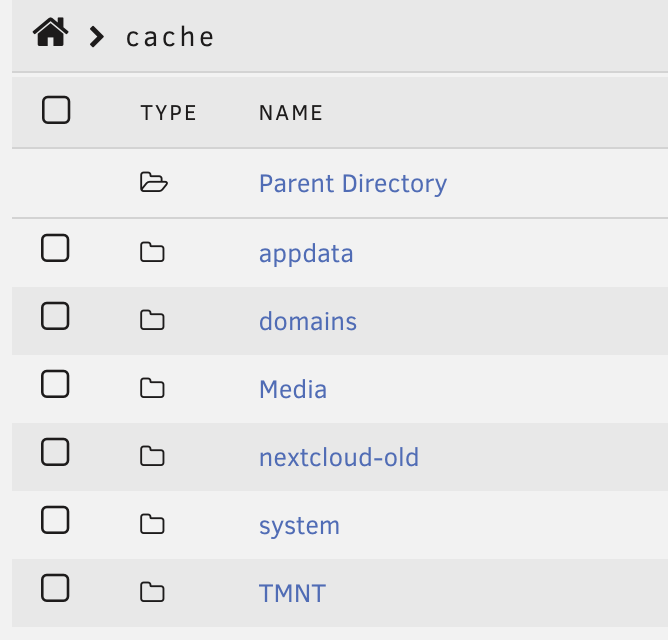
Sorry, I'm just not following. I can see the "Media" share and I can check the settings for it. How can I check the settings for "media" which I am not seeing? I do see the "Media" folder on my cache and across my array drives. Could you explain a little more where I should be looking for this?
-
Huh. Where did you see the "media" share? I only see "Media" in my shares. All my apps use "Media" to my knowledge. Ah. No idea. It's deleted now. So one less potential issue, hopefully.
-
Thanks for the reply. The lowercase one is brand new. I was thinking of changing to that one. It's empty and not used for any dockers. I can delete it. I've been having this issue since before I created that share.
-
I've had this issue for a while. My cache keeps filling up, primarily from my downloads folder and my media folder. I have Sonarr and Radarr. Mover isn't moving the files even when manually initiated. I've read loads of threads and haven't found anything that seems to fit my issues. I believe my share settings are correct. I don't have the mover tuning plugin. I have attached my shares overview and my diagnostics. Any help would be appreciated! home-server-diagnostics-20260414-1918.zip

-
I have posted the issue on the plex forums, so hopefully I get some insight there. However even with downgrading the issues I am having are still quite bad. Playback locks up and the server becomes unresponsive regularly no matter the version I downgrade to.
-
Hi there, my plex server had starting becoming unresponsive, plex apps couldn't discover the server, etc. In the logs I was getting a bunch of "connect: Connection timed out" errors. I tried reinstalling the docker container, deleting the docker image and starting over, but nothing worked until I downgraded plex. I downgraded to 1.13.2.5154-fd05be322 and now the server is much more quickly discovered and media plays, etc, but every so often it dies again and requires a docker container restart. I am also still getting a huge number of these errors (like pages and pages): connect: Connection timed out connect: Connection timed out connect: Connection timed out connect: Connection timed out connect: Connection timed out connect: Connection timed out connect: Connection timed out I'm running unraid 6.6.1 and I have attached my diagnostics to this message. Also when I reinstall the docker container or make changes here is the output: root@localhost:# /usr/local/emhttp/plugins/dynamix.docker.manager/scripts/docker run -d --name='plex' --net='host' -e TZ="America/Chicago" -e HOST_OS="Unraid" -e 'PUID'='99' -e 'PGID'='100' -e 'VERSION'='1.13.2.5154-fd05be322' -v '/mnt/user/Media/':'/media':'rw' -v '/tmp/':'/transcode':'rw' -v '/mnt/user/appdata/plex':'/config':'rw' 'linuxserver/plex' 0790f41fd9ad67b65bb35622056278db63031673dbb1bfec20b5c4fdfcce97cd The command finished successfully! home-server-diagnostics-20181028-1612.zip


