nicecube
Members
-
Joined
-
Last visited
Everything posted by nicecube
-
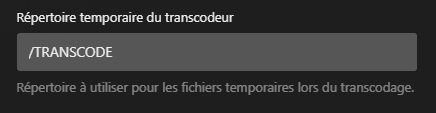
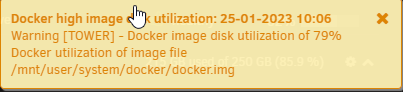
Hello, I have been using unraid for several years now, for several I have had my docker image filling up and emptying. This causes me problems because sometimes it crashes my server and it stops responding. I'm trying to find the cause but I can't, I've searched but without result. I turned off most of my dockers but the problem is still present. The docker is constantly filling up and in a few minutes it will be at 100% Here are the dockers that are on: bitwardenrs binhex-plexpass cloudflare-ddns NginxProxyManager In the plex configurations I have put the transcode outside my docker Currently I have stream on plex and it's live play Label: none uuid: 7fc3f933-0fb8-4d9f-b34b-d7e3f72b084b Total devices 1 FS bytes used 75.69GiB devid 1 size 100.00GiB used 79.99GiB path /dev/loop2 UUID: 7fc3f933-0fb8-4d9f-b34b-d7e3f72b084b no stats available Total to scrub: 76.28GiB Rate: 0.00B/s Error summary: no errors found docker ps -s CONTAINER ID IMAGE COMMAND CREATED STATUS PORTS NAMES SIZE d1b5b302005b binhex/arch-plexpass "/usr/bin/dumb-init …" 3 days ago Up 8 hours binhex-plexpass 252MB (virtual 1.6GB) a56a1e25ec60 jlesage/nginx-proxy-manager "/init" 2 weeks ago Up 8 hours 0.0.0.0:18443->4443/tcp, :::18443->4443/tcp, 0.0.0.0:1880->8080/tcp, :::1880->8080/tcp, 0.0.0.0:7818->8181/tcp, :::7818->8181/tcp NginxProxyManager 16.3kB (virtual 192MB) 6bf65029154c bitwardenrs/server "/usr/bin/dumb-init …" 2 weeks ago Up 8 hours (healthy) 3012/tcp, 0.0.0.0:8080->80/tcp, :::8080->80/tcp bitwardenrs 0B (virtual 187MB) 45e8ead4bf44 oznu/cloudflare-ddns "/init" 2 weeks ago Up 8 hours cloudflare-ddns 5.8kB (virtual 36.3MB) du -h -d 1 /var/lib/docker/ 936K /var/lib/docker/containerd 197M /var/lib/docker/containers 0 /var/lib/docker/plugins Docker Container Size: deepstack 4.28 GB 845 kB 11.8 MB binhex-plexpass 1.60 GB 252 MB 59.5 kB binhex-delugevpn-2 1.36 GB 3.08 MB 441 kB binhex-delugevpn-1 1.23 GB 3.13 MB 159 kB binhex-prowlarr 1.14 GB 216 MB 7.73 MB radarr 1.03 GB 163 MB 172 MB meshcentral 633 MB 20.6 MB 1.83 kB epicgames-freegames 603 MB 2.07 MB 3.92 kB flaresolverr 591 MB 13.3 MB 14.6 kB ombi 438 MB 140 MB 31.2 kB Mealie 401 MB 14.5 MB 1.36 MB sonarr 336 MB 0 B 42.6 MB Plex-Meta-Manager 271 MB 0 B 42.6 MB openvpn-as 258 MB 29.5 MB 18.9 kB tautulli 201 MB 327 kB 1.99 MB NginxProxyManager 192 MB 16.3 kB 7.94 MB bitwardenrs 187 MB 0 B 254 kB postgres 158 MB 0 B 7.62 kB Redis 117 MB 0 B 2.28 kB cloudflare-ddns 36.3 MB 5.80 kB 1.38 MB vm_custom_icons 33.3 MB 0 B 2.99 kB Total size 15.1 GB 858 MB 291 MB I tried a script from Spaceinvader One to check the space but can't find the problem Script location: /tmp/user.scripts/tmpScripts/Check Docker Size/script Note that closing this window will abort the execution of this script ################################################################################## Cleanup before starting (if requested in script) ################################################################################## Not removing orphaned images (this can be set in script if you want to) --------------------------------------------------------------------------------- Not removing unconnected docker volumes (this can be set in script if you want to) ################################################################################## List of Image, Container and docker volume size. ################################################################################## There are 26 Images taking up ......14.75GB There are 21 Containers taking up ......857.7MB There are 19 Local Volumes taking up ......53.07MB There are 0 Build Cache taking up ......0B ################################################################################## List of containers showing size and virtual size ################################################################################## First size is the writable layers of the container (Virtual size is writable and read only layers) 0B (virtual 336MB) Is being taken up by ......... lscr.io/linuxserver/sonarr 0B (virtual 271MB) Is being taken up by ......... meisnate12/plex-meta-manager 2.07MB (virtual 603MB) Is being taken up by ......... charlocharlie/epicgames-freegames:latest 29.5MB (virtual 258MB) Is being taken up by ......... linuxserver/openvpn-as 252MB (virtual 1.6GB) Is being taken up by ......... binhex/arch-plexpass 3.13MB (virtual 1.23GB) Is being taken up by ......... binhex/arch-delugevpn 13.3MB (virtual 591MB) Is being taken up by ......... flaresolverr/flaresolverr 20.6MB (virtual 633MB) Is being taken up by ......... typhonragewind/meshcentral 0B (virtual 117MB) Is being taken up by ......... redis 0B (virtual 158MB) Is being taken up by ......... postgres:12.5-alpine 845kB (virtual 4.28GB) Is being taken up by ......... deepquestai/deepstack 140MB (virtual 438MB) Is being taken up by ......... linuxserver/ombi 163MB (virtual 1.03GB) Is being taken up by ......... binhex/arch-radarr 327kB (virtual 201MB) Is being taken up by ......... tautulli/tautulli 0B (virtual 33.3MB) Is being taken up by ......... spaceinvaderone/vm_custom_icons 16.3kB (virtual 192MB) Is being taken up by ......... jlesage/nginx-proxy-manager 14.5MB (virtual 401MB) Is being taken up by ......... hkotel/mealie:latest 0B (virtual 187MB) Is being taken up by ......... bitwardenrs/server 216MB (virtual 1.14GB) Is being taken up by ......... binhex/arch-prowlarr 3.08MB (virtual 1.36GB) Is being taken up by ......... ef66c60e791c 5.8kB (virtual 36.3MB) Is being taken up by ......... oznu/cloudflare-ddns ################################################################################## List of containers in size order ################################################################################## 4280MB - deepquestai/deepstack 2180MB - altran1502/immich-machine-learning 1350MB - binhex/arch-plexpass 1230MB - binhex/arch-delugevpn 929MB - binhex/arch-prowlarr 870MB - binhex/arch-radarr 612MB - typhonragewind/meshcentral 601MB - charlocharlie/epicgames-freegames 578MB - flaresolverr/flaresolverr 506MB - altran1502/immich-server 387MB - hkotel/mealie 385MB - altran1502/immich-web 376MB - postgres 336MB - lscr.io/linuxserver/sonarr 298MB - linuxserver/ombi 271MB - meisnate12/plex-meta-manager 228MB - linuxserver/openvpn-as 201MB - tautulli/tautulli 192MB - jlesage/nginx-proxy-manager 187MB - bitwardenrs/server 158MB - postgres 142MB - altran1502/immich-proxy 117MB - redis 113MB - redis 36.3MB - oznu/cloudflare-ddns 33.3MB - spaceinvaderone/vm_custom_icons ################################################################################## List of docker volumes, the container which they are connected to their size ################################################################################## ID 0b0be3d0a13bf700eab18f5bd34acc6c725959ef17d107b56362973ae7418f70 This volume connected to has a size of 0 ID 0e5a75fa989996ed984392248cd18c20be808c7cf9773f3437cd193eca9de4ec This volume connected to has a size of 4.0K ID 1cfbe3f07107bad070027971724ce7e35bde5c06d6d40614723f4da77a3a6cc0 This volume connected to has a size of 0 ID 08e9c4b8962b5444ecc0e4624d88129b744408e90146077be9f0a1af4fe22b9c This volume connected to has a size of 0 ID 42e4f1973f15b5148f900c83c5455a7be65fe85f87fe2a47ff5e4fd85aebca12 This volume connected to has a size of 0 ID 46d136f5d0c6f0d3f1555ee72692f0a12051aa81729cd6e31085039ac25a1913 This volume connected to has a size of 0 ID 53df48f2f13d73be079b9e8acc236acae128d5a59a7dc180983e359202b1aaf5 This volume connected to has a size of 0 ID 85c3e131210eb9f707668b7f9ac187b5adc37f0587f21be3bc8a5062de1cf475 This volume connected to meshcentral has a size of 0 ID 150ec0700e535d12386645bf515e3d580960f00d0f8411dfc7ab0cdde3bc9939 This volume connected to has a size of 0 ID 464b730facf3bd1b6b1817fb267666e04dbdf1a93e07932fece2d05aaaacd18e This volume connected to has a size of 0 ID 816df409baf8917e24e73914520302d2cf9f27f47c0fb98093cbde6ec8821172 This volume connected to has a size of 0 ID 39539516ba802caaee7bb2651016e3909481a500865b1590bd77052a55b7fb3a This volume connected to has a size of 0 ID a09184cb31a7db363a3364cdf3e4e7f16f4e334f8bfdac47d2c1c41aaf47bfbd This volume connected to Redis has a size of 4.0K ID c623db44f320eec627c9b1e6411f98f80ec35ec66604f192faa3b792db9393a6 This volume connected to has a size of 0 ID dcf7fce0d9a6b84bd630aeb44f27fa1be084a47f3bae375151659019df0a3369 This volume connected to has a size of 0 ID e2d6cc70f9db8dc1d13ea95e8f4a1cd45aadb0c2823d3dc3cd4e9d0eee8b5d92 This volume connected to has a size of 0 ID eee3c4204b7f4cf4876f962d77b8a0dcff18757689862c6bcf720a2025fc4a8e This volume connected to has a size of 0 ID fc08d2085b36b6474ce8b02a199abe89a19d0286fb295e2080dd675f53e6838a This volume connected to has a size of 0 ID immich_pgdata This volume connected to has a size of 51M ################################################################################## docker ps | awk '{print $1}' | grep -v CONTAINER | xargs -n 1 -I {} sh -c "echo -e \\\n#================\\\nDocker container:{}; docker exec {} du -hx -d1 / " #================ Docker container:d1b5b302005b 7.9M /etc 16K /root 4.0K /.gnupg 0 /boot 2.0M /home 0 /mnt 0 /opt 0 /run 0 /srv 8.0K /tmp 1.4G /usr 17M /var 1.4G / #================ Docker container:a56a1e25ec60 7.1M /bin 2.0M /etc 0 /home 5.0M /lib 0 /media 0 /mnt 48.8M /opt 0 /root 224.0K /run 460.0K /sbin 0 /srv 0 /tmp 142.4M /usr 4.4M /var 84.0K /libexec 20.0K /defaults 210.5M / #================ Docker container:6bf65029154c 4.9M /bin 0 /boot 1.9M /etc 0 /home 12M /lib 4.0K /lib64 0 /media 0 /mnt 0 /opt 8.0K /root 0 /run 4.2M /sbin 0 /srv 0 /tmp 103M /usr 6.8M /var 33M /web-vault 197M / #================ Docker container:45e8ead4bf44 7.6M /bin 1.8M /etc 0 /home 4.7M /lib 0 /media 0 /mnt 0 /opt 0 /root 84K /run 592K /sbin 0 /srv 0 /tmp 26M /usr 12K /var 4.0K /app 4.0K /config 0 /defaults 108K /libexec 41M / Someone can help me plz, sry for my english im french d diagnostic.zip


-
I will update my bios, is there a way to enlarge the log partition I have enough space. When the log is 100% my docker and VM crash
-
Someone can help me ?
-
Hello, I have been using Unraid for 4 years now, I have no problem other than my log is always 100% full and my docker stops working. When my logs are at 100% I do the command mount -o remount,size=24288m /var/log but it always comes back can someone help me to fix the problem for good! tower-diagnostics-20220530-1110.zip
-
root@Tower:/dev# btrfs check -s 1 /dev/sdn1 using SB copy 1, bytenr 67108864 No valid Btrfs found on /dev/sdn1 ERROR: cannot open file system root@Tower:/dev# btrfs check -s 1 --mode=lowmem /dev/sdn1 using SB copy 1, bytenr 67108864 No valid Btrfs found on /dev/sdn1 ERROR: cannot open file system root@Tower:/dev#
-
I'm going to replace the SDD by a new Samsung, I'm no longer trust Kingston SSD. I'm reinstalling all my dockers, I have not lost important data just configurations that can be done again, thanks again for your help it was really appreciated,have a good day
-
This is the output of the above command: root@Tower:/# btrfs restore -v -u 1 /dev/sdn1 /mnt/user/Backup/cachebck No valid Btrfs found on /dev/sdn1 Could not open root, trying backup super ERROR: superblock bytenr 274877906944 is larger than device size 120034091008 Could not open root, trying backup super root@Tower:/#
-
I got this message when im trying to do the command: root@Tower:/# btrfs restore -v -u 2 /dev/sdn1 /mnt/user/Backup/cachebck ERROR: superblock bytenr 274877906944 is larger than device size 120034091008 Could not open root, trying backup super root@Tower:/#
-
I rebooted my server i tried the repair command again but i have the same output root@Tower:/# mount -o recovery,ro /dev/sdn1 /mnt/user/Backup/cachebck mount: /mnt/user/Backup/cachebck: wrong fs type, bad option, bad superblock on /dev/sdn1, missing codepage or helper program, or other error. root@Tower:/# btrfs restore -v /dev/sdn1 /mnt/user/Backup/cachebck No valid Btrfs found on /dev/sdn1 Could not open root, trying backup super No valid Btrfs found on /dev/sdn1 Could not open root, trying backup super ERROR: superblock bytenr 274877906944 is larger than device size 120034091008 Could not open root, trying backup super root@Tower:/# btrfs check --repair /dev/sdn1 enabling repair mode No valid Btrfs found on /dev/sdn1 ERROR: cannot open file system root@Tower:/#
-
I include tower-diagnostics-20180202-0940 I ll reboot my server tower-diagnostics-20180202-0940.zip
-
Ty for the help, i think the disk can't be repaired, this is the output of all command i have done. I think i ll buy a new SSD. This time i ll make a backup of all my docker in my array ... mount -o recovery,ro /dev/sdn1 /mnt/user/Backup/cachebck mount: /mnt/user/Backup/cachebck: wrong fs type, bad option, bad superblock on /dev/sdn1, missing codepage or helper program, or other error. btrfs restore -v /dev/sdn1 /mnt/user/Backup/cachebck No valid Btrfs found on /dev/sdn1 Could not open root, trying backup super No valid Btrfs found on /dev/sdn1 Could not open root, trying backup super ERROR: superblock bytenr 274877906944 is larger than device size 120034091008 Could not open root, trying backup super btrfs check --repair /dev/sdn1 enabling repair mode No valid Btrfs found on /dev/sdn1 ERROR: cannot open file system
-
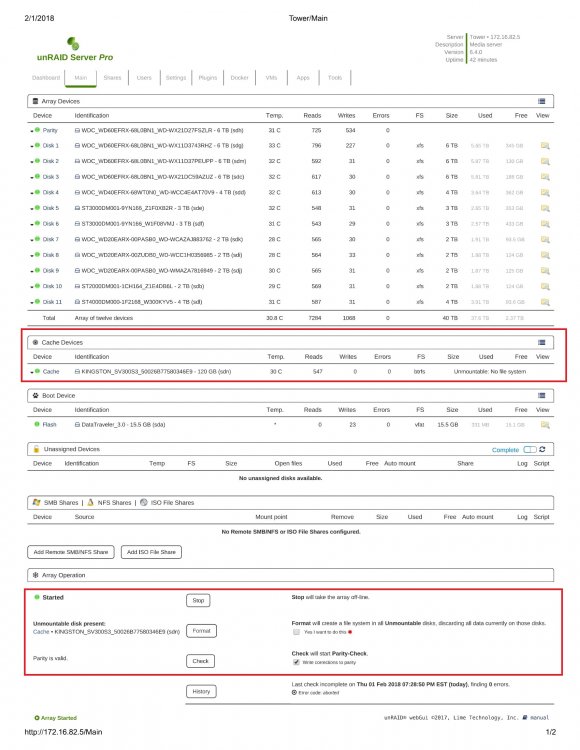
Hi, i need help, after a power failure my cache disk ask to be formatted and my docker will not boot anymore. I try to restart my server 2 times and the disk still does not boot. I was wondering if there is a way to do a disk check or enable parity to fix my array. Sorry for the big picture but i would like to add more information as possible. I hope to be able to fix the problem. Feb 1 19:31:07 Tower kernel: sd 9:0:7:0: [sdn] 234441648 512-byte logical blocks: (120 GB/112 GiB) Feb 1 19:31:07 Tower kernel: sd 9:0:7:0: [sdn] Write Protect is off Feb 1 19:31:07 Tower kernel: sd 9:0:7:0: [sdn] Mode Sense: 73 00 00 08 Feb 1 19:31:07 Tower kernel: sd 9:0:7:0: [sdn] Write cache: enabled, read cache: enabled, doesn't support DPO or FUA Feb 1 19:31:07 Tower kernel: sdn: sdn1 Feb 1 19:31:07 Tower kernel: sd 9:0:7:0: [sdn] Attached SCSI disk Feb 1 19:31:07 Tower kernel: BTRFS: device fsid 2a6067f8-0a58-4f51-98ff-9522b8181eb8 devid 1 transid 563610 /dev/sdn1 Feb 1 19:31:24 Tower emhttpd: KINGSTON_SV300S3_50026B77580346E9_350026b77580346e9 (sdn) 512 234441648 Feb 1 19:31:24 Tower emhttpd: import 30 cache device: (sdn) KINGSTON_SV300S3_50026B77580346E9_350026b77580346e9 Feb 1 19:31:29 Tower emhttpd: shcmd (96): mount -t btrfs -o noatime,nodiratime /dev/sdn1 /mnt/cache Feb 1 19:31:29 Tower kernel: BTRFS info (device sdn1): disk space caching is enabled Feb 1 19:31:29 Tower kernel: BTRFS info (device sdn1): has skinny extents Feb 1 19:31:29 Tower kernel: BTRFS info (device sdn1): enabling ssd optimizations Feb 1 19:31:29 Tower kernel: BTRFS error (device sdn1): parent transid verify failed on 141355253760 wanted 563611 found 563400 Feb 1 19:31:29 Tower kernel: BTRFS warning (device sdn1): failed to read log tree Feb 1 19:31:29 Tower root: mount: /mnt/cache: can't read superblock on /dev/sdn1. Feb 1 19:31:29 Tower kernel: BTRFS error (device sdn1): open_ctree failed Feb 1 19:41:44 Tower emhttpd: shcmd (159): /usr/sbin/hdparm -S0 /dev/sdn Feb 1 19:41:44 Tower root: /dev/sdn: Feb 1 19:57:07 Tower emhttpd: shcmd (1167): mount -t btrfs -o noatime,nodiratime /dev/sdn1 /mnt/cache Feb 1 19:57:07 Tower kernel: BTRFS info (device sdn1): disk space caching is enabled Feb 1 19:57:07 Tower kernel: BTRFS info (device sdn1): has skinny extents Feb 1 19:57:07 Tower kernel: BTRFS info (device sdn1): enabling ssd optimizations Feb 1 19:57:07 Tower kernel: BTRFS error (device sdn1): parent transid verify failed on 141355253760 wanted 563611 found 563400 Feb 1 19:57:07 Tower kernel: BTRFS warning (device sdn1): failed to read log tree Feb 1 19:57:07 Tower root: mount: /mnt/cache: can't read superblock on /dev/sdn1. Feb 1 19:57:07 Tower kernel: BTRFS error (device sdn1): open_ctree failed Feb 1 20:55:54 Tower emhttpd: shcmd (1328): /usr/sbin/hdparm -S0 /dev/sdn Feb 1 20:55:54 Tower root: /dev/sdn: Feb 1 21:02:09 Tower emhttpd: shcmd (1802): mount -t btrfs -o noatime,nodiratime /dev/sdn1 /mnt/cache Feb 1 21:02:09 Tower kernel: BTRFS info (device sdn1): disk space caching is enabled Feb 1 21:02:09 Tower kernel: BTRFS info (device sdn1): has skinny extents Feb 1 21:02:10 Tower kernel: BTRFS info (device sdn1): enabling ssd optimizations Feb 1 21:02:10 Tower kernel: BTRFS error (device sdn1): parent transid verify failed on 141355253760 wanted 563611 found 563400 Feb 1 21:02:10 Tower kernel: BTRFS warning (device sdn1): failed to read log tree Feb 1 21:02:10 Tower root: mount: /mnt/cache: can't read superblock on /dev/sdn1. Feb 1 21:02:10 Tower kernel: BTRFS error (device sdn1): open_ctree failed Feb 1 21:04:04 Tower emhttpd: shcmd (1850): /usr/sbin/hdparm -y /dev/sdn Feb 1 21:04:04 Tower root: /dev/sdn: Feb 1 21:04:10 Tower emhttpd: shcmd (1851): /usr/sbin/hdparm -S0 /dev/sdn Feb 1 21:04:10 Tower root: /dev/sdn: Feb 1 21:05:57 Tower emhttpd: shcmd (1855): /usr/sbin/hdparm -y /dev/sdn Feb 1 21:05:57 Tower root: /dev/sdn: Feb 1 21:06:13 Tower emhttpd: shcmd (1857): /usr/sbin/hdparm -y /dev/sdn Feb 1 21:06:14 Tower root: /dev/sdn: Feb 1 21:06:34 Tower emhttpd: shcmd (1859): /usr/sbin/hdparm -y /dev/sdn Feb 1 21:06:34 Tower root: /dev/sdn: Feb 1 21:37:00 Tower emhttpd: shcmd (1920): /usr/sbin/hdparm -y /dev/sdn Feb 1 21:37:00 Tower root: /dev/sdn: Feb 1 21:37:05 Tower emhttpd: shcmd (1922): /usr/sbin/hdparm -y /dev/sdn tower-smart-20180201-2140.zip