





Thomas van Dalen
Members
-
Joined
-
Last visited
Everything posted by Thomas van Dalen
-
I have done that, should i keep the <emulatorpin cpuset='0,4'/> on the windows vm? and --cpuset-cpus=0,4 in dockers? just to start with, or leave those fiels blank and only select the cvpus from the template? agian TY
-
Thank you for your time and explanation. My English is not great, and I am reading over and over to try to understand more... I am still on trial method, but yes when i got my last hiccups gone I am planning to buy the software. Please tell me if i have to remove the isolcpus=1,2,3,5,6,7 initrd=/bzroot,/bzroot-gui or not. The audio lag is another issue and i do not feel like i have to put that in this post so i made a new post here:
-
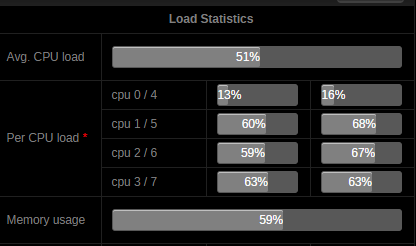
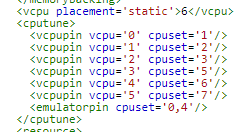
I have seen the video and adjusted all dockers extra parameters to --cpuset-cpus=0,4 Dockers: deluge, filezilla, xeoma and zoneminder, nothing more. with append isolcpus=1,2,3,5,6,7 initrd=/bzroot,/bzroot-gui this so unraid wont use other cores right? so that should be good right? even the op use this line in syslinux.cfg for a quad setup I have set that extra core 2 also to win 10, I am not sure if only core 3 and 4 are enough for ultra high setting gaming. Properly not no, but if 2 cores (core 3 and 4) are enough for windows ultra gaming settings, id like to have kali to be able to launch next to it on a single core.(core 2) In Windows xml i change the line to: <emulatorpin cpuset='0,4'/> so now it uses core 2 3 and 4. The video was usefull Sorry still having troubling understand the great picture. And thank you for replying before Anyway, still issuing the audio lag when usb devices get attached
-
Hi, i have a 1080TI and i have hyper v On In the OP i see: Set Hyper-V to 'yes' unless you need it off for Nvidia GPUs. Can anyone tell me why that is? I have read its been fixed with v 6.2. And can be left Enabled. Except for the audio lag, everything else works fine, including gaming I still suffer audio issues, mostly when windows detects a USB plugin or right after logging in. I already have Enable+ on both the GPU and the GPU its audio chip GM200 I have an i7-6700k cpu 0 / 4 cpu 1 / 5 cpu 2 / 6 cpu 3 / 7 syslinux.conf: append isolcpus=1,2,3,5,6,7 initrd=/bzroot,/bzroot-gui vm xml: <vcpu placement='static'>4</vcpu> <cputune> <vcpupin vcpu='0' cpuset='2'/> <vcpupin vcpu='1' cpuset='3'/> <vcpupin vcpu='2' cpuset='6'/> <vcpupin vcpu='3' cpuset='7'/> <emulatorpin cpuset='0-1,4-5'/> </cputune> I believe that I have core 1 cpu 0 / 4 for unraid and dockers. (docker names start with --cpuset=0,4) Did i understand this correct? core2 = 1 / 5 for reserved for later virtual machines core3 = 2 / 6 for win 10 gaming vm core4 = 3 / 7 for win 10 gaming vm
