




Skip to content
View in the app

A better way to browse. Learn more.

Unraid

A full-screen app on your home screen with push notifications, badges and more.

To install this app on iOS and iPadOS
  1. Tap the Share icon in Safari
  2. Scroll the menu and tap Add to Home Screen.
  3. Tap Add in the top-right corner.
To install this app on Android
  1. Tap the 3-dot menu (⋮) in the top-right corner of the browser.
  2. Tap Add to Home screen or Install app.
  3. Confirm by tapping Install.

dnamaster2000

Members
  • Joined

  • Last visited

  1. Installed the 2017.09.27 update and everything is working correctly now, thank you for the quick fix!
  2. when I try to pre clear the disk, the icon on main goes away, but when I open pre clear I was able to find a log for the operation. it looks like because there is an issue with the drive information, it thinks the disk is in the array. in my case this is a new disk, fresh out of the box into the server. the disk selected is the one listed in the "potential candidates for clearing" list. Edit: adding screen shot of how disk is appearing in pre clear plugin
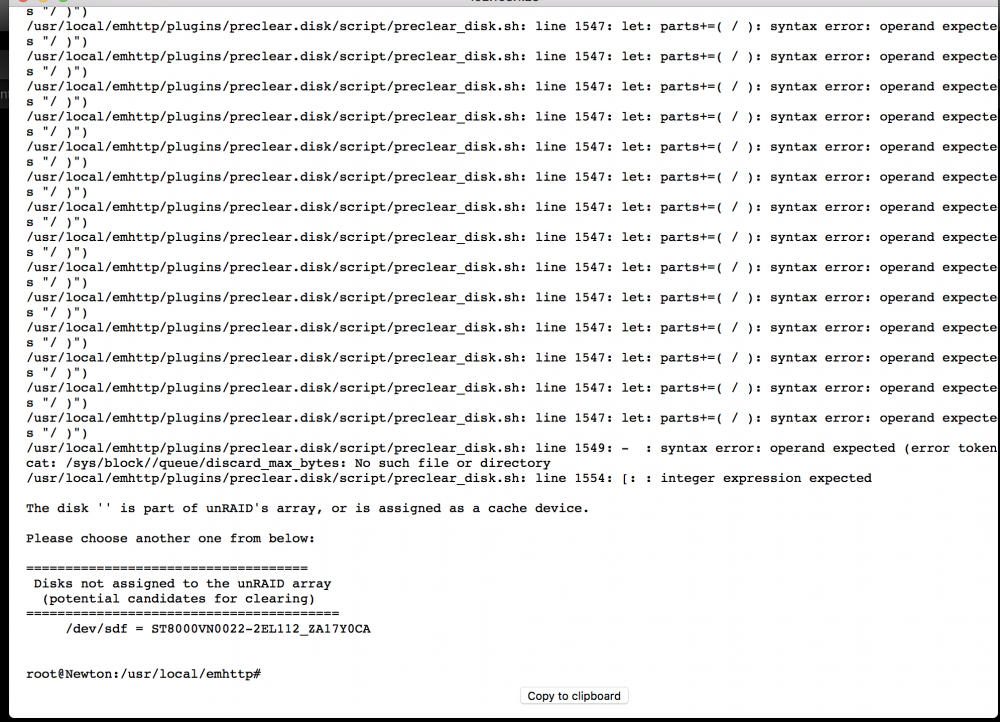
  3. I'm having the same issue, just re-installed pre clear, and that did not fix the issue. my symptoms match exactly with what fredhoon posted.

Account

Navigation

Search

Search

Configure browser push notifications

Chrome (Android)
  1. Tap the lock icon next to the address bar.
  2. Tap Permissions → Notifications.
  3. Adjust your preference.
Chrome (Desktop)
  1. Click the padlock icon in the address bar.
  2. Select Site settings.
  3. Find Notifications and adjust your preference.
