





CowboyRedBeard
Members
-
Joined
-
Last visited
Everything posted by CowboyRedBeard
-
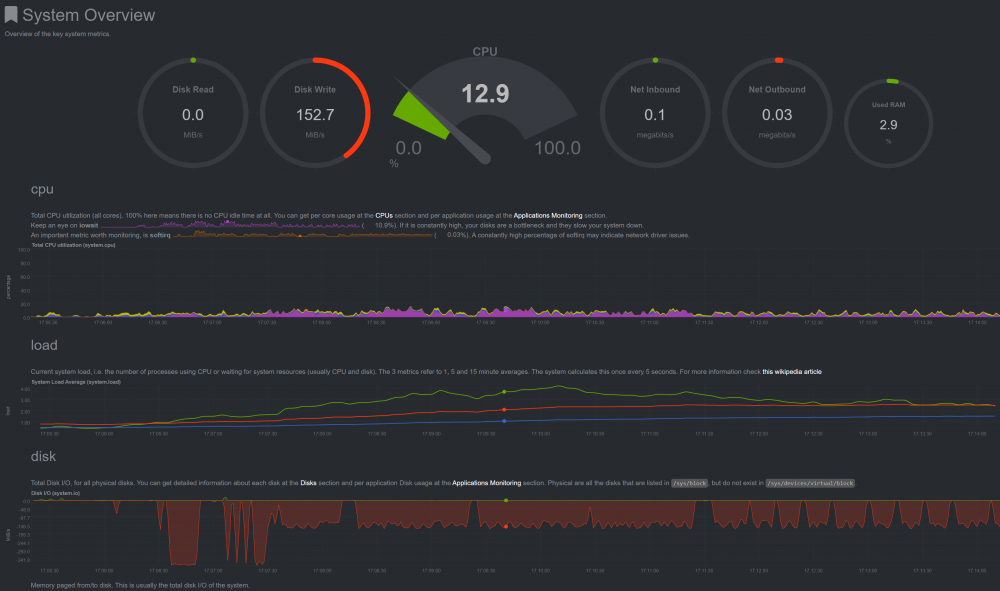
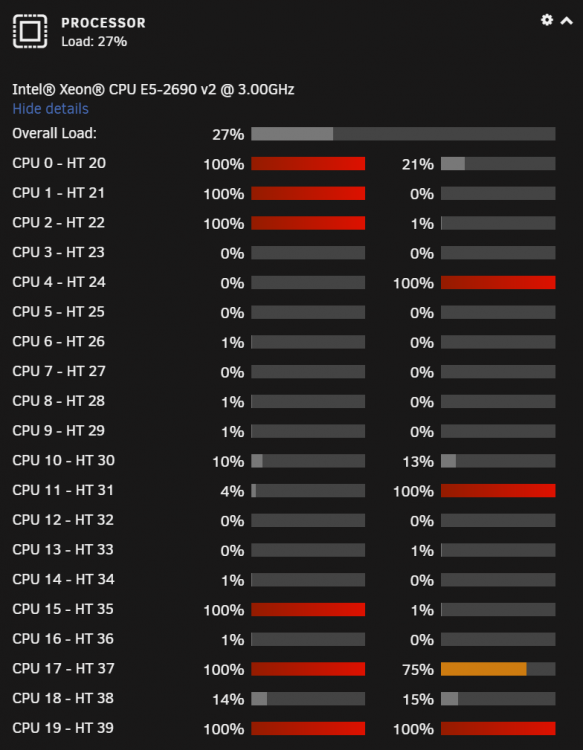
I'd say this isn't any better..... Gets into the 20% range, downloaded a 40G file / unpack / etc... All on cache What else can I provide to help isolate the issue? This is killing my server. Crushing it just to copy one file... this is rediculous.
-
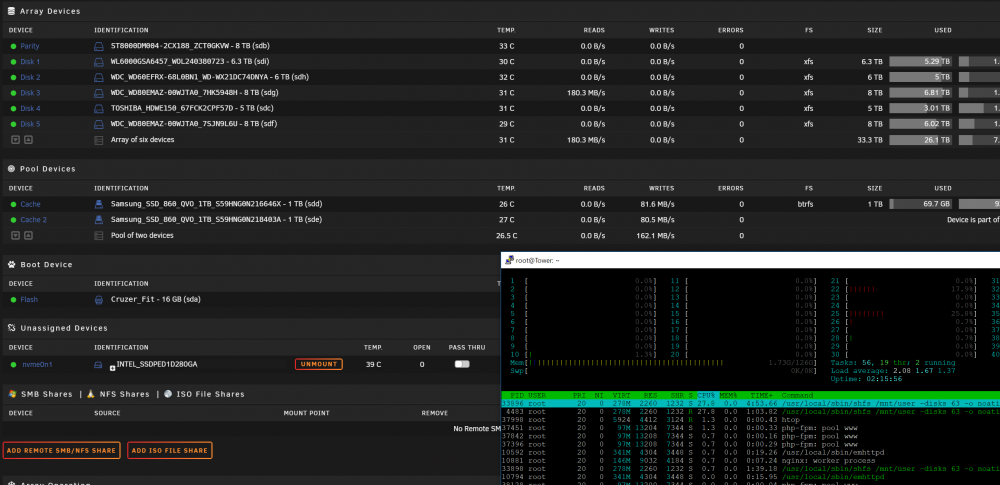
So far, docker disabled while using the mover to get files back onto the cache.... Looking like it's the same sorta CPU usage only it's not a sticking to the same thread pairing hung at 100% .... will test when everything is back the way it should be
-
Ah-ha! Didn't see that in the "release notes" window within the GUI upgrade tool, works now. Will do some testing and report back!
-
Done, but when I click on the cache drive it still says: Partition format: MBR: 4KiB-aligned
-
So 6.9.0b25 is out it seems.... Does that look like a good one to try for fixing this issue? And will it realign after upgrade, or will I need to reformat the cache?
-
Should I follow the above directions where I went from BTRFS to XFS (no pool) ?
-
I see it mainly when writing to the cache pool, I think because that's the only thing that is fast enough to exhibit the issue. I could run the mover and see what happens though, since I'm usually asleep when it runs. I'm happy to run any tests deemed informative and post results here. Someone above had suggested the output from iotop but I didn't see how to get that to work.
-
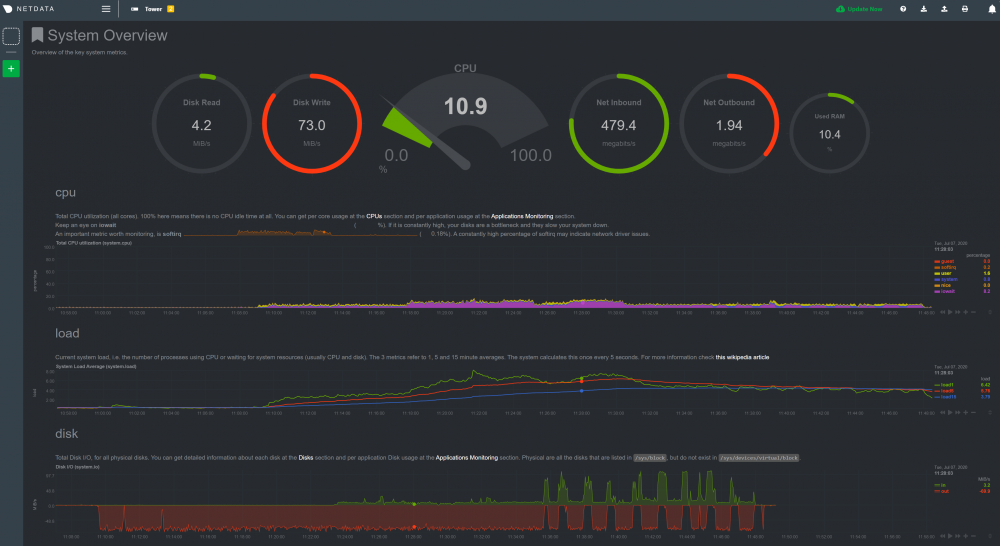
I don't want to keep necro-posting here... let me know if I need to start a different thread or what.... But this is still an issue. Here for example is 2 different files coming down through SAB onto a single XFS cache drive.... This never used to happen, and now even after moving away from a pool it's still beating up the system. It's livable, as in other services don't fall off completely, but it's still way more impact than prior. This isn't working for me. I mean at this point, my server basically does only Plex and download media files because it can't handle anything else. And this is a decently stout machine (dual Xeon E5 2690v2 with 128G RAM). Help please.
-
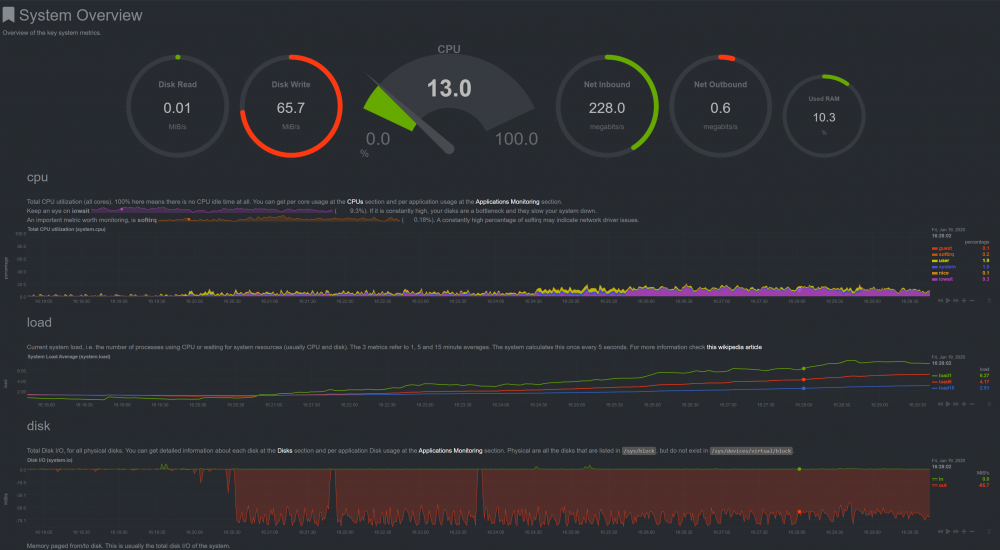
This seems to be an ongoing problem, even with XFS and no pool. What sort of data can I provide to help diagnose what's going on here? Moving to no pool / XFS has made the system "survive" during these operations, which is better than totally offline during them... but still not an awesome thing. Help?
-
OK, finally have time to do this. From the shell on unraid I don't get iotop... I installed it via nerd tools But get this :~# iotop libffi.so.7: cannot open shared object file: No such file or directory To run an uninstalled copy of iotop, launch iotop.py in the top directory
-
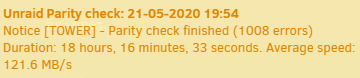
I'll do a test and post the results tonight, I was waiting for the parity check to finish. It did come up with errors, which is a first time for that for me
-
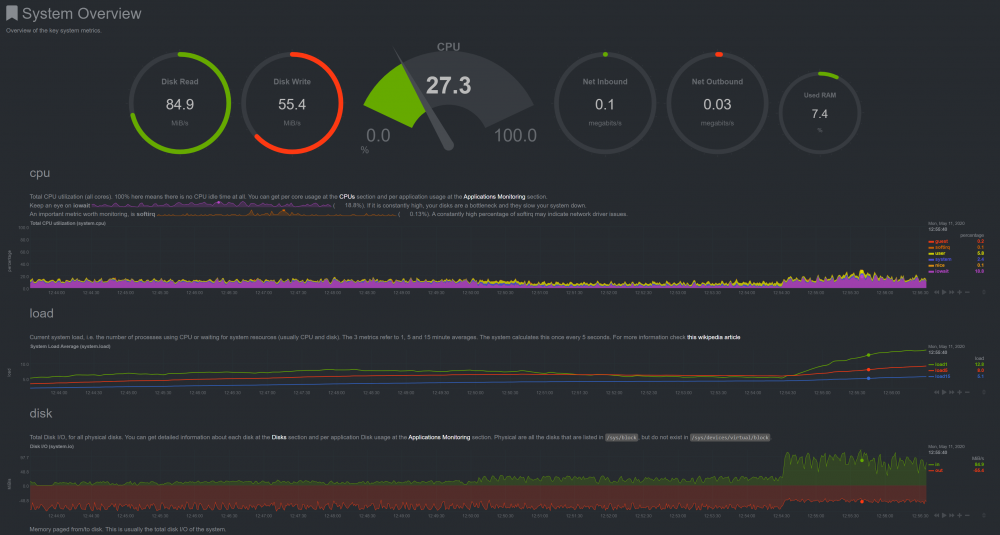
I mean, it's not killing other services like it once was... but the IOWAIT is still very very high Anyone from LT able to help with this?
-
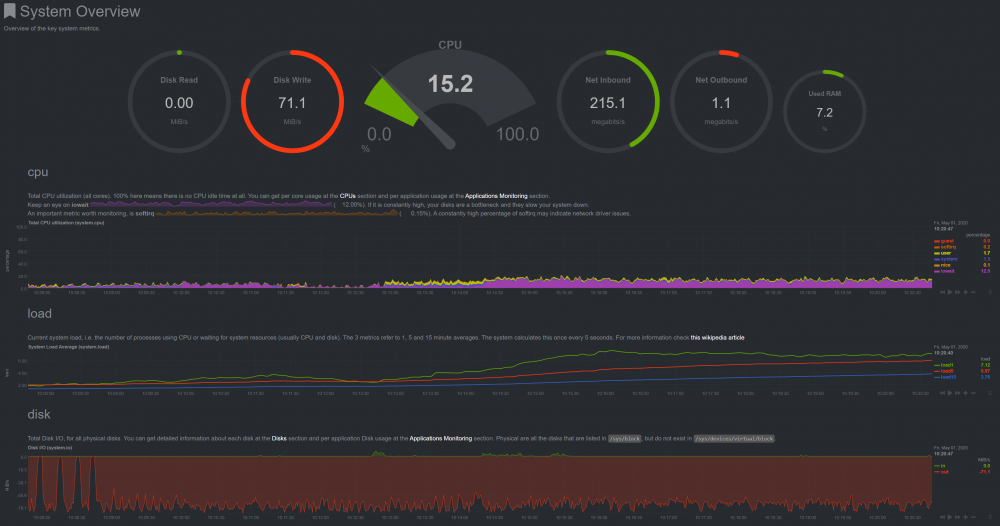
And... so after sustained load we see the issue crop up again, not as bad as before, but still pretty terrible performance. Help?
-
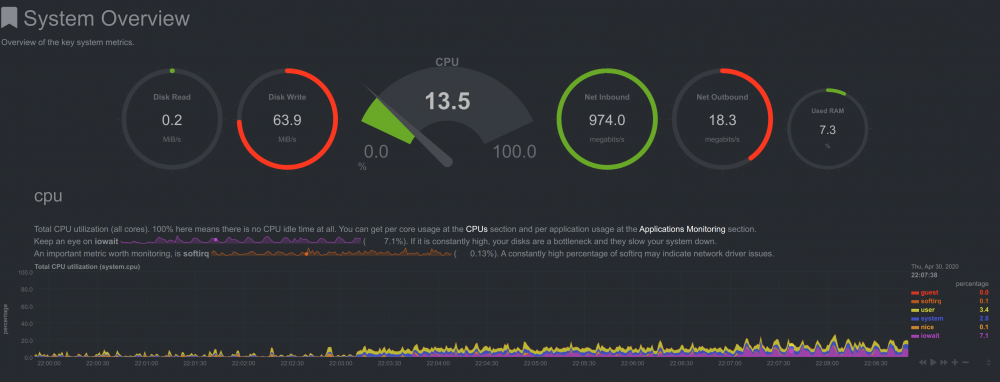
Further experimentation .... Feeding it 1Gbps shows stress still (again though I'm not sure what's normal for a rig like this)
-
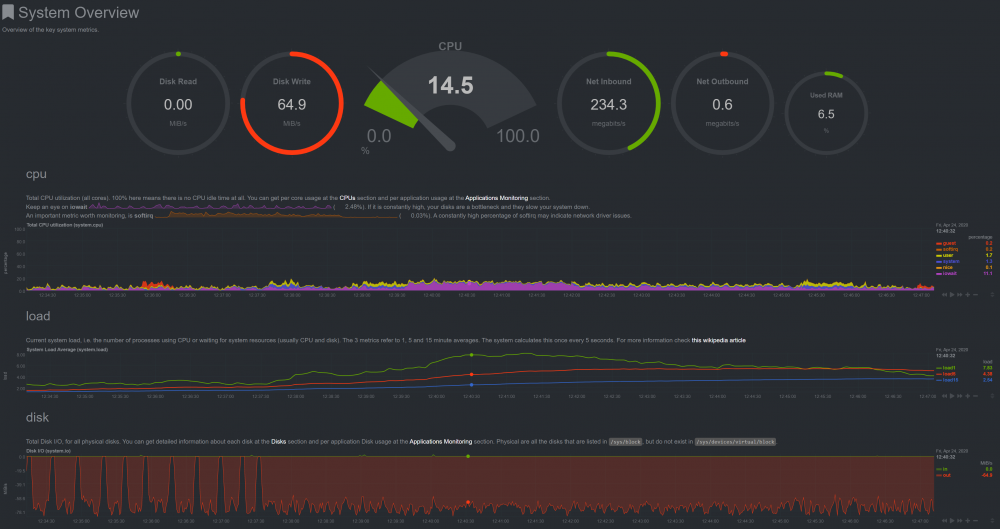
I did beat up on it a bit with about 100G... results show the issue as MUCH less significant... still a good amount of IO Wait, but I'm not sure what's normal.
-
Guys.... Settle down. Let's not pollute the thread with arguments about which is the best file system, a discussion that could only take place somewhere like here of course🤣 Back to my problem... I see what I've done here with the single drive on XFS as a work around. How can I get back to a cache pool with the same performance?
-
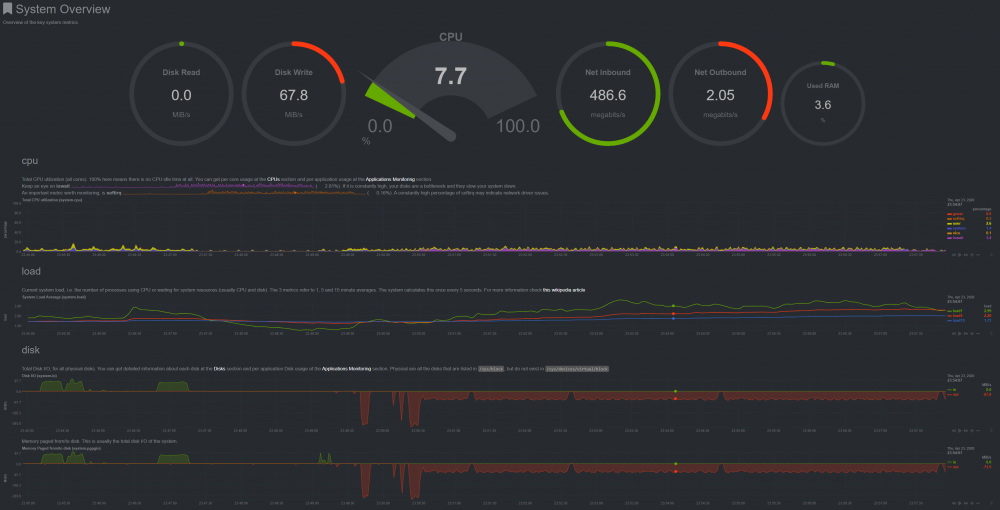
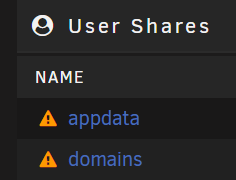
Results are in.... DEFINITELY an issue with BTRFS (and something?) (This is a 26G file) Now... who can help me get rid of these horrid looking triangles? ( i know, it's because there's no pool now)
-
OK, that was weird... I had to start the array, then stop it... After it allowed me to set the filesystem to XFS and change the slots to 1.
-
After reboot, the cache slots is greyed out and set to 2 still?? It also only gives me options for BTRFS or BTRFS-encrypted for filesystem
-
Thanks for the reply, two questions: In your "3)" are you addressing what I have in my "2)" ? as in , change it to "yes" under cache usage? Where will 6.2 take place, in the settings? ALSO... just noticed something and I'm not sure if this matters, but my default file system is set to "XFS" and all my array drives are set to that. Would that possibly be a factor here?
-
Since this seems like something that's not going to be fixed for a while, could someone help me understand the correct way to split my cache pool and then make use of a single drive formatted to XFS? I'm assuming I'd 1) stop & disable docker and vm 2) change the system, appdata and domains shares to array 3) run mover 4) set array to not auto-start 5) reboot 6) unassign one of the pool drives and then format the remaining one to XFS 7) start the array 8 ) stop & disable docker and vm 9) change the system, appdata and domains shares to cache only 10) run mover ?
-
I verified it, I don't have /appdata/ or /system/ on any of the physical disks, only on the cache drive. I also put the folder Sab downloads to on a cache only share and my problem persists. For me, basically it's any time I'm doing file operations of size on the cache drives that I have this issue. I guess I could split the pool and have a single cache drive formated to XFS. My Optane card is XFS and it doesn't exhibit the issue. However, I'd kinda like to have it work the way it's supposed to instead. I have a pool so that everything is redundant.
-
How do I make sure the docker.img isn't on the array? In settings, it shows this path: /mnt/user/system/docker/docker.img And the system share is set to only. I browsed the disks and none show /system on them. I think what you've done here is basically what @trurl had me do on the first page of this thread.
-
Anybody from LT look at this yet?
-
Netdata Available in docker form via community applications:


