





CowboyRedBeard
Members
-
Joined
-
Last visited
Everything posted by CowboyRedBeard
-
So.... My docker has been working for a long while and now all of a sudden Krusader cannot move or create directories. I'm guessing it's a file permission issue. I did try this: And that didn't work. I'm on Unraid 6.7.0 and Krusader in the "help" menu shows version 2.7.2 This is the last thing in the docker log: 2020-02-09 10:42:45,741 DEBG 'start' stderr output: kdeinit5: Got EXEC_NEW '/usr/lib/qt/plugins/kf5/kio/file.so' from launcher. kdeinit5: preparing to launch '/usr/lib/qt/plugins/kf5/kio/file.so' Where should I look next? I noticed this when all of a sudden Sonarr couldn't see files that I had manually dumped into a series folder, even though Plex docker can.
-
OK, stupid question... How do I edit the file?? It doesn't seem like nano / vim work in the console. I tried viewing the files via Krusader but the Netdata folder in appdata is empty?
-
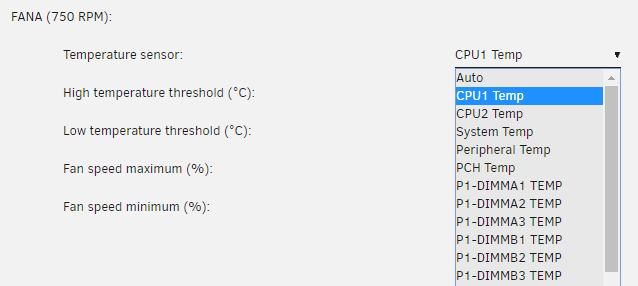
Hrmm... so just now messing with this again. I guess the issue I have is that FANA/B for CPUs based on CPU temp is based on the temp of just 1 CPU... So if I ended up having 1 CPU get really hot, and that wasn't the one being monitored... then that could be a real issue.... I guess I could do one zone for 1 CPU and the other zone for the other CPU... but then that would leave the drive & case fans to be done via my dedicated controller... Which is what I have today. So maybe I'm to let SM BMC control the CPU fans, my dedicated controller to case & drive fans (it does have a probe) ... and I just use the IPMI plugin for monitoring and alerting. Thoughts?
-
I've read this like 4 times now... Thanks, that is VERY helpful. SO... if I read you correctly. I could: Use one zone (FANA/B) to run CPU fans - basing the controls and thresholds on the CPU temp sensors Also use another zone (FAN1234) - referencing the highest HD temp to control case fans ? That... sounds... AWESOME I'm just so nervous to mess this up and cause a meltdown. Part of my trepidation is I'm running e5-2690v2 procs which are 130w TDP ... I'm actually on round 2 of Noctua coolers (NH-D9DX i4 3U). I'm worried they won't keep pace under load. In my limited testing it appears I'm getting some level of thermal throttling under load presently with fans at 77%. However, they don't seem to ramp to 100% unless I set it that way in the BMC. This is all with the standard fan control in BMC, not through the plugin. It's not likely that I'll hit such high sustained loads regularly, but I also want to build it so that I don't have to ever worry about it. Do you think it's best to manage fans via the BMC or the IPMI plugin?
-
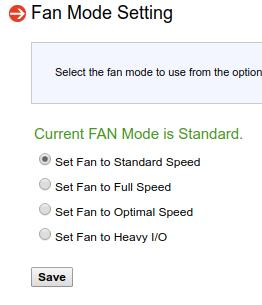
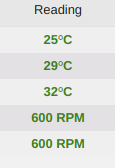
OK, thanks for that info on the thresholds. But my question is more surrounding if it's referencing the hard drive temp instead of the CPU... minimum threshold isn't going to help me. I'm thinking the plugin might be the way I monitor it and issue alerts, but CPU fan control might need to be done via BMC / BIOS on the SM board. I've since switched it to "standard" via the SM IPMI: And it seems to hold the fans at a nice low speed and temps are stable (at idle) And when I'm loading it up (one processor doing a video conversion via handbrake) it kicks the fans up appropriately and holds acceptable temps. Although it seems I might be getting a bit of thermal throttling, but I need to do more testing on that. I guess at this point I'm most interested in knowing if I can manage the fans referencing the CPU temp instead of a HD temp which makes no sense to me... so I had assumed I'm doing something incorrectly. Which wouldn't be the first time.
-
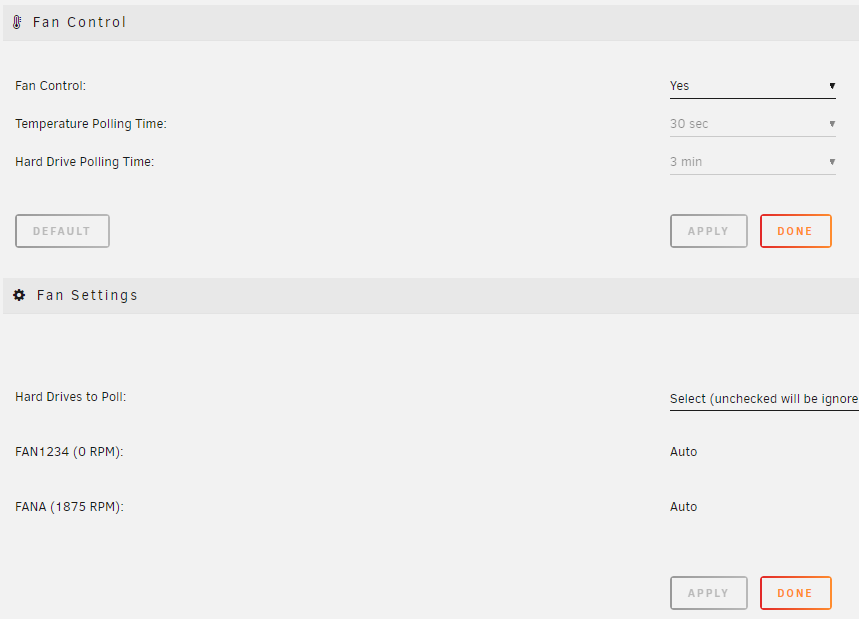
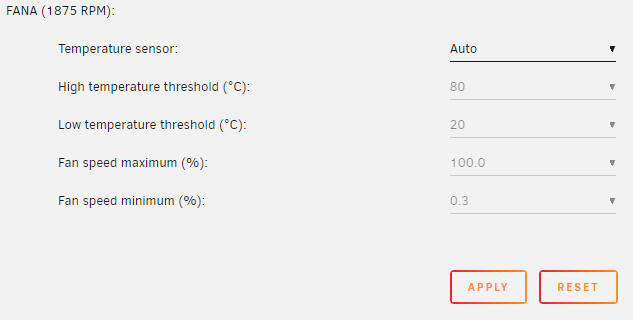
I searched the topic, but I didn't didn't see anything that answered my questions. I've got a SM X9DRi-LN4F+ I see this in the OP: ###2018.05.20 - format min and max percentages to one decimal place - add support for Supermicro X9 boards - set Supermicro boards to full speed mode (other modes seem to interfere with script) I'm trying to figure out a few things. The plugin references a hard drive to poll for temp, so does that mean the script would adjust fan speeds based on the temp of a hard drive instead of a CPU? My goal is to have this run the CPU fans, which I have on "FANA" and "FANB". Which do appear to be set at full speed. I've load tested them, and they keep temps down even at 100% extended load (30mins +)... however, 100% fan isn't exactly optimal. And when I turn the IPMI fan control off and use the SM "optimal speed" setting the fans jump up and down from 400+/- RPM to full 1800 RPM... even at idle. Which doesn't seem right. Also, if you notice below... FANA is denoted correctly, but FAN1234 shows up instead of FANB... which is seen by the system. I'm assuming I'd have to edit the config or something to get that to be referenced right? So on advanced view, do these high and low values come from a referenced HD? Can I make it reference CPU temps instead if that's true? I run the case fans on a standalone controller and really I'm looking for the best way to control the CPU fans here.
-
Does it just take a few days for the docker image to catch up for updates? When I go to the admin page it shows there is an update available, but when I "check for updates" in the docker tab of unraid it doesn't show an available update for the docker???? I do have: pihole/pihole:latest https://hub.docker.com/r/pihole/pihole/
-
It would be awesome to add this... or at least maybe someone could create a docker of CloudFlareD : https://visibilityspots.org/dockerized-cloudflared-pi-hole.html
-
What's the correct Repository: & Docker Hub URL: Looks like it got renamed from diginc/pi-hole to pihole/pihole So should it be: pihole/pihole:latest & https://hub.docker.com/r/pi-hole/pi-hole
-
I might have missed it somewhere, but is there a way to see what Handbrake is currently working on when you have it set for auto startup? I set this thing up ages ago, and don't remember the particulars but I have it configured to start converting anything in a "in" directory to mp4 for an iPad profile and put the final file into an "out" directory. Only I can't seem to figure out how to pop in and see what file it's working on at the moment.
-
Still not showing an update after hitting the "check for updates"... I changed the repository and it doesn't show update option... But when I login it's now showing on 4.0 Thanks!

-
I guess what I'm asking is that my docker still shows 3.x and when I do a "check for updates" under docker, there's not one listed for this. Should I change the repository or something?
-
So based on what I've read on the git the interface needs to be changed from br0 to eth0 ?? Will there be an update to the community app that allows me to push button upgrade? 😃


