





CowboyRedBeard
Members
-
Joined
-
Last visited
Everything posted by CowboyRedBeard
-
Is there a fix in that 12 pages? I don't want to go necroposting ... but this sucks it KILLS my server whenever I'm writing to or from
-
Yeah, all that is beyond me.... But hopeful you've found something that can be addressed by the team here. 🤞
-
Yeah... I mean, to me this seems like a significant issue. Also doesn't seem to be a configuration issue. ¯\_(ツ)_/¯ Anyone?

-
Bumping this back up... Can someone help me get a resolution?
-
I can see that angle... But SSD's are cheap these days also. I'm running VMs on it, sabnzbd and a few other operations. Also a few VMs. I guess I could migrate it to XFS to test and see if that fixes it... but honestly I'd prefer the BTRFS / cache issue fixed if that's what's going on here. What's the best way to do that? Copy everything off and then start in maintenance mode and then copy back? Anyone from Limetech looked into this situation at all since it seems I'm not the only one?
-
You can't have redundant cache (pool) with XFS... https://wiki.unraid.net/UnRAID_6/Storage_Management#Switching_the_cache_to_pool_mode That's a problem... I suppose this is something I could try, but don't see lack of a pool as a viable option going forward.
-
No it did not happen when copying to the Optane drive, however it is formatted to XFS. Maybe that is part of the issue? I wonder if there's an easy way for me to convert my cache pool to XFS and then try?
-
More files: Cache Disk 1 Cache Disk 2
-
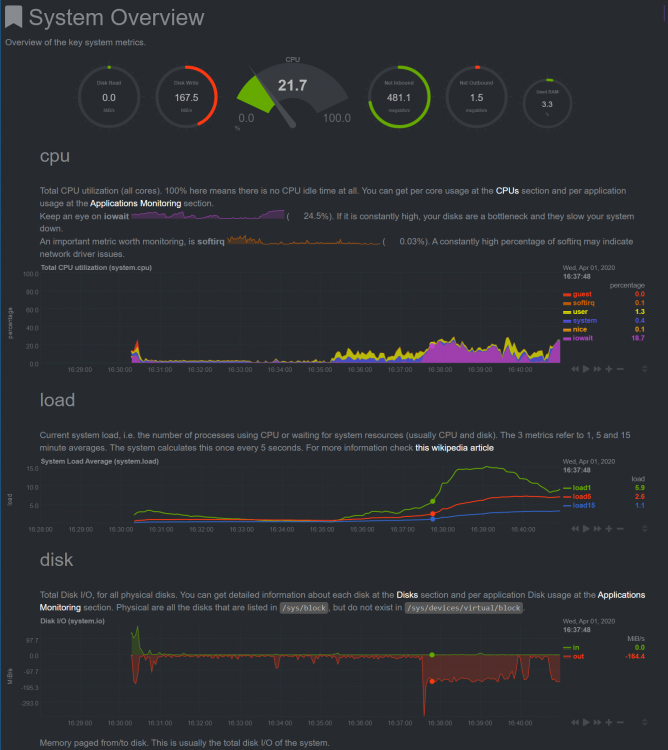
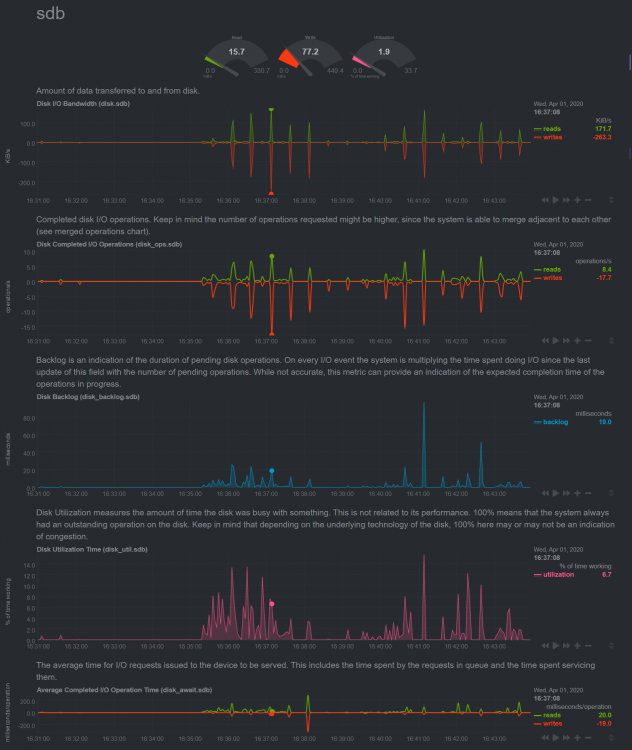
So this is my latest test, I shut the system down and installed a PCIE SATA controller card. Moved both cache drives over to it (from the MB SATA3) and here was an 8G file: More or less the same issue with IO wait, however the speed might be a little better... hard to say as this file was half the size of the previous tests
-
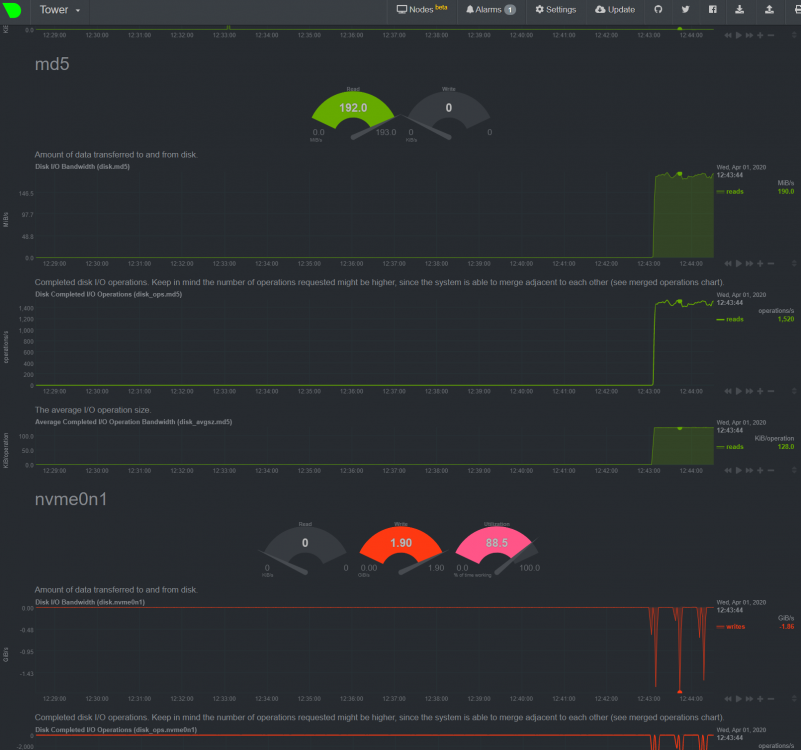
Like here is that same file coming off the same disk on the array to the Optane drive at 190MBs vs the 85MBs the cache pool was able to manage
-
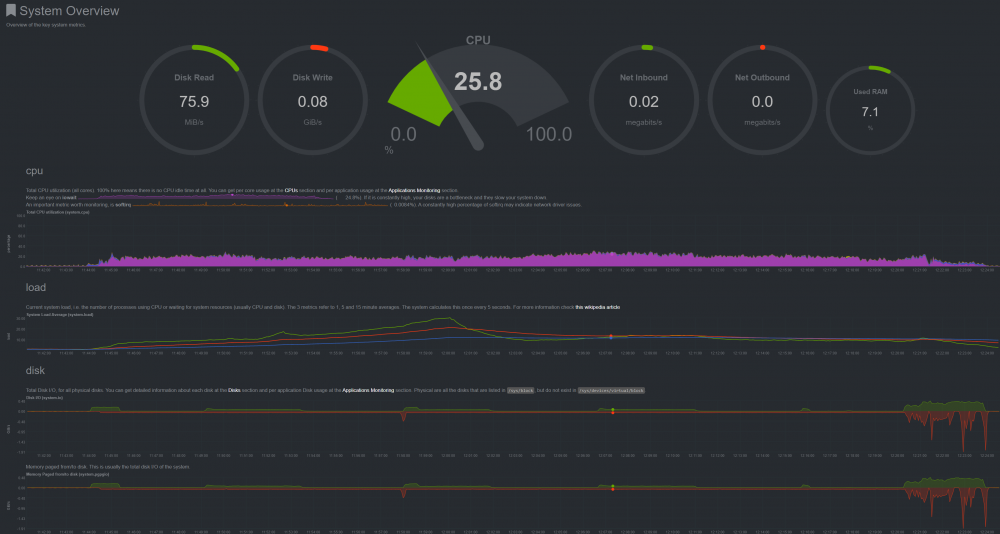
I mean, I'm not seeing the speeds as limited as others... although I'm unable to obtain the speeds I did in the past. The larger issue for me is that when I DO write to the cache as fast as it can... it crushes the server and other services basically stop. As seen in the first post.
-
And the IO during that cache write operation
-
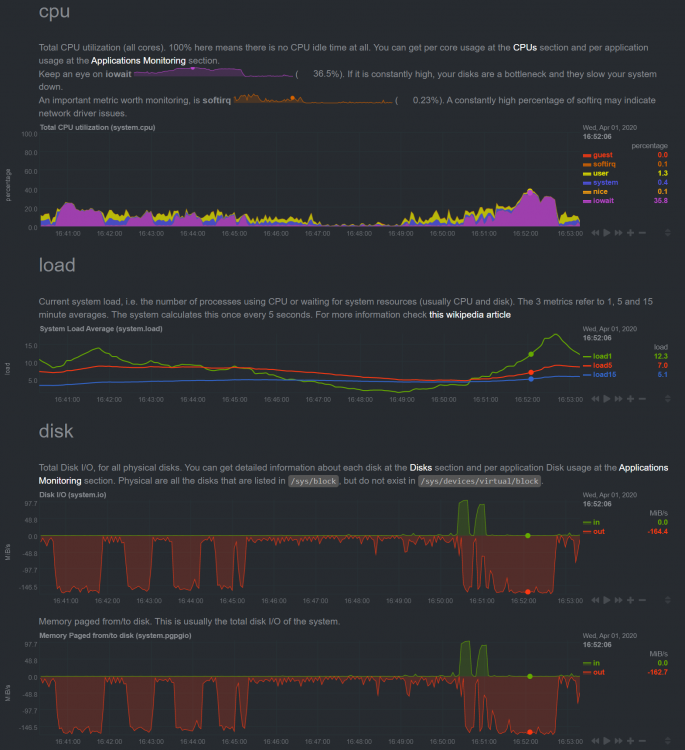
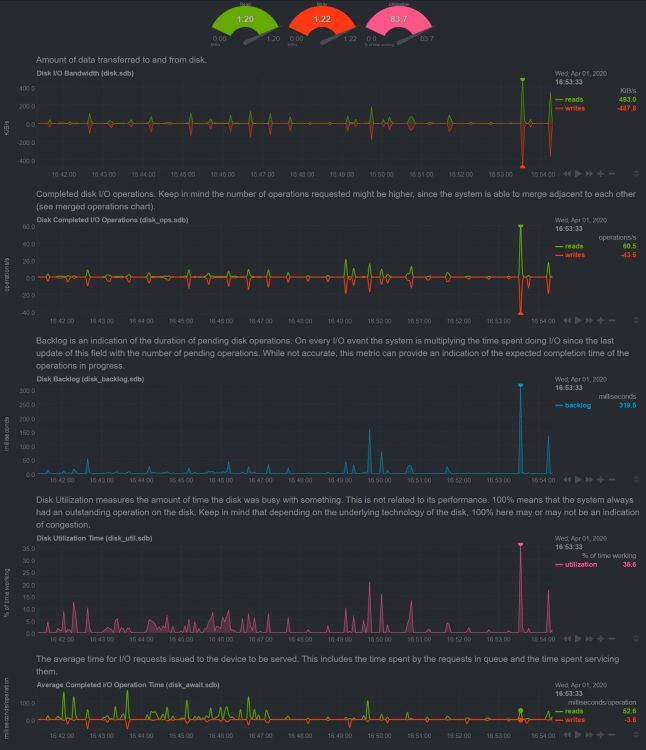
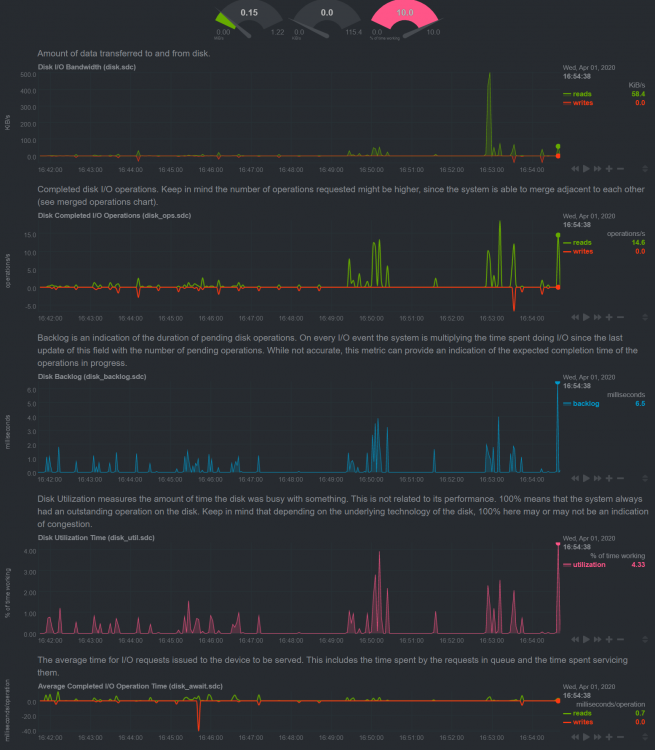
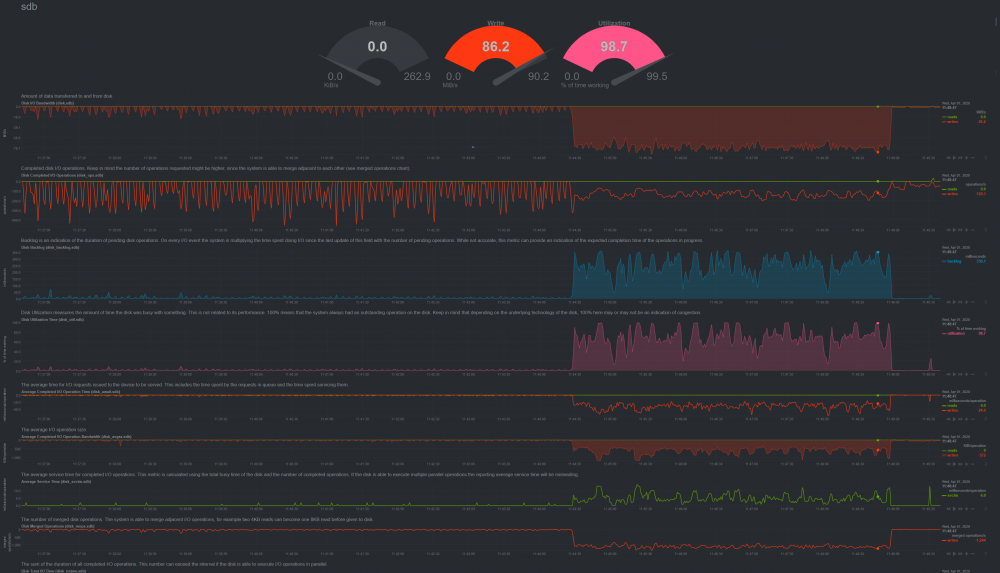
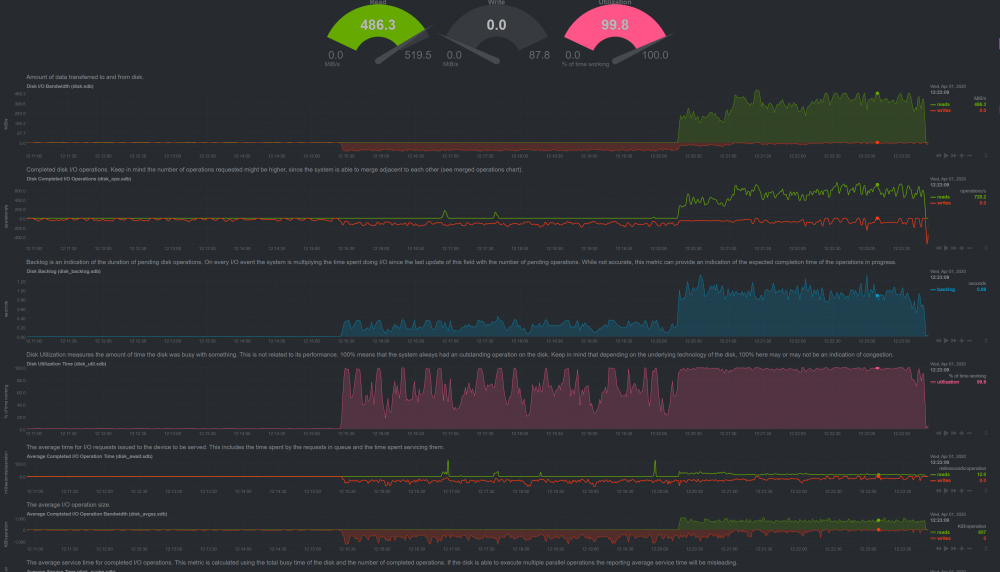
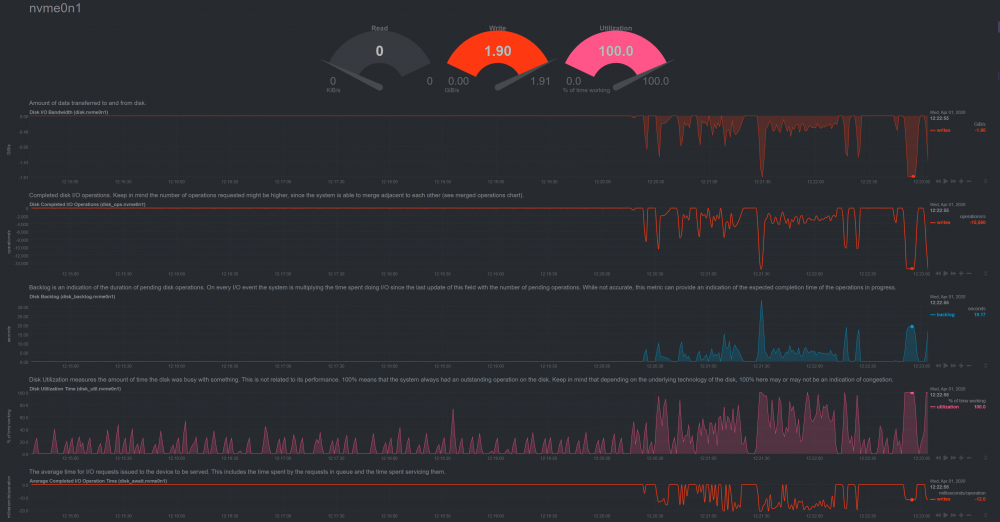
For a test, here's me copying a file (83G) from the array to the cache drive (via MC in shell): And where this drive drops off utilization, you can scroll down to the other cache drive and watch it pick up where this one left off. Now this is writting at only 85MBs (+/-), it's pulling from a spinning disk... which should be able to feed it more than that. But there's your backlog you asked about. And as a test, I have a PCIE Intel Optane drive in the box that I copied this file to FROM cache: And this is the Optane, which typically seems to be able to take as fast as you can give: Hopefully this adds some light to the issue?
-
I appreciate the help, but it isn't the drives. Check out the netdata graphs I posted at the start of this thread. As you can see from my first posts, I'm not getting anything near these speeds: https://ssd.userbenchmark.com/SpeedTest/667965/Samsung-SSD-860-QVO-1TB https://www.pcworld.com/article/3322947/samsung-860-qvo-ssd-review.html The issue was the same with the Crucial drives. So... I'm pretty sure it's not the drives themselves. I'm not on the same level as most of you guys with this stuff, but given the discussion thus far it seems clear to me that this is something unique to unRAID and cache.
-
And with the MX500's I'd get 500mbs transfers...
-
The Crucial were MX500.... and the part you might have missed is that this issue hasn't always happened. In fact, part of the reason I put the Samsung drives in (apart from running out of space regularly on the MX500) was because I wondered if they might had been part of the issue. So, MX500 drives didn't have the issue... then at some point it started. I'm pretty sure it started right when I went to 6.7 but mostly had these operations happening late at night.
-
Yeah, but I had Crucial drives in and had the same issue. So the brand of drive isn't what the problem is here.
-
Please post what you find, I use mine as a "one box to do it all" so this is killing me. And it's not normal operation to have this much IO wait, as it hadn't been the case in the past. I assume the following article is what we're looking at: https://linux-blog.anracom.com/2018/12/03/linux-ssd-partition-alignment-problems-with-external-usb-to-sata-controllers-i/ This is mine: root@Tower:~# lsblk -o NAME,ALIGNMENT,MIN-IO,OPT-IO,PHY-SEC,LOG-SEC /dev/sdc NAME ALIGNMENT MIN-IO OPT-IO PHY-SEC LOG-SEC sdc 0 512 0 512 512 └─sdc1 0 512 0 512 512 root@Tower:~# lsblk -o NAME,ALIGNMENT,MIN-IO,OPT-IO,PHY-SEC,LOG-SEC /dev/sdb NAME ALIGNMENT MIN-IO OPT-IO PHY-SEC LOG-SEC sdb 0 512 0 512 512 └─sdb1 0 512 0 512 512 root@Tower:~# This more than I'm comfortable with goofing around with on my own. Hoping to get some guidance here. Thanks
-
I use cache for downloads because sometimes I want to put media onto Plex and watch right after. MUCH less wait time. I've also found benefit when copying lots of files to a share of it using cache to make that take less time. Like you said, everyone's use case is different. But I'd like my cache to work like it used to for sure. It seems like ephigenie and others are seeing the same thing I am. Which for over a year I did not see. And, with two different sets of cache drives from different manufacturers it doesn't appear to be a hardware issue on the surface of it. I used to get write speeds to cache of 500M + What are some good next steps for troubleshooting the issue?
-
So reading through this some more, it does sound like what I'm experiencing... although I was experiencing it with the Crucial drives also. This stuff is out of my realm of understanding, should I try a different file system than btrfs?
-
I have only parsed through all that.... but the issue started before using the Samsung drives. I had Crucial drives before switching to the Samsung and the problem occurred then too. This box was running fine for over a year, it started I think after an upgrade. I've only noticed it recently as I had most of these sort of operations happening in the dead of night. Is this some sort of formatting error?
-
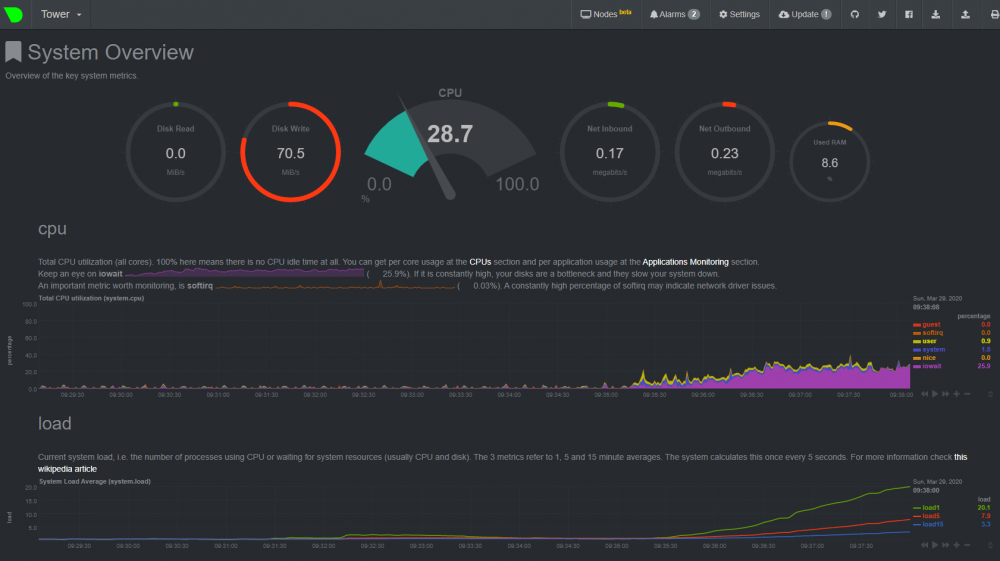
And this is copying from the array only sab test share to my media share, which is cache "yes" So it's definitely something to do with the cache drives, which are new... and the previous ones did the same. This is not likely to be hardware I'm guessing, so I'm not sure where to look next. Thoughts?
-
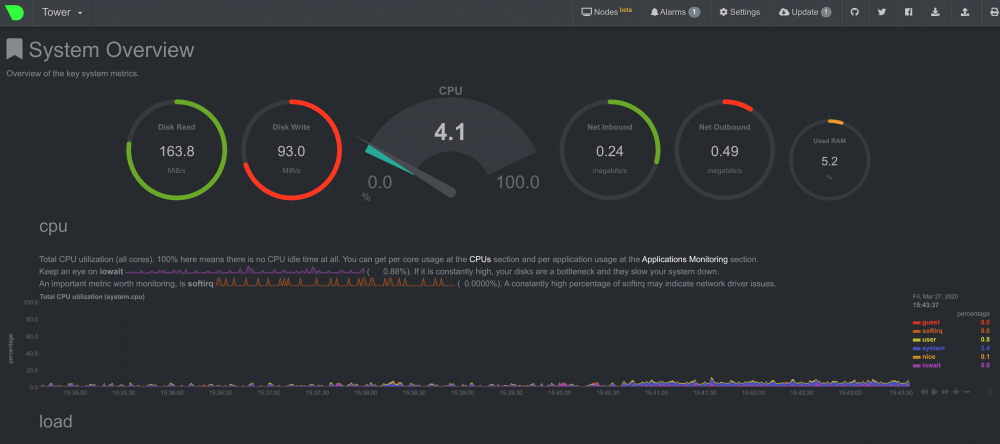
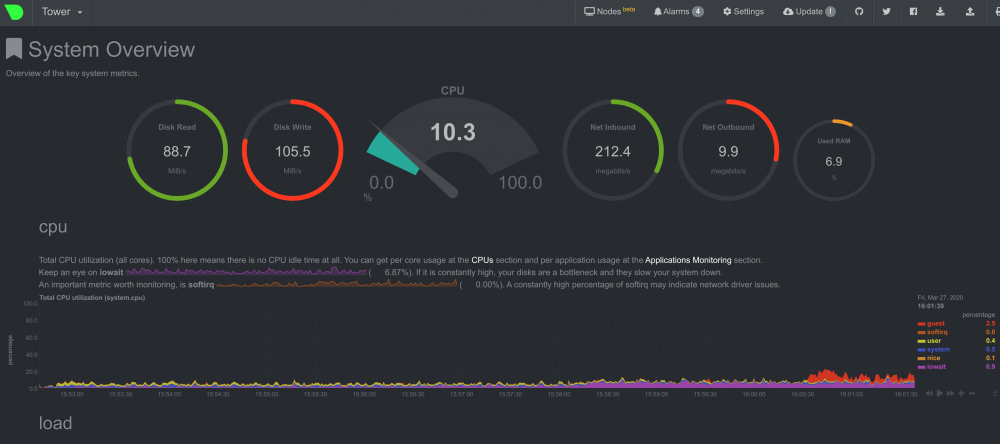
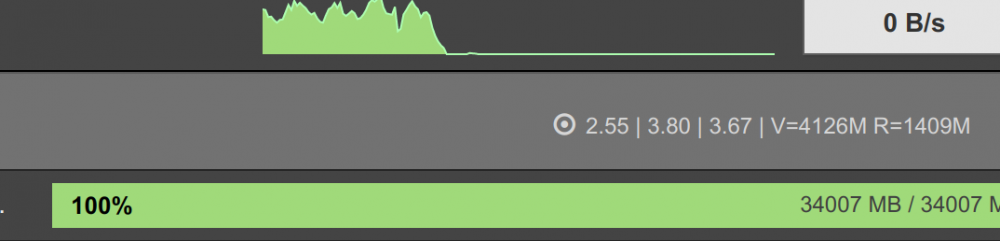
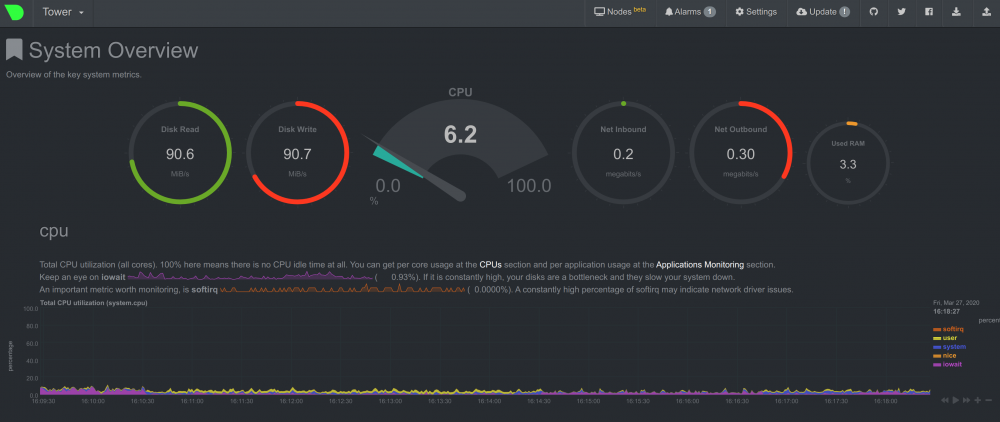
OK, so this is what I did. I created a share "sabtest" that was cache "no" and then copied the file structure of the cache only one "sab" to it.... This was the performance during copying from cache to the array: That was 20G of files, from unfinished downloads. This was performance during sab running to this array only share: This is during download, and I think notable here is how it's now downloading at about 40% of the previous speed. And while the overall impairment of the system's performance and response of other services wasn't as bad... It's still sluggish. Interestingly enough, after the download has "finished" sab seems to hang up for a few minutes, before unpacking And then this is what it looks like during unpacking:
-
I've gotten everything back to normal, but still have the high IO situation when downloading with sab ??
-
OK, I'll take a look. Most of those are non-essential anyway. Is there any further ideas on why I'm still getting the high IO? Latest diag attached. 6th-tower-diagnostics-20200326.zip


