genius384
Members
-
Joined
-
Last visited
-
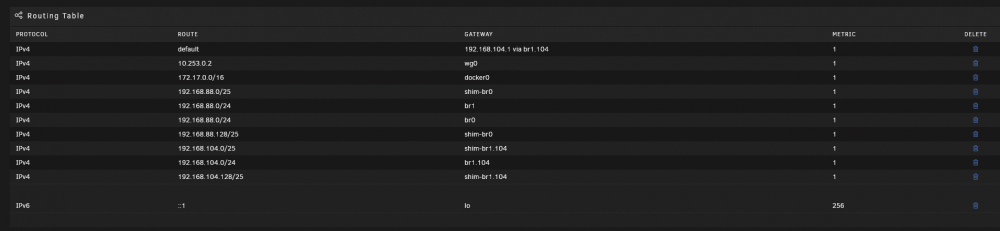
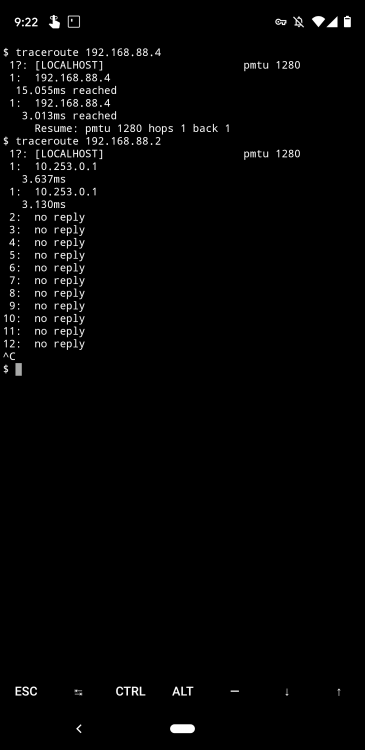
Hi folks, First off, great plugin. I was able to set this up with minimal headaches. However, I have one issue that I'm hoping to get some help with. My Unraid server has two NICs. Both in bridge mode: eth0: 192.168.88.0/24 eth1: 192.168.104.0/24 I run all of my containers off eth1. For Wireguard, everything works and I'm able to resolve and route to containers, my local router (192.168.88.1) and to containers on the bridge network. However, I'm unable to access any of my devices on the LAN (such as Pihole on 192.168.88.2) from my client. I have my client set up with "Remote Tunnel Access" since I want everything to route through my local net. I'm thinking there is an issue with having both NICs in bridge mode. When I run a traceroute on my client, it works for everything but the LAN devices, and hangs after hopping to 10.253.0.1. I've attached a screenshot of my route table in Unraid and the traceroute from my client device (Android) Edit: I figured this out. For Allowed IPs on the client side, you should include 0.0.0.0/0, ::0/0 (for IPV6) to make sure Android works and routes all traffic through the tunnel.