






ShaneH
Members
-
Joined
-
Last visited
-
oot@Tower:~# zpool status pool: zfs state: ONLINE status: Some supported and requested features are not enabled on the pool. The pool can still be used, but some features are unavailable. action: Enable all features using 'zpool upgrade'. Once this is done, the pool may no longer be accessible by software that does not support the features. See zpool-features(7) for details. scan: scrub repaired 0B in 02:26:22 with 0 errors on Mon Sep 28 19:34:39 2026 config: NAME STATE READ WRITE CKSUM zfs ONLINE 0 0 0 mirror-0 ONLINE 0 0 0 sdg1 ONLINE 0 0 0 sde1 ONLINE 0 0 0 errors: No known data errors Array is UP ZFS looks good SCRUB is complete is zero errors Thank you JorgeB
-
Note: I ran SpinRite (about a 24 hr test) on both 8tb drives before starting this process. No errors.
-
Hello. Gotta go to work. I will return in about 10 hrs. Diag posted. Thank you tower-diagnostics-20260928-0802.zip
-
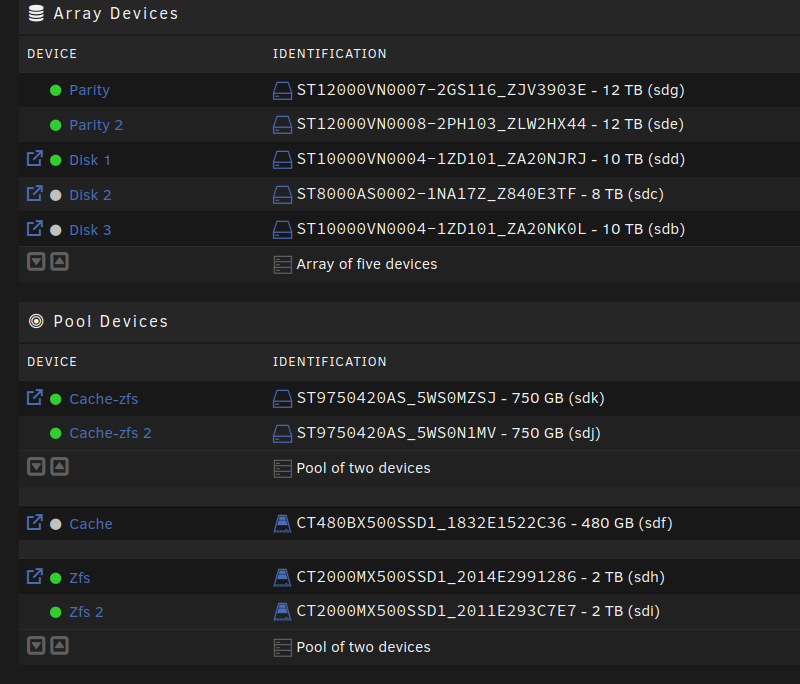
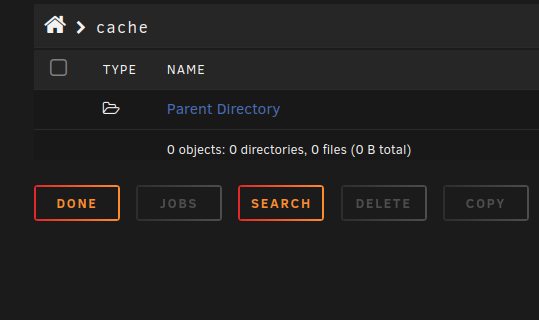
Hello I followed your steps. on main click on the first device for that pool and then "remove pool" back on main, create a new pool with the same name and 2 slots assign the pool devices (sdf and sde), leave the filesystem set to auto start the array to import the pool Looking good. stop array remove 2TB Add 8tb start array ZFS pool in degraded state. ------------------- root@Tower:~# zpool status pool: zfs state: DEGRADED status: One or more devices is currently being resilvered. The pool will continue to function, possibly in a degraded state. action: Wait for the resilver to complete. scan: resilver in progress since Sun Sep 27 18:15:17 2026 332G / 1.22T scanned at 1.26G/s, 0B / 1.22T issued 0B resilvered, 0.00% done, no estimated completion time config: NAME STATE READ WRITE CKSUM zfs DEGRADED 0 0 0 mirror-0 DEGRADED 0 0 0 replacing-0 DEGRADED 0 0 0 16993851880963452365 UNAVAIL 0 0 0 was /dev/sdf1 sdg1 ONLINE 0 0 0 sde1 ONLINE 0 0 0 errors: No known data errors ------------------- I was not expecting the second 8tb disk to show up like "16993851880963452365 UNAVAIL" Stop array. Took about 4 min to stop. Wait 2 min Start array. Took about 4 min to start. -------------------- root@Tower:~# zpool status pool: zfs state: DEGRADED status: One or more devices is currently being resilvered. The pool will continue to function, possibly in a degraded state. action: Wait for the resilver to complete. scan: resilver in progress since Sun Sep 27 18:15:17 2026 1.22T / 1.22T scanned, 185G / 1.22T issued at 153M/s 186G resilvered, 14.87% done, 01:58:04 to go config: NAME STATE READ WRITE CKSUM zfs DEGRADED 0 0 0 mirror-0 DEGRADED 0 0 0 replacing-0 DEGRADED 15 0 0 16993851880963452365 UNAVAIL 0 0 0 was /dev/sdf1 sdg1 ONLINE 0 0 16 (resilvering) sde1 ONLINE 0 0 0 errors: No known data errors -------------------- I was going to power down and re-seat the SATA cable but --> "zpool status" shows progress is happening. Unraid 'main' tab shows reads and writes on both 8th disks. (like a rebuild is happening.) I will wait and see what happens. Thank youHello root@Tower:~# zpool import pool: zfs id: 14105319935932811347 state: ONLINE status: Some supported features are not enabled on the pool. (Note that they may be intentionally disabled if the 'compatibility' property is set.) action: The pool can be imported using its name or numeric identifier, though some features will not be available without an explicit 'zpool upgrade'. config: zfs ONLINE mirror-0 ONLINE sdf1 ONLINE sde1 ONLINE root@Tower:~#Hi I am in trouble and need help. My array disks, I believe, are fine and I did not change them. I am trying to upgrade my two 2TB disk ZFS mirror pool to two 8tb disks. I replaced one 2tb disk with an 8tb (part s/n ZM25G) disk started the array and the resilver process completed yesterday. Today, I tried to replace the second 2tb disk with an 8tb disk. I got "wrong pool state" from unraid. I have changed pool membership a few times. I have upset Unraid because my 'start array' button is now greyed out. Goal --> keep data and have a two 8TB disk ZFS mirror pool. Diag file attached. How do I get there? Thank you tower-diagnostics-20260926-1132.zipWhat I did: Remove data and shares from both pools. (don't have to deal with changes to the 'shares' tab later) Stop array Delete 'cache' pool with 480 GB drive. Rename pool with 750 GB drives to 'cache' Thank youHello, I was experimenting with some new disks on my Unraid server and now I have a cfg I need some help to get rid of. The end goal is to use the two 750 GB disks as a ZFS cache mirror. Currently only test data on both 750 GB disks so they can be erased. The 480 GB disk is empty (screenshot) and is going into retirement. I tried unsuccessfully to delete the "Cache-zfs" pool. I need some guidance. How do I move to a config using a 750 GB ZFS mirror as my Cache? Thank you
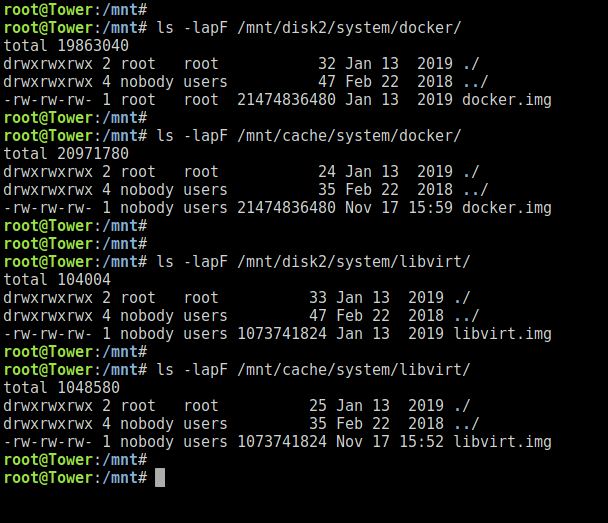
 Perfect. Thank you.I hope I did not feed you poor information. You said "named files1, but all files for that user share are not necessarily on the ZFS pool." files1 is an exclusive share on a ZFS pool. Therefore (I believe) all of the files are on the ZFS pool. Correct? You said "Similar for /mnt/user/files4, a user share named files4 but all files for that user share are not necessarily on the array." This share was created using the GUI 'shares' tab, so I think all files will be on the array. (excluding a possible short stop on a cache). Correct? Thank youHello, I want to use the Unraid CLI (click the icon top right and login as root) to backup / copy some files. Most of the source files are located on a ZFS pool and I would like to make a copy using rsync (now and then) to the Unraid array. ZFS pool source: /mnt/user/files1 Backup target: /mnt/user/Backup/files2 Unraid Array source: /mnt/user/files4 Backup target: /mnt/user/Backup/files5 Is there any reason this is a bad idea? I just want a simple method to create another copy of some files. Next stage is offsite. Thank youAdvice taken. Files have been deleted. Thank you for your help.Hello, I am trying to move my appdata and system shares to a different (new & zfs) cache pool. I have watched the SpaceInvader video here: https://www.youtube.com/watch?v=vXF8au5o9Tw&t=308s System share will not move completely. I have stopped all of my dockers and virtual machines. I have gone to Unraid settings and stopped the docker and VM service. This should release the files and make them available to be moved. System share will not move. docker and libvirt seem to be causing the issue. I did read JorgeB said "Mover won't move files that already exist on destination." There appears to be old copies of libvirt.img and docker.img on disk2. The time stamp of the IMG files on the cache drive is updated when I start the two services. The goal is to move system share to the array, then move system share to a different pool device. Can I delete libvirt.img and docker.img on disk2 without data loss? Thank you
 Hi I am running Plex in a VM on a Ubuntu server and my media is on my Unraid server. (I don't want a Plex docker) I am not getting 'stale file handle' errors sometimes. Is the recommended fix still this? "Settings => Global Share Settings => Tunable (support Hard Links)" to NO https://forums.unraid.net/bug-reports/stable-releases/nfs-is-about-useless-in-unraid-680-r822/?tab=comments#comment-8059 No other downsides to be concerned with? Thank you



