





okokjai
Members
-
Joined
-
Last visited
-
-
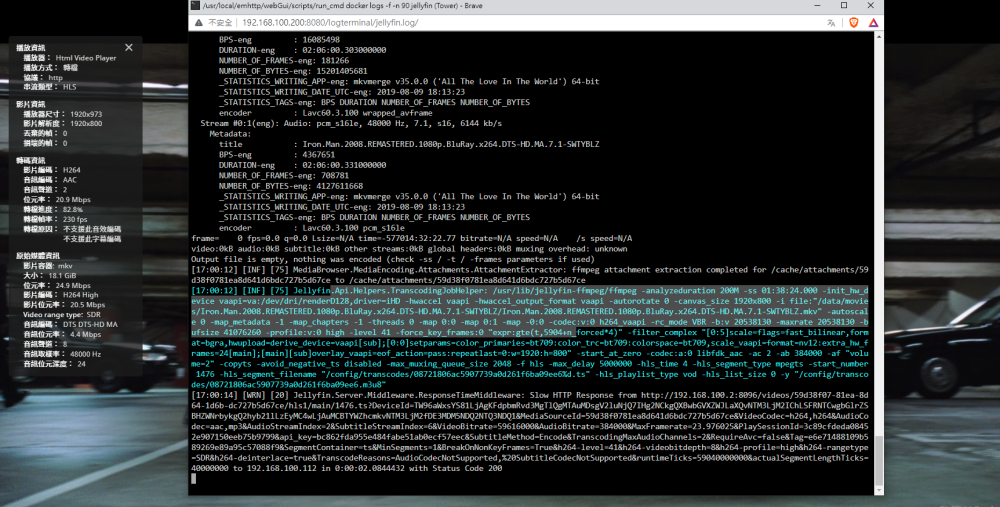
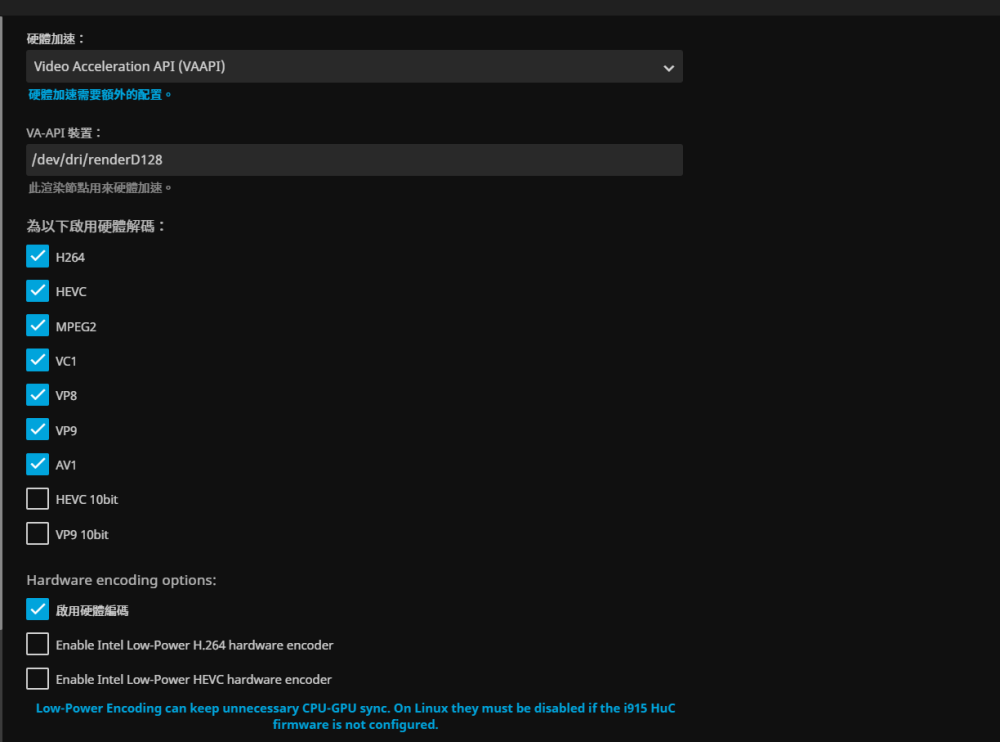
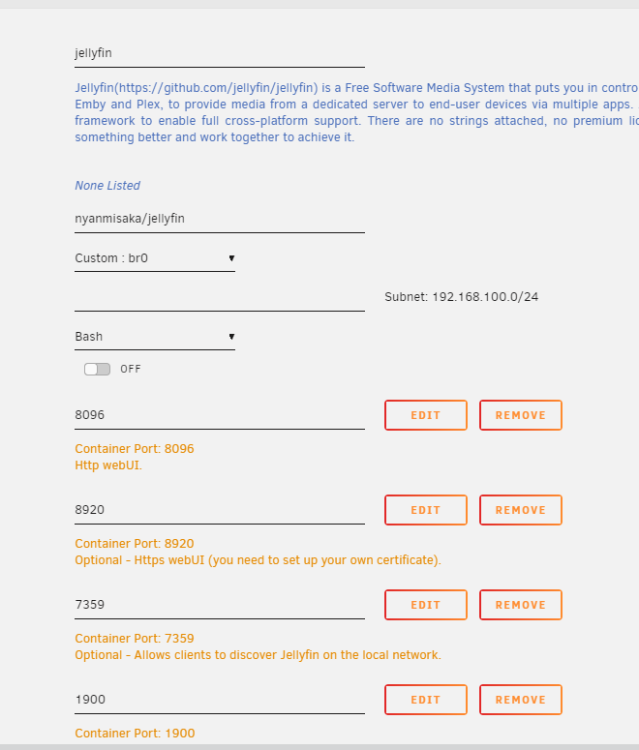
我用的是nyanmisaka/jellyfin 爬了好幾天文 研究 ..但是總是有(一些)片不能硬解 有一些4K 又可以解碼..... 搞不懂 是不是要用P400/1060TI 比較好?但理論上UHD630 解碼應該不差,,
-
可以請教一下 為什麼影片有(一些)不能直接硬解 有一些可以 .
-
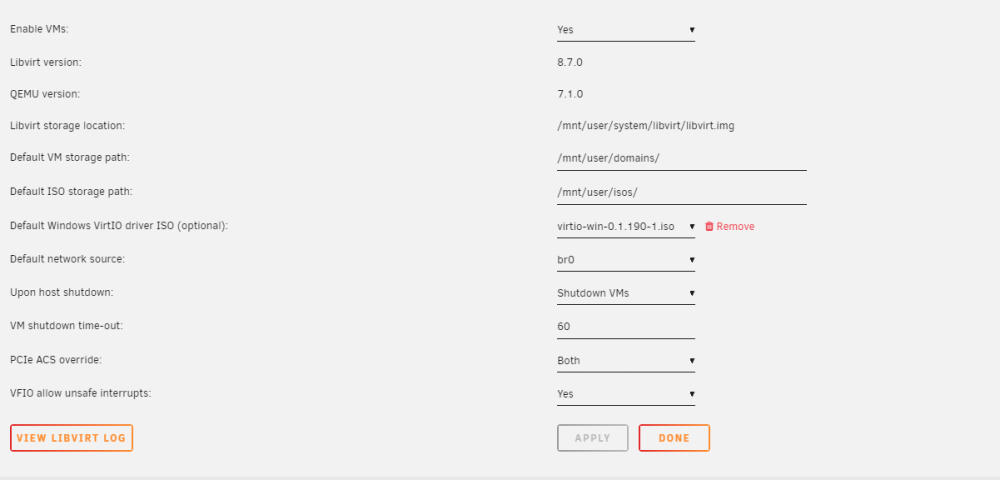
謝謝 但是GPU 面版不會動不知道是不是設置錯誤I used to have no problem with GPU passthrough on version 6.9.2 befo, but I had an accident and had to reinstall my USB. Now Still have encountering issues with 6.12.3 as follows. MB: MSI b550 TOMAHAWK CPU: AMD Ryzen 1700 GPU: AMD RX460XT HHD: 10TB WD Red x5 SSD: Samsung 980 x2 UnRaid: 6.12.3 VM: Windows 10 On Motherboard: Enable IMOUU -----YES On Unraid: Tools > System Devices > Select GPU and GPU-Audio > Bind Selected VFIO on Boot-----STILL NO WORKING On Unraid: Main > Flash > Change Syslinux configuration -----STILL NO WORKING Install unraid plugin AMD Vendor Reset ----- WORKING (ONLY 1CPU AFTER REBOOT STILL ISSUES) Reboot Unraid -----STILL NO WORKING Create VM with the following:Machine: Q35-7.1 (latest number)Bios: OVMF TPMHyper-V: Yes -----STILL NO WORKING Use VNC graphics -----YES Install Windows and updates -----STILL NO WORKING Shutdown VM -----YES ? Add (not replace) GPU to VMSome people said to add gpu bios and some didn’t -----STILL NO WORKING syslog.txt tower-diagnostics-20230915-0655.zip謝謝你 是不是WAN (eth5) 不要直通 , br0就會上網?Still no luck…..befo 6.9.2 is work but some accident and had to reinstall my USB .and I try back 6.9.2 still have this problemistoreos 的wan(eth5)是直通的,lan口使用的br0(eth0)和unraid管理口使用同一个br0 ,但是上不了網 UNRAID可以連接,但不能UPDATE和download apps 問題1. 如果直通是不是不可以用 br0(eth0)做WAN ? 問題2.如果用其他直通wan(eth5) ,br0(eth0)是不是不能上網? 千萬感謝 , 痛苦了二星期 ...............................................................................................................................................text error warn system array login 2023-06-11 00:02:11.314+0000: starting up libvirt version: 8.7.0, qemu version: 7.1.0, kernel: 5.19.17-Unraid, hostname: tank6115 LC_ALL=C \ PATH=/bin:/sbin:/usr/bin:/usr/sbin \ HOME='/var/lib/libvirt/qemu/domain-5-Windows 10' \ XDG_DATA_HOME='/var/lib/libvirt/qemu/domain-5-Windows 10/.local/share' \ XDG_CACHE_HOME='/var/lib/libvirt/qemu/domain-5-Windows 10/.cache' \ XDG_CONFIG_HOME='/var/lib/libvirt/qemu/domain-5-Windows 10/.config' \ /usr/local/sbin/qemu \ -name 'guest=Windows 10,debug-threads=on' \ -S \ -object '{"qom-type":"secret","id":"masterKey0","format":"raw","file":"/var/lib/libvirt/qemu/domain-5-Windows 10/master-key.aes"}' \ -machine pc-q35-7.1,usb=off,dump-guest-core=off,mem-merge=off,memory-backend=pc.ram \ -accel kvm \ -cpu host,migratable=on,topoext=on,hv-time=on,hv-relaxed=on,hv-vapic=on,hv-spinlocks=0x1fff,hv-vendor-id=none,host-cache-info=on,l3-cache=off \ -m 2048 \ -object '{"qom-type":"memory-backend-ram","id":"pc.ram","size":2147483648}' \ -overcommit mem-lock=off \ -smp 1,sockets=1,dies=1,cores=1,threads=1 \ -uuid 1a21d5cb-6619-741c-b661-8614ddf663a0 \ -display none \ -no-user-config \ -nodefaults \ -chardev socket,id=charmonitor,fd=36,server=on,wait=off \ -mon chardev=charmonitor,id=monitor,mode=control \ -rtc base=localtime \ -no-hpet \ -no-shutdown \ -boot strict=on \ -device '{"driver":"pcie-root-port","port":8,"chassis":1,"id":"pci.1","bus":"pcie.0","multifunction":true,"addr":"0x1"}' \ -device '{"driver":"pcie-root-port","port":9,"chassis":2,"id":"pci.2","bus":"pcie.0","addr":"0x1.0x1"}' \ -device '{"driver":"pcie-root-port","port":10,"chassis":3,"id":"pci.3","bus":"pcie.0","addr":"0x1.0x2"}' \ -device '{"driver":"pcie-root-port","port":19,"chassis":4,"id":"pci.4","bus":"pcie.0","addr":"0x2.0x3"}' \ -device '{"driver":"pcie-root-port","port":20,"chassis":5,"id":"pci.5","bus":"pcie.0","addr":"0x2.0x4"}' \ -device '{"driver":"ich9-usb-ehci1","id":"usb","bus":"pcie.0","addr":"0x7.0x7"}' \ -device '{"driver":"ich9-usb-uhci1","masterbus":"usb.0","firstport":0,"bus":"pcie.0","multifunction":true,"addr":"0x7"}' \ -device '{"driver":"ich9-usb-uhci2","masterbus":"usb.0","firstport":2,"bus":"pcie.0","addr":"0x7.0x1"}' \ -device '{"driver":"ich9-usb-uhci3","masterbus":"usb.0","firstport":4,"bus":"pcie.0","addr":"0x7.0x2"}' \ -device '{"driver":"virtio-serial-pci","id":"virtio-serial0","bus":"pci.2","addr":"0x0"}' \ -blockdev '{"driver":"file","filename":"/mnt/user/domains/Windows 10/vdisk1.img","node-name":"libvirt-3-storage","cache":{"direct":false,"no-flush":false},"auto-read-only":true,"discard":"unmap"}' \ -blockdev '{"node-name":"libvirt-3-format","read-only":false,"cache":{"direct":false,"no-flush":false},"driver":"raw","file":"libvirt-3-storage"}' \ -device '{"driver":"virtio-blk-pci","bus":"pci.3","addr":"0x0","drive":"libvirt-3-format","id":"virtio-disk2","bootindex":1,"write-cache":"on"}' \ -blockdev '{"driver":"file","filename":"/mnt/user/isos/Win10_1709_Chinese(Traditional)_x64.iso","node-name":"libvirt-2-storage","auto-read-only":true,"discard":"unmap"}' \ -blockdev '{"node-name":"libvirt-2-format","read-only":true,"driver":"raw","file":"libvirt-2-storage"}' \ -device '{"driver":"ide-cd","bus":"ide.0","drive":"libvirt-2-format","id":"sata0-0-0","bootindex":2}' \ -blockdev '{"driver":"file","filename":"/mnt/user/isos/virtio-win-0.1.229-1.iso","node-name":"libvirt-1-storage","auto-read-only":true,"discard":"unmap"}' \ -blockdev '{"node-name":"libvirt-1-format","read-only":true,"driver":"raw","file":"libvirt-1-storage"}' \ -device '{"driver":"ide-cd","bus":"ide.1","drive":"libvirt-1-format","id":"sata0-0-1"}' \ -netdev tap,fd=37,id=hostnet0 \ -device '{"driver":"virtio-net","netdev":"hostnet0","id":"net0","mac":"52:54:00:12:24:5c","bus":"pci.1","addr":"0x0"}' \ -chardev pty,id=charserial0 \ -device '{"driver":"isa-serial","chardev":"charserial0","id":"serial0","index":0}' \ -chardev socket,id=charchannel0,fd=35,server=on,wait=off \ -device '{"driver":"virtserialport","bus":"virtio-serial0.0","nr":1,"chardev":"charchannel0","id":"channel0","name":"org.qemu.guest_agent.0"}' \ -device '{"driver":"usb-tablet","id":"input0","bus":"usb.0","port":"1"}' \ -audiodev '{"id":"audio1","driver":"none"}' \ -device '{"driver":"vfio-pci","host":"0000:2b:00.0","id":"hostdev0","bus":"pci.4","addr":"0x0","romfile":"/mnt/disk1/isos/rx460xt.rom"}' \ -device '{"driver":"vfio-pci","host":"0000:2b:00.1","id":"hostdev1","bus":"pci.5","addr":"0x0"}' \ -sandbox on,obsolete=deny,elevateprivileges=deny,spawn=deny,resourcecontrol=deny \ -msg timestamp=on char device redirected to /dev/pts/0 (label charserial0)Thanks you reply , still no luck ......want give up .................. <?xml version='1.0' encoding='UTF-8'?> <domain type='kvm'> <name>Windows 10</name> <uuid>1a21d5cb-6619-741c-b661-8614ddf663a0</uuid> <metadata> <vmtemplate xmlns="unraid" name="Windows 10" icon="windows.png" os="windows10"/> </metadata> <memory unit='KiB'>2097152</memory> <currentMemory unit='KiB'>2097152</currentMemory> <memoryBacking> <nosharepages/> </memoryBacking> <vcpu placement='static'>1</vcpu> <cputune> <vcpupin vcpu='0' cpuset='0'/> </cputune> <os> <type arch='x86_64' machine='pc-q35-7.1'>hvm</type> </os> <features> <acpi/> <apic/> <hyperv mode='custom'> <relaxed state='on'/> <vapic state='on'/> <spinlocks state='on' retries='8191'/> <vendor_id state='on' value='none'/> </hyperv> </features> <cpu mode='host-passthrough' check='none' migratable='on'> <topology sockets='1' dies='1' cores='1' threads='1'/> <cache mode='passthrough'/> <feature policy='require' name='topoext'/> </cpu> <clock offset='localtime'> <timer name='hypervclock' present='yes'/> <timer name='hpet' present='no'/> </clock> <on_poweroff>destroy</on_poweroff> <on_reboot>restart</on_reboot> <on_crash>restart</on_crash> <devices> <emulator>/usr/local/sbin/qemu</emulator> <disk type='file' device='disk'> <driver name='qemu' type='raw' cache='writeback'/> <source file='/mnt/user/domains/Windows 10/vdisk1.img'/> <target dev='hdc' bus='virtio'/> <boot order='1'/> <address type='pci' domain='0x0000' bus='0x03' slot='0x00' function='0x0'/> </disk> <disk type='file' device='cdrom'> <driver name='qemu' type='raw'/> <source file='/mnt/user/isos/Win10_1709_Chinese(Traditional)_x64.iso'/> <target dev='hda' bus='sata'/> <readonly/> <boot order='2'/> <address type='drive' controller='0' bus='0' target='0' unit='0'/> </disk> <disk type='file' device='cdrom'> <driver name='qemu' type='raw'/> <source file='/mnt/user/isos/virtio-win-0.1.229-1.iso'/> <target dev='hdb' bus='sata'/> <readonly/> <address type='drive' controller='0' bus='0' target='0' unit='1'/> </disk> <controller type='usb' index='0' model='ich9-ehci1'> <address type='pci' domain='0x0000' bus='0x00' slot='0x07' function='0x7'/> </controller> <controller type='usb' index='0' model='ich9-uhci1'> <master startport='0'/> <address type='pci' domain='0x0000' bus='0x00' slot='0x07' function='0x0' multifunction='on'/> </controller> <controller type='usb' index='0' model='ich9-uhci2'> <master startport='2'/> <address type='pci' domain='0x0000' bus='0x00' slot='0x07' function='0x1'/> </controller> <controller type='usb' index='0' model='ich9-uhci3'> <master startport='4'/> <address type='pci' domain='0x0000' bus='0x00' slot='0x07' function='0x2'/> </controller> <controller type='pci' index='0' model='pcie-root'/> <controller type='pci' index='1' model='pcie-root-port'> <model name='pcie-root-port'/> <target chassis='1' port='0x8'/> <address type='pci' domain='0x0000' bus='0x00' slot='0x01' function='0x0' multifunction='on'/> </controller> <controller type='pci' index='2' model='pcie-root-port'> <model name='pcie-root-port'/> <target chassis='2' port='0x9'/> <address type='pci' domain='0x0000' bus='0x00' slot='0x01' function='0x1'/> </controller> <controller type='pci' index='3' model='pcie-root-port'> <model name='pcie-root-port'/> <target chassis='3' port='0xa'/> <address type='pci' domain='0x0000' bus='0x00' slot='0x01' function='0x2'/> </controller> <controller type='pci' index='4' model='pcie-root-port'> <model name='pcie-root-port'/> <target chassis='4' port='0x13'/> <address type='pci' domain='0x0000' bus='0x00' slot='0x02' function='0x3'/> </controller> <controller type='pci' index='5' model='pcie-root-port'> <model name='pcie-root-port'/> <target chassis='5' port='0x14'/> <address type='pci' domain='0x0000' bus='0x00' slot='0x02' function='0x4'/> </controller> <controller type='virtio-serial' index='0'> <address type='pci' domain='0x0000' bus='0x02' slot='0x00' function='0x0'/> </controller> <controller type='sata' index='0'> <address type='pci' domain='0x0000' bus='0x00' slot='0x1f' function='0x2'/> </controller> <interface type='bridge'> <mac address='52:54:00:12:24:5c'/> <source bridge='br0'/> <model type='virtio-net'/> <address type='pci' domain='0x0000' bus='0x01' slot='0x00' function='0x0'/> </interface> <serial type='pty'> <target type='isa-serial' port='0'> <model name='isa-serial'/> </target> </serial> <console type='pty'> <target type='serial' port='0'/> </console> <channel type='unix'> <target type='virtio' name='org.qemu.guest_agent.0'/> <address type='virtio-serial' controller='0' bus='0' port='1'/> </channel> <input type='tablet' bus='usb'> <address type='usb' bus='0' port='1'/> </input> <input type='mouse' bus='ps2'/> <input type='keyboard' bus='ps2'/> <audio id='1' type='none'/> <hostdev mode='subsystem' type='pci' managed='yes'> <driver name='vfio'/> <source> <address domain='0x0000' bus='0x2b' slot='0x00' function='0x0'/> </source> <rom file='/mnt/disk1/isos/rx460xt.rom'/> <address type='pci' domain='0x0000' bus='0x04' slot='0x00' function='0x0' multifunction='on'/> </hostdev> <hostdev mode='subsystem' type='pci' managed='yes'> <driver name='vfio'/> <source> <address domain='0x0000' bus='0x2b' slot='0x00' function='0x1'/> </source> <address type='pci' domain='0x0000' bus='0x04' slot='0x00' function='0x1'/> </hostdev> <memballoon model='none'/> </devices> </domain> diagnostics-20230611-0707.zipI don't know what the problem is anymore Could anyone please help me? 😔Plaese help a beginner, and thank you very much ! I used to have no problem with GPU passthrough on version 6.9.2 befo, but I had an accident and had to reinstall my USB. Now I am encountering issues with 6.11.5 as follows. All this is done using Q35-5.1. I also tried i440fx-5.1 and it don't work too.My display is RX460XT. syslog.txt
.thumb.png.5f157ba4a3fbd72e81fb61350f1040b1.png)
.thumb.png.727e7164618dab6091dcec058249eff8.png)
.thumb.png.4be27338913a18e251c6db53be87a788.png)


.png.df0c72aa6dcb9b5ed917f3fab01365c2.png)
.png.ecc5c3907bab2717df780602ccf41ba7.png)
.png.748c8b56a476eba436696d60a63aea8f.png)
