





Dragnoballz
Members
-
Joined
-
Last visited
-
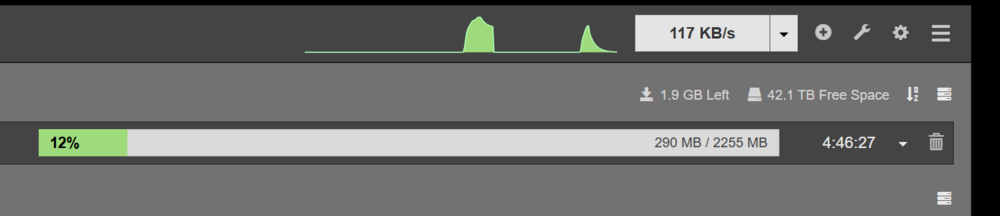
Sabnzbd only goes up to 15MB/s. Also it intermitently goes down to 0KB/s while downloading a file at random times. i.e. it will do that every once a minute or so when downloading a file and then pick back up to 15 MB/s.

-
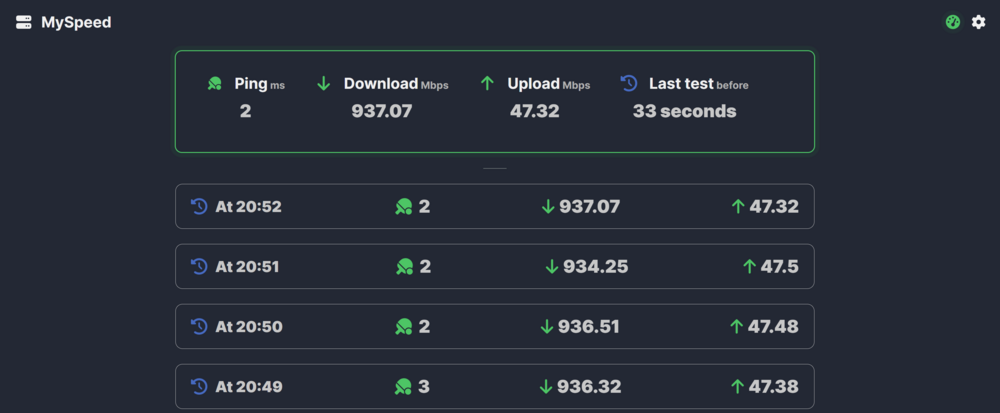
Speed test results attached below.
-
My server is connected through an ethernet cable to the home network. When connecting the same network cable to a windows laptop and running speed test, I get around 800mbps download speed. However on the server using the same network cable and port only gets me a maximum of 100 mbps. This is based on the download speeds at which sabnzbd is downloading. Not too sure what is the reason for the low speed or how to troubleshoot it any further. Any suggestions would be highly apprecited. Please let me know if I need to share any logs to help identify the problem. Edit: I downloaded a speedtest tool on the app store and that seems to show me that the download speed is similar to what I see on the laptop. So the issue seems to be in the sabnzbd config or some other config / hardware delimiting factor. Any help on how to investigate further would be much appreicated.
-
Tried a new USB drive and then just copied the config folder accross and everything magically works! Thanks a lot for your input.
-
Hi Unraid community, I have encountered this issue where after a power outage the internet connectivy to the server has stopped working. I have tried to do a clean reboot, tried to change the network cable, tested the network port and cable with a different machine which works fine, so I know there is not issues with the network or cable. I can also confirm that I am able to access the unraid machine from other computers on the local network, so it is connecting to the local network, but not to the internet due to some reason. Have attached diagnostics. Any help will be much appreciated. kunraid-diagnostics-20250202-1513.zip
-
Have retunred the HDDs as DOA. Thanks for your help.
-
Hello unraid community, I am in a bit of a pickle - I bought a new 18TB Seagate Exos X20 drive to replace my existing 10TB parity drive. The intent was to replace the parity and then start to replace all my data drives all of which are 8TB each. This is the link to the seagate drive - https://east-digital.myshopify.com/products/st18000nm003d-seagate-exos-18tb-x20-512e-4kn-3-5-enterprise-sata-hard-drive?pr_prod_strat=e5_desc&pr_rec_id=cff53a14d&pr_rec_pid=9373694329105&pr_ref_pid=9116095316241&pr_seq=uniform I tried to add the Seagate drive to the array and unraid recognises the drive fine. However when I try to format the drive, it errors out saying format failed and to check system logs. The logs seem to be saying there is a read / write error on the drive. I have already tried swapping different SATA cables and power cables with no wins so far. Also found some info relating to type 2 protection on some seagate drives, and ran the following command on the drive to check: sg_readcap -l /dev/sdd Here are the results: Read Capacity results: Protection: prot_en=0, p_type=0, p_i_exponent=0 Logical block provisioning: lbpme=0, lbprz=0 Last LBA=35156656127 (0x82f7fffff), Number of logical blocks=35156656128 Logical block length=512 bytes Logical blocks per physical block exponent=0 Lowest aligned LBA=0 Hence: Device size: 18000207937536 bytes, 17166336.0 MiB, 18000.21 GB, 18.00 TB So, it does not look like the drive is protected (but I am a noob on these things so not 100% sure) Worst of all, when trying to test different cables, I broke the SATA port on the existing parity, so am currently without parity :(, so any help would be much appreciated. Both diagnostics and SMART report for the drive are attached. By the way, I ordered 2 x 18TB drives and both have same issues, so am assuming the chances of a DOA are low. Thanks. kunraid-diagnostics-20240520-1632.zip kunraid-smart-20240520-1003.zip
-
Hi There, I have been using unraid for my years without any issue but from the last couple of week, my server seems to keep freezing after I have started the array. Not too sure exactly when does it freeze over, but when I go back after a few hours, it is non-responsive. Would be great if you could help troubleshoot the issue. Thanks kunraid-diagnostics-20240308-1553.zip
-
First of all, I would like to thank you for developing this docker. This is a fantastic tool for users with limited understanding of networking (like myself). Now, on to the problem: I configured Nginx Proxy Manager for 5 different proxy hosts - Sabnzbd, Sonarr, Radarr, Lidarr and Ombi Everything else seems to work flawlessly except Ombi. With Ombi, although I am able to get to the login page, it keeps looping back to the same page, when I click on the login button. i.e. Instead of logging me into Ombi, it open a new tab / window and goes back to the login screen. Also, the same behavior is persistent on both Ombi native login and plex authorization. Have even tried the option to log a user based on just the username, but even that does not work. I have checked the configuration file for Ombi and the options selected on that file are exactly the same as other proxy host config files. I have included my config file below for your assistance: # ------------------------------------------------------------ # ombi.mydomain.com # ------------------------------------------------------------ server { set $forward_scheme http; set $server "x.x.x.x"; set $port 3579; listen 8080; listen 4443 ssl http2; server_name ombi.mydomain.com; # Let's Encrypt SSL include conf.d/include/letsencrypt-acme-challenge.conf; include conf.d/include/ssl-ciphers.conf; ssl_certificate /etc/letsencrypt/live/npm-7/fullchain.pem; ssl_certificate_key /etc/letsencrypt/live/npm-7/privkey.pem; # Asset Caching include conf.d/include/assets.conf; # Block Exploits include conf.d/include/block-exploits.conf; access_log /data/logs/proxy_host-5.log proxy; location / { # Force SSL include conf.d/include/force-ssl.conf; proxy_set_header Upgrade $http_upgrade; proxy_set_header Connection "upgrade"; proxy_http_version 1.1; # Proxy! include conf.d/include/proxy.conf; } } --------------------------- Any help would be much appreciated. Edit : Managed to fix the issue by disabling the support websockets option.


