





Kamikazejs
Members
-
Joined
-
Last visited
-
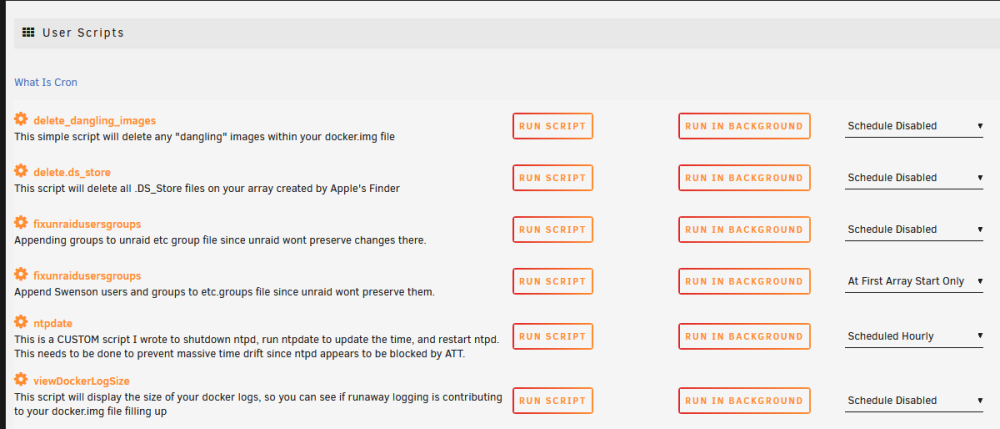
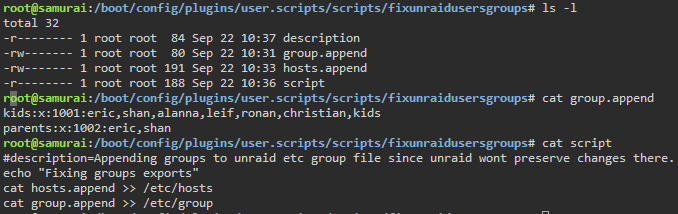
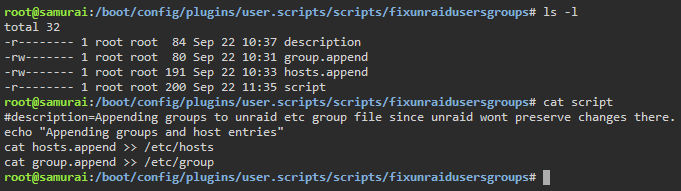
I know what you're trying to do but I don't know if you *CAN* do it without manually editing the smb-shares.conf. One workaround would be to just change the user permissions on the parent directory so that user A has access, but user B doesn't, then give both users access to the /homemovies subdirectory. I usually do this with adding a unix group to /etc/groups, making certain users members of different groups, and managing ownership and access using the good old User/Group/Other permissions. Unraid doesn't preserve groups, which is a bummer, but I use the Community Applications CA user scripts plugin and have it run a custom script that I create (the button at the bottom there explains this really well). *THIS ONLY NEEDS TO BE RUN ONCE at Array Startup*. Perhaps Unraid isn't '"Built" for this but it's an incredibly basic function/feature of any Samba server, one which I've used since 1996. And now I feel old, thank you. =-D BTW, the official response will probably be to just split that out into two different shares with different user access. That doesn't work for most of what I want to do (I already have too many), but it's easy to do.

-
Respectfully this has been my BIGGEST annoyance with Unraid for the last 4 years I've used it, along with proper NFS export support to control permissions by hostname. My workaround back then was a dumb script ("samurai" below is the hostname): Once this runs and any negative caches on clients time out, all of the security works group. Users in group A can access folders owned by that group, users in group B can access folders in another group. root@samurai:/mnt/user/scripts# cat fixunraid.sh showmount -e echo "Fixing hosts, groups, and NFS exports" cat hosts.append >> /etc/hosts cat group.append >> /etc/group cp /etc/exports /etc/exports.BAK cp exports.samurai /etc/exports sleep 10 exportfs -a sleep 5 showmount -e (I previously also appended passwd entries but sometime in the past few years Unraid actually remembered changes to /etc/passwd, such as the primary GID.) Perhaps this sounds "too complicated" to manage automatically but this is the simplest, most BASIC UNIX-level security and has been implemented through simple GUIs (that work across local, NFS, and Samba access) hundreds of times. Just for HOME use, this lets me keep my kids from accessing or deleting files they shouldn't. Implementing Groups is essential for any NAS and I'm shocked at some of the suggestions in this thread to create tons of extra shares or duplicate files.

