





Connor Moloney
Members
-
Joined
-
Last visited
-
Yes thank you so much for your help
-
Yeah I have always used your sonarr version have recently transferred to your plex media server and tautulli builds as well, in the process of trying to configure them exactly as I had them previously but then I noticed that hundreds of my films had disappeared so using radarr to get them back and then will finish configuring the server
-
How strange, I must have clicked something by accident
-
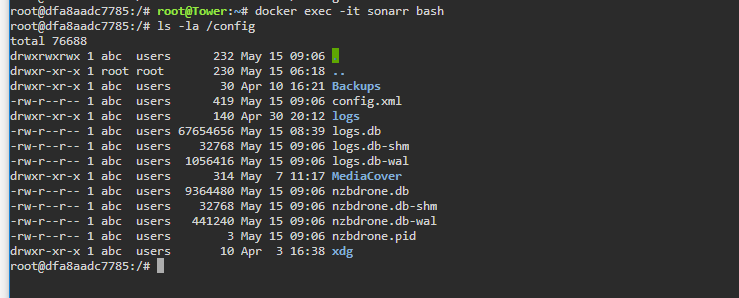
Okay so I ran this, restarted the docker then afterwards re-ran the commands you gave me earlier to get this output now: is this normal?
-
I don't think I have done either, only thing I have done recently which could remotely be connected to this is set up a dns for my openvpn and that's about it? So how do you think it's happened then?
-
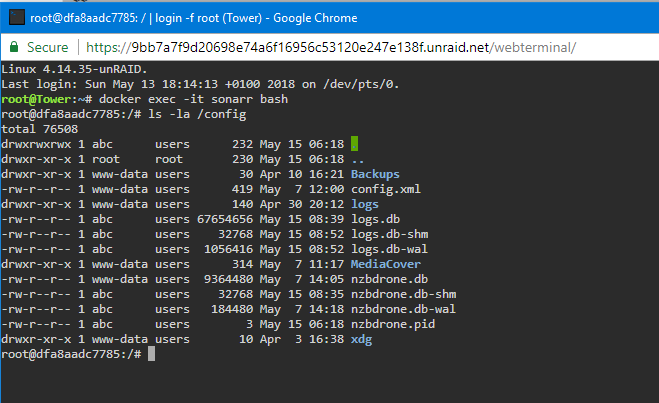
I ran that and got this output:
-
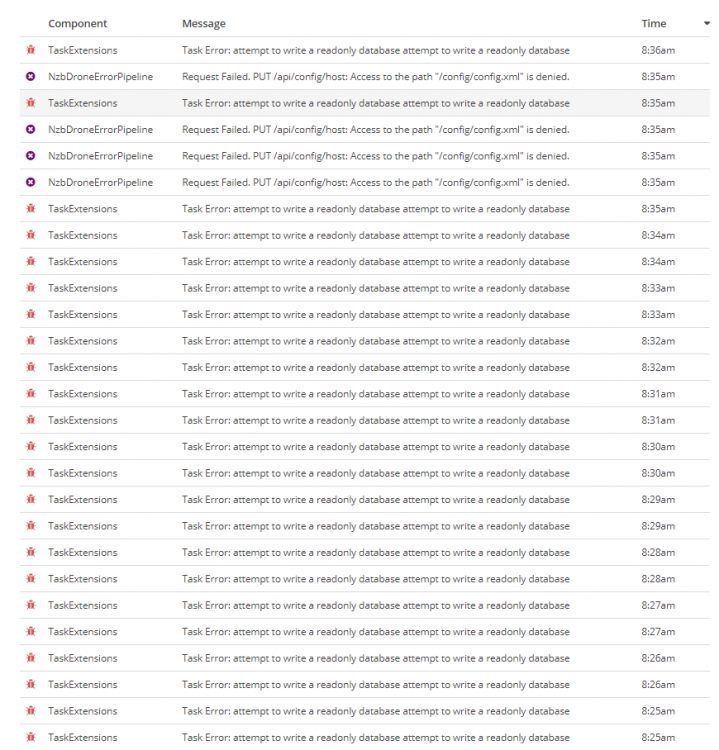
I just tried turning sonarr log mode to debug and it said "failed to save general settings" I think you are right with the database corruption as all it says in the log table is stuff about the database and errors, how can I fix that?
-
Okay so after trying to reconfigure sonarr to work with deluge (container i used to use for downloads) I would set it all up correctly click test it would work got the notification in the corner popping up saying it had succeeded. So i press save and wait for the spinny circle to disappear then press the 'x' in the top right and deluge isn't there in the download clients. Like I said earlier it's almost as if sonarr just isn't responding, I have tried restarting the container, turning docker on and off but don't know what else to try?
-
Yeah will test it now
-
When I first started using this docker I had the download client on my unraid server so yes I have done that in the past but now I download using my desktop (vpn) so the location is on that computer now
-
Stopping container: sonarr Successfully stopped container 'sonarr' Removing container: sonarr Successfully removed container 'sonarr' Command:root@localhost:# /usr/local/emhttp/plugins/dynamix.docker.manager/scripts/docker run -d --name='sonarr' --net='bridge' -e TZ="Europe/London" -e HOST_OS="unRAID" -e 'PUID'='99' -e 'PGID'='100' -p '8989:8989/tcp' -v '/dev/rtc':'/dev/rtc':'ro' -v '/mnt/user/Media/TV Shows/':'/tv':'rw' -v '/mnt/disks/192.168.1.72_My_Pc_-_Spare_Storage/Movies/completed/':'/downloads':'rw,slave' -v '/mnt/cache/appdata/sonarr':'/config':'rw' 'linuxserver/sonarr' dfa8aadc778577e64943c3ac6fc3a814925d814b2eda5fd9be4a90ed98e52abe The command finished successfully!
-
Having a few issues with this container it has been working for ages then 7 days ago it stopped working, its still running but none of the automated tasks are running, it doesn't send requests to look for new episodes, it isn't recognising when new episodes are added to the array and also the log file hasn't been updated in 7 days. Any thoughts? So in the log shown in the docker window this is repeated god knows how many times: [v2.0.0.5163] System.Data.SQLite.SQLiteException (0x80004005): attempt to write a readonly databaseattempt to write a readonly databaseat System.Data.SQLite.SQLite3.Reset (System.Data.SQLite.SQLiteStatement stmt) [0x00083] in <61a20cde294d4a3eb43b9d9f6284613b>:0at System.Data.SQLite.SQLite3.Step (System.Data.SQLite.SQLiteStatement stmt) [0x0003c] in <61a20cde294d4a3eb43b9d9f6284613b>:0at System.Data.SQLite.SQLiteDataReader.NextResult () [0x0016b] in <61a20cde294d4a3eb43b9d9f6284613b>:0at System.Data.SQLite.SQLiteDataReader..ctor (System.Data.SQLite.SQLiteCommand cmd, System.Data.CommandBehavior behave) [0x00090] in <61a20cde294d4a3eb43b9d9f6284613b>:0at (wrapper remoting-invoke-with-check) System.Data.SQLite.SQLiteDataReader..ctor(System.Data.SQLite.SQLiteCommand,System.Data.CommandBehavior)at System.Data.SQLite.SQLiteCommand.ExecuteReader (System.Data.CommandBehavior behavior) [0x0000c] in <61a20cde294d4a3eb43b9d9f6284613b>:0at System.Data.SQLite.SQLiteCommand.ExecuteScalar (System.Data.CommandBehavior behavior) [0x00006] in <61a20cde294d4a3eb43b9d9f6284613b>:0at System.Data.SQLite.SQLiteCommand.ExecuteScalar () [0x00006] in <61a20cde294d4a3eb43b9d9f6284613b>:0at Marr.Data.QGen.InsertQueryBuilder`1[T].Execute () [0x00046] in M:\BuildAgent\work\b69c1fe19bfc2c38\src\Marr.Data\QGen\InsertQueryBuilder.cs:140at Marr.Data.DataMapper.Insert[T] (T entity) [0x0005d] in M:\BuildAgent\work\b69c1fe19bfc2c38\src\Marr.Data\DataMapper.cs:728at NzbDrone.Core.Datastore.BasicRepository`1[TModel].Insert (TModel model) [0x0002d] in M:\BuildAgent\work\b69c1fe19bfc2c38\src\NzbDrone.Core\Datastore\BasicRepository.cs:111at NzbDrone.Core.Messaging.Commands.CommandQueueManager.Push[TCommand] (TCommand command, NzbDrone.Core.Messaging.Commands.CommandPriority priority, NzbDrone.Core.Messaging.Commands.CommandTrigger trigger) [0x0013d] in M:\BuildAgent\work\b69c1fe19bfc2c38\src\NzbDrone.Core\Messaging\Commands\CommandQueueManager.cs:82at (wrapper dynamic-method) System.Object.CallSite.Target(System.Runtime.CompilerServices.Closure,System.Runtime.CompilerServices.CallSite,NzbDrone.Core.Messaging.Commands.CommandQueueManager,object,NzbDrone.Core.Messaging.Commands.CommandPriority,NzbDrone.Core.Messaging.Commands.CommandTrigger)at NzbDrone.Core.Messaging.Commands.CommandQueueManager.Push (System.String commandName, System.Nullable`1[T] lastExecutionTime, NzbDrone.Core.Messaging.Commands.CommandPriority priority, NzbDrone.Core.Messaging.Commands.CommandTrigger trigger) [0x000b7] in M:\BuildAgent\work\b69c1fe19bfc2c38\src\NzbDrone.Core\Messaging\Commands\CommandQueueManager.cs:95at NzbDrone.Core.Jobs.Scheduler.ExecuteCommands () [0x00043] in M:\BuildAgent\work\b69c1fe19bfc2c38\src\NzbDrone.Core\Jobs\Scheduler.cs:42at System.Threading.Tasks.Task.InnerInvoke () [0x0000f] in <71d8ad678db34313b7f718a414dfcb25>:0at System.Threading.Tasks.Task.Execute () [0x00010] in <71d8ad678db34313b7f718a414dfcb25>:0[Error] TaskExtensions: Task Error But in the log section in the actual docker it shows it not having been updated for 7 days?
-
I may be wrong but I had similar issues when the files weren't named with their extension in the name e.g. .mkv or whatever the media type is
-
