





Michael Woodson
Members
-
Joined
-
Last visited
Everything posted by Michael Woodson
-
I can confirm I am having the same issues. I recently created a new VLAN for Unraid and changed the server's internal IP. The A record has not been updated, and it has been over 24 hours. The record shows incorrect IP even when queried outside my network. Is there any good way to force a refresh? on unraid 6.9.2.
-
The method I have found to update each of the Jitsi docker involves using Portainer. In the Portainer GUI, click Stacks > selected docker-jitsi-meet -> select all and stop all -> Select each Container one at a time (i.e. click on it's name) -> Click Recreate and click "Pull latest image" and then "Recreate" -> once all are updated start all containers -> restart letsencrypt -> done @SpaceInvaderOne Is there a better way? Also, can you help enable Colibri for Jitsi stats? I can't seem to figure it out with this set up. Thank you!
-
Anyone know the best way to update the Jitsi containers, if necessary? Maybe in portainer?
-
I had a flawless 5 person meeting last night after removing the listen 80 from the above letsencrypt.conf file. Things really start to breakdown if connections are allowed through non-https, so this is critical. I am using Google domains (private domain) and forwarding directly my IP to that meet.* private domain. Now users are only taken to the https site. Additionally, I only have the 3 ports open which spaceinvader recommended. Not port 4443 as I spoke of earlier, 4443 is not a part of the quick install guide. https://github.com/jitsi/jitsi-meet/blob/master/doc/quick-install.md
-
I've had people complain of this as well. In fact, had someone who could not get their video to work even after trying to force the permissions on within the browser (the latest version of chrome). Others in the same meeting had no issues.
-
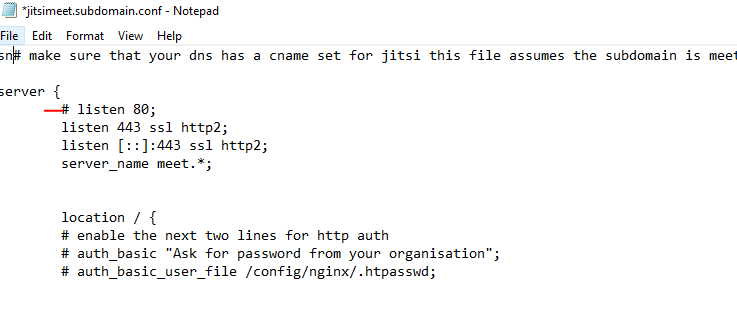
It looks like I have resolved this issue by commenting out this line of the lets-encrypt jitsimeet.subdomain.conf config file. Now things only direct to https.
-
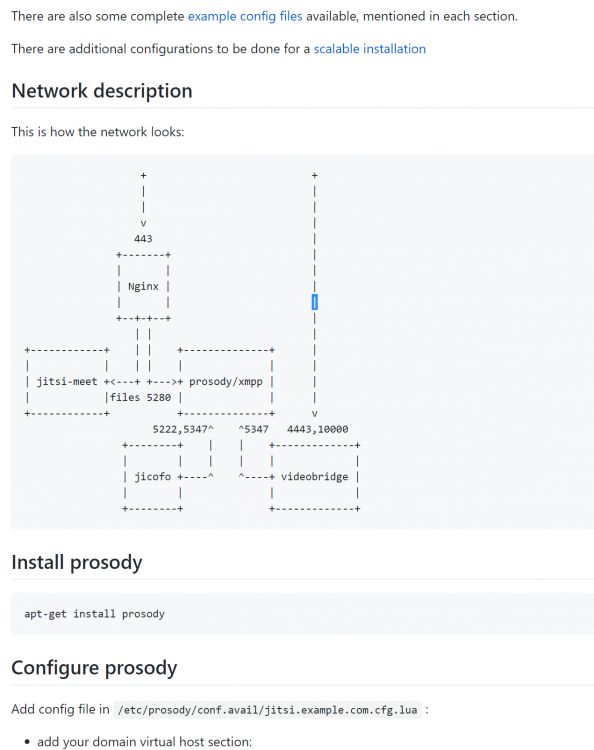
Hi @SpaceInvaderOne, Correct me if I wrong, but does video bridge need port 4443 forwarded to it? https://github.com/jitsi/jitsi-meet/blob/master/doc/manual-install.md Thank you again for all you do! Edit: things seem to improve dramatically with multi-users and when switching from wifi to cellular once 4443 is forwarded to the server.
-
One issue I am having is that people can access a non secure version of the jitsi meet. i.e. meet.mydomain.com takes you to a http site. https://meet.mydomain.com is a secure site with the letsencrypt reverse proxy cert and that all works. I have letsencypt generating a top-level cert and a single sub domain cert as well. When I visit mydomain.com it takes you straight away to the https site basic "welcome to our site" page. I have played around with my domain settings and no luck. I have my sub domain (meet) directly resolving to my IP and same with my top level domain. I am beginning to think this may be a jitsi setting that needs to forward people to the secure site. Any help is appreciated. I have set up following Space Invader to a T, I believe. Beyond the above everything is working and I had success with a few meetings. Thank you!
-
++++++1 !. This would be so helpful for me during quarantine. Edit: I see there is a broken-out Jitsi components version in the app store. Is there a way to put this in a single docker and then we can also put together an install guide?

