





Aceriz
Members
-
Joined
-
SO I understand that while I have tailscale vpn active on my laptop i am not able to access the delugeVPN docker container. WebUI. I am reading the Q36 from the Binhex - Q36. When enabling Tailscale I can no longer access the Web UI of any VPN enabled contains, why is this and how can I fix it?. A36. Tailscale interferes with DNS and networking causing issues with VPN enabled images, here are the known workarounds:- MagicDNS is enabled - Fix is to disable MagicDNS in Tailscale TAILSCALE_USERSPACE_NETWORKING is set to false - Fix is to set this to true Note If you are attempting to access the VPN enabled applications Web UI remotely over Tailscale then you will also need to ensure the Tailscale IP network is also added to LAN_NETWORK - See Q30. above for more details. Although I have been doing unraid for a bit, I still consider myself as very new. I am wonder how would I go about updating the TAILSCALE- Userspace-networking ? I tried to add the docker tailscale to deluge but found it did not work. so reverted this. Any ideas? much appreciated.
-
So that I know what does the attribute mean ? Does it matter if it is going up across a number of my drives ?
-
I have tried checking the cables and reseating all of them in case there was a one loose. Tried re seating the LSI card
-
Some of the errors do appear to be climbing ever slowly by a few ever few days but most stable
-
Sorry forgot to attach the diagnostic report rizznetunraid-diagnostics-20241203-0700.zip
-
Hopefully someone is able to help me out. I have multiple drives that are spitting out smart error 188 I am not sure exactly what is causing this Example of error Event: Unraid Disk 10 SMART health [188] Subject: Warning - command timeout is 131078 Description: ST14000NM001G-2KJ103_ZTM0CHN5 (sdp) Importance: warning
-
had you been able to figure this out ? I found a thread that outlines a way to configure fail 2 ban but not sure how to get the logs https://github.com/immich-app/immich/discussions/3243
-
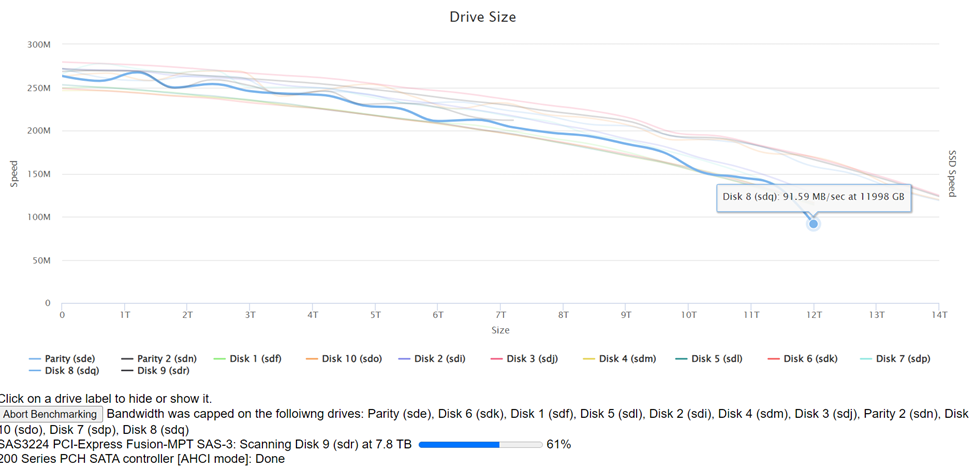
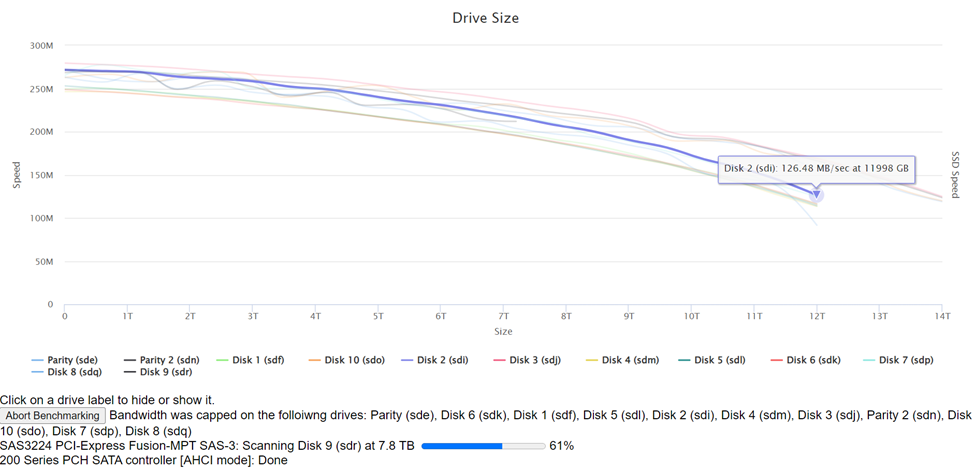
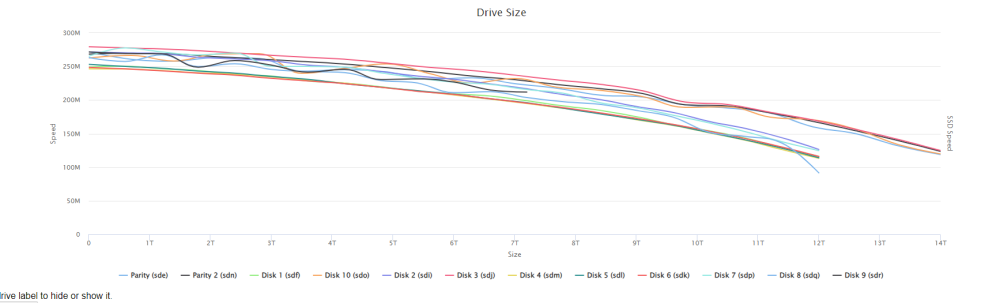
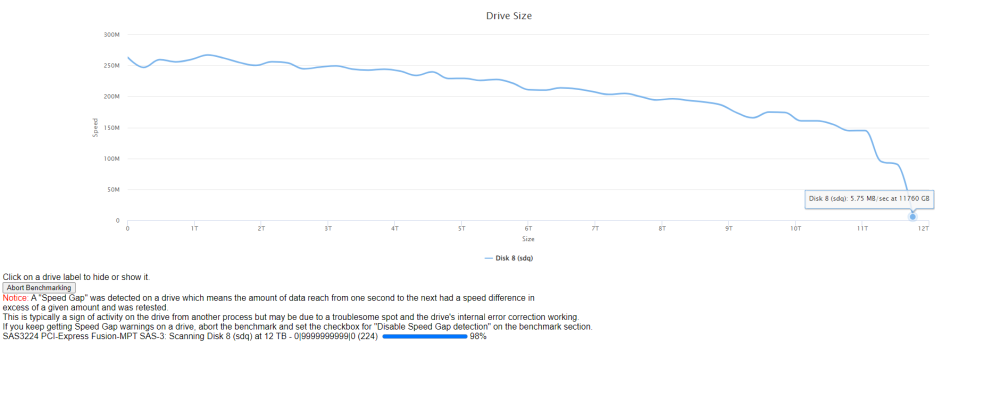
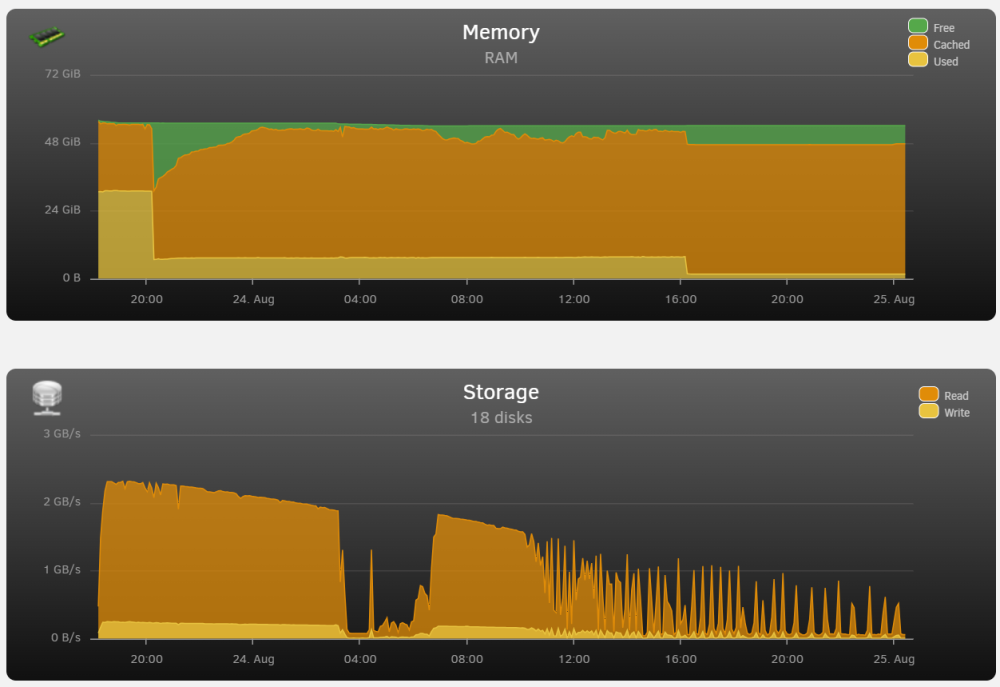
So if I have understood and interpreted the graphs correctly I think the drive that is causing my issues is the disk 8 in the graphs below. it tanks at the last 1 tb each time in terms of read speed as compared to the other drives. I re tested with the original scanning settings on its own and the same behaviour occurs. When I test it with more frequent testing zones 2% as opposed to the default 10% it plummeted even further in the last TB. to speeds that were in keeping to what I was seeing during the data rebuild and build of the 2nd parity drive. It also appeared to stall at the 98% with it sitting there for 20 min (even with the speed check option unchecked) I note that I tested some of the other drives ex (drive 10) which was showing a bit of early variation in the grouped test in the first graph and it smoothed out on retesting, and disk 9 which paused for some time at 61% finished without issues. Going to run a few more tests on the disk 9 and 10 (at the 2% increments... But thought I would ask mind letting me know your thoughts is it likely the disk 8 in your opinion causing my issues ? before I start a warranty process wanted to ensure I am reading the graphs correctly lol
-
Okay perfect I will run that once finished. The initial rebuild of the lost drive finished. (but i started up the building of my 2nd parity after I recovered the lost drive. Had been on list of to dues. I have noticed the same behaviour with the building of the second parity drive. When I run Diskspeed what am I looking for specifically ? That way I can perhaps post helpful things here to help with diagnosing any issues
-
At this point there shouldnt be anything accessing the array. I have had no other computers on the network connecting to it. Not accessing it from my laptop other than to look at the progress page through the browser Is there a way to see if anything else is accessing the array that I might not be aware of?
-
Hello All, I have attached my diagnostics, and photo below. I had a drive recently fail so purchased a replacement drive. Ran it through 3x preclear with it passing without issues. During the preclear I think it was averaging around 230-240mb/sec. I added the drive to the array to rebuild the failed drive. I noticed initially that the rebuild appeared to be writing at around 250mb/s which was the speed that it appeared to run at while doing the pre-clear. (see graph below) However after a period of time into the rebuild it has slowed right down to like 5-7mb/s. This appeared to fluctuate with times where it spikes up to 125mg/second for a brief period of time. Then again drops down to 5-7mb/sec I am trying to figure out why this is occurring and what I can do to help with process. I have attached a photo of the stats page which shows the performance of the drives over time since the start of the re-build. As I was looking things up online found a number of posts that suggest to ensure VMs and dockers etc are all closed. I had the VMs all off from very early on, and then turned off the dockers 1/2 way through without any significant change or improvement in the speed. rizznetunraid-diagnostics-20230825-0019.zip
-
SO to round this out so that future people will know how to solve if similar issue, 1. Install Borgmatic a. with the cache host path directed at "/nextcloud_aio_backup_cache/_data/" b. With the Repro drive host path pointed at the correct path Then docker exec -it borgmatic bash then borg break-lock /mnt/borg-repository sudo docker rm nextcloud-aio-borgbackup sudo docker volume rm nextcloud_aio_backup_cache Then reset the master docker and run the backup
-
from within Terminal when I inspect the folders either the original or the rsync files I do see the file "Lock.roster" and folder "lock.exclusive." when I navigate to the "/var/lib/docker/volumes/nextcloud_aio_backup_cache/_data" there is no files here... is there a way to manually delete the lock ? or replace the lock in the cache file ?
-
So I was able to install another instance of Borgmatic from within Unraid that stays active .... However I am having difficulty with executing the Borg Break-lock command from within Nextcloud the directory is located at " /mnt/user/Backups/nextcloudaio\ Backup/borg " when I navigate through terminal I see that it is located at "/mnt/user/Backups/nextcloudaio\\\ Backup/borg " When I attempt to run this command docker exec -it borgmatic borg break-lock /mnt/user/Backups/nextcloudaio\\\ Backup/borg I received an error stating " Repository /mnt/user/Backups/nextcloudaio\ Backup/borg does not exist. " In an attempt to help with problemsolving in case the "\\\" or " (space) before Backup" caused issues I did an rsync to a new directory "mnt/user/Backups/BORG-Nextcloudaio/borg " which was successful at copying all the files over on this new directory I still get the error "Repository /var/lib/docker/volumes/nextcloud_aio_backup_cache/_data does not exist"
-
Okay so I have made some progress where I am decided to just go with the above. This now has the nextcloudaio Mastercontainer starting up. But when I try to run the backup I am getting error ===> Failed to create/acquire the lock /root/.cache/borg/xxxxxxxxxx.lock.exclusive " Failed to create/acquire the lock" and point to a lock.exclusive file in my backup folder. Steps to replicate it: Manually start a backup Additional Info: This started after the above crash that occurred when trying to do the last update for the master container which failed. From within the Mastercontainer Interface I can run the check backup integrity command. Which comes back clean without reported errors. From what I can find it looks like I need to run the borg break-lock Command https://borgbackup.readthedocs.io/en/stable/usage/lock.html#borg-break-lock I can not seem to figure out how to run this in unraid.. as the "nextcloud-aio-borgbackup" docker closes immediately after about 2 second when I attempt to run the backup so not enough time to activate anything... Nor do I really know what the command would be.. is it borg -v break-lock /mnt/user/Backups/nextcloudaio\ Backup/borg ? thanks for help


