




Skip to content
View in the app

A better way to browse. Learn more.

Unraid

A full-screen app on your home screen with push notifications, badges and more.

To install this app on iOS and iPadOS
  1. Tap the Share icon in Safari
  2. Scroll the menu and tap Add to Home Screen.
  3. Tap Add in the top-right corner.
To install this app on Android
  1. Tap the 3-dot menu (⋮) in the top-right corner of the browser.
  2. Tap Add to Home screen or Install app.
  3. Confirm by tapping Install.

lukerv4

Members
  • Joined

  • Last visited

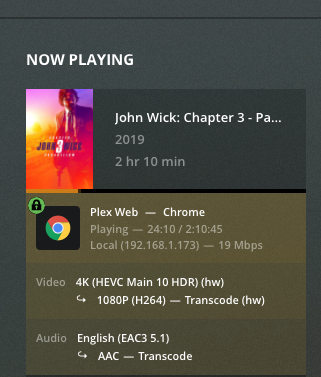
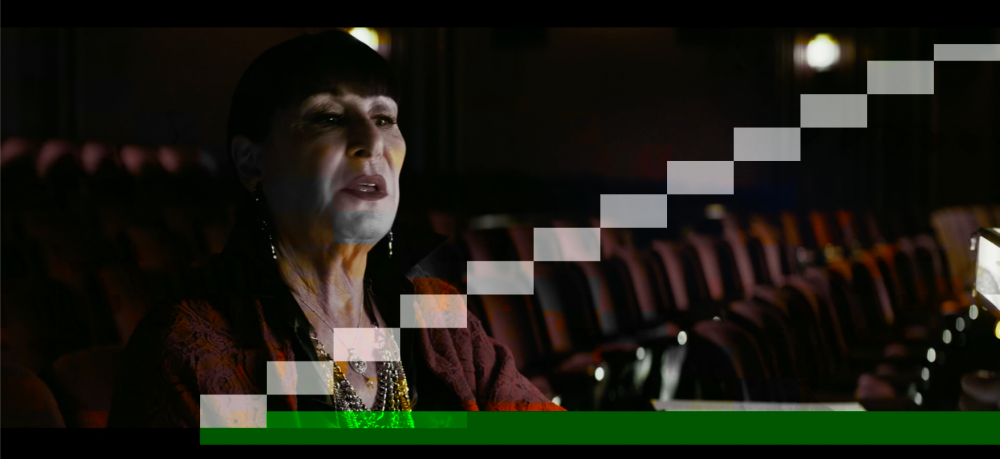
  1. Hardware accelerated HDR Tonemapping is working as of Plex version: 1.23.0.4497. Weird graphics glitches still occur if using HDR Tonemapping below the 1080p HD High setting I'm running an Intel i5 11400 with a UHD 730 1. Create a file on your UNRAID flash drive under /boot/config/modprobe.d called i915.conf 2. paste the following code in the conf file you created options i915 force_probe=4c8a options i915 enable_guc=2 3. Reboot your server and you should be able to turn on Plex transcoding in your docker No need to update your UNRAID version
Account

Navigation

Search

Search

Configure browser push notifications

Chrome (Android)
  1. Tap the lock icon next to the address bar.
  2. Tap Permissions → Notifications.
  3. Adjust your preference.
Chrome (Desktop)
  1. Click the padlock icon in the address bar.
  2. Select Site settings.
  3. Find Notifications and adjust your preference.
