





jhonny85
Members
-
Joined
-
Last visited
-
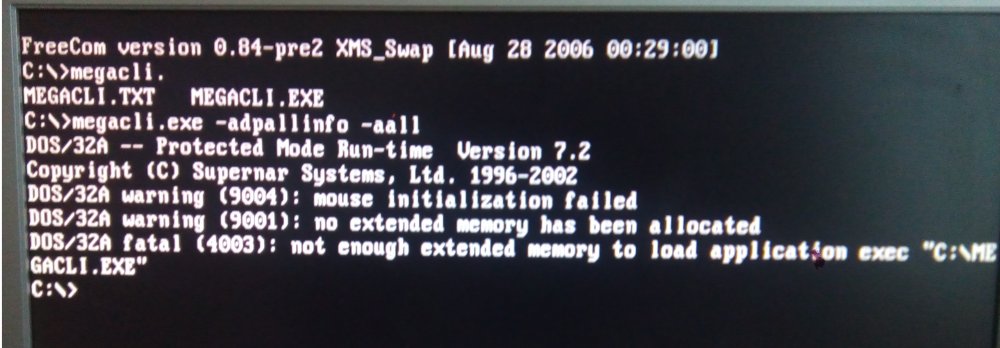
The command's result is on the picture. My main "pc" is a lenovo g505s. And I have couple of old am2 boards+cpu, one asrock g31m-vs2 that's my mothers browsing pc, no uefi. May be one of my friend will help Me. I ask around :). Will tell if I succeed. Thanks Jonny and nthu9280
-
Hello! First of all sorry for my bad english! I bought a FUJITSU D2607. It wasn't in IT mode. At least I didn't saw my "expendable" hdd in windows 7 home premium x64 just the raid card but it wasn't detected properly (not importatant i will use unraid... i mean i'd like to). The hdd showed up in the cards bios so it did see it. Then I found this cool topic! Fortunately (You will see why) I've made a SBR backup: megarec -readsbr 0 sbr-bak.bin and I have the SAS address. but I used the: megarec -cleanflash 0 command too. but there is a problem with the uefi switching thing! My H8SCM-F is a non-uefi motherboard.... Silly me I still tried the efi tool no surprise it didn't worked. I didn't give up. I turned off the machine and then I read an other guide while I was shercing for a ms-dos version that this bricks the card! Great! But there is hope. I found two versions of MS-DOS sas2flsh.exe (v20 and v19), it's working, but i get the following error message: "No LSI SAS adapters found! Limited Command Set Available!ERROR: Command Not allowed without an adapter! ERROR: Couldn't Create Command -f Exiting Program" This is not the only topic I've tried that's why I have ms-dos version of the flash tool. Before I cleaned the flash the error message was the same. Could someone help Me and save my card? Thanks.
