passi0509
Members
-
Joined
-
Last visited
-
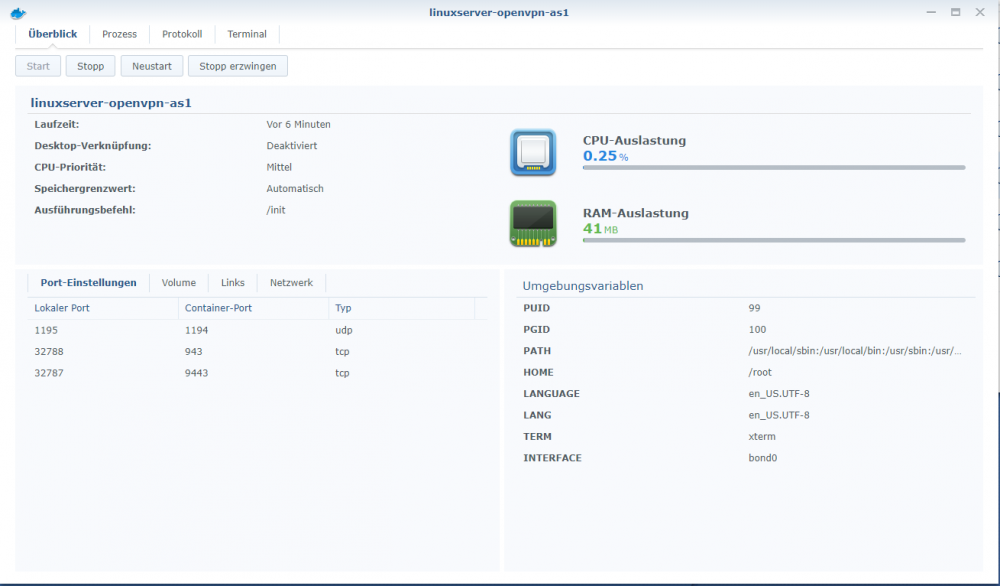
2018-03-24 18:06:48 stdout [services.d] done. 2018-03-24 18:06:48 stdout [services.d] starting services 2018-03-24 18:06:48 stdout [cont-init.d] done. 2018-03-24 18:06:48 stdout [cont-init.d] 50-interface: exited 0. 2018-03-24 18:06:48 stdout MOD Default {} {} 2018-03-24 18:06:47 stdout MOD Default {} {} 2018-03-24 18:06:46 stdout MOD Default {} {} 2018-03-24 18:06:46 stdout MOD Default {} {} 2018-03-24 18:06:45 stdout [cont-init.d] 50-interface: executing... 2018-03-24 18:06:45 stdout [cont-init.d] 40-openvpn-init: exited 0. 2018-03-24 18:06:45 stdout [cont-init.d] 40-openvpn-init: executing... 2018-03-24 18:06:45 stdout [cont-init.d] 30-config: exited 0. 2018-03-24 18:06:45 stdout [cont-init.d] 30-config: executing... 2018-03-24 18:06:45 stdout [cont-init.d] 20-time: exited 0. 2018-03-24 18:06:45 stdout 2018-03-24 18:06:45 stdout Universal Time is now: Sat Mar 24 18:06:45 UTC 2018. 2018-03-24 18:06:45 stdout Local time is now: Sat Mar 24 18:06:45 UTC 2018. 2018-03-24 18:06:45 stdout Current default time zone: 'Etc/UTC' 2018-03-24 18:06:45 stdout 2018-03-24 18:06:45 stdout [cont-init.d] 20-time: executing... 2018-03-24 18:06:45 stdout [cont-init.d] 10-adduser: exited 0. 2018-03-24 18:06:45 stdout 2018-03-24 18:06:45 stdout ------------------------------------- 2018-03-24 18:06:45 stdout User gid: 100 2018-03-24 18:06:45 stdout User uid: 99 2018-03-24 18:06:45 stdout 2018-03-24 18:06:45 stdout ------------------------------------- 2018-03-24 18:06:45 stdout GID/UID 2018-03-24 18:06:45 stdout ------------------------------------- 2018-03-24 18:06:45 stdout https://www.linuxserver.io/donations/ 2018-03-24 18:06:45 stdout We gratefully accept donations at: 2018-03-24 18:06:45 stdout Brought to you by linuxserver.io 2018-03-24 18:06:45 stdout 2018-03-24 18:06:45 stdout 2018-03-24 18:06:45 stdout |_| |___/ |_| \__/ 2018-03-24 18:06:45 stdout | | \__ \ | | | () | 2018-03-24 18:06:45 stdout | | / __| | | / \ 2018-03-24 18:06:45 stdout | | ___ _ __ 2018-03-24 18:06:45 stdout _ () 2018-03-24 18:06:45 stdout ------------------------------------- 2018-03-24 18:06:45 stdout 2018-03-24 18:06:45 stdout [cont-init.d] 10-adduser: executing... 2018-03-24 18:06:45 stdout [cont-init.d] executing container initialization scripts... 2018-03-24 18:06:45 stdout [fix-attrs.d] done. 2018-03-24 18:06:45 stdout [fix-attrs.d] applying ownership & permissions fixes... 2018-03-24 18:06:45 stdout [s6-init] ensuring user provided files have correct perms...exited 0. 2018-03-24 18:06:45 stdout [s6-init] making user provided files available at /var/run/s6/etc...exited 0. Hey guys, any ideas? I'm always gettin connection refused on "192.168.1.35:1195/admin". Also tried eth0 as INTERFACE variable. I'm using Synology Docker with DDNS.