eurlin
Members
-
Joined
-
Last visited
-
I'm an idiot, because the Auth mode wasn't working for me so I just assumed 2.7.16 was lower lol thanks for clearing up the version.
-
My docker has Python 2.7.16 , is there a way to upgrade to 2.7.9?
-
Hello, on a fresh install on the docker and appdata. I get this issue Scanning Hardware 18:32:51 Spinning up hard drives 18:32:51 Scanning system storage 18:33:04 Scanning USB Bus 18:33:05 Scanning hard drives Lucee 5.2.9.31 Error (application) MessageError invoking external process Detail/usr/bin/lspci: option requires an argument -- 's' Usage: lspci [<switches>] Basic display modes: -mm Produce machine-readable output (single -m for an obsolete format) -t Show bus tree Display options: -v Be verbose (-vv for very verbose) -k Show kernel drivers handling each device -x Show hex-dump of the standard part of the config space -xxx Show hex-dump of the whole config space (dangerous; root only) -xxxx Show hex-dump of the 4096-byte extended config space (root only) -b Bus-centric view (addresses and IRQ's as seen by the bus) -D Always show domain numbers Resolving of device ID's to names: -n Show numeric ID's -nn Show both textual and numeric ID's (names & numbers) -q Query the PCI ID database for unknown ID's via DNS -qq As above, but re-query locally cached entries -Q Query the PCI ID database for all ID's via DNS Selection of devices: -s [[[[<domain>]:]<bus>]:][<slot>][.[<func>]] Show only devices in selected slots -d [<vendor>]:[<device>][:<class>] Show only devices with specified ID's Other options: -i <file> Use specified ID database instead of /usr/share/misc/pci.ids.gz -p <file> Look up kernel modules in a given file instead of default modules.pcimap -M Enable `bus mapping' mode (dangerous; root only) PCI access options: -A <method> Use the specified PCI access method (see `-A help' for a list) -O <par>=<val> Set PCI access parameter (see `-O help' for a list) -G Enable PCI access debugging -H <mode> Use direct hardware access (<mode> = 1 or 2) -F <file> Read PCI configuration dump from a given file StacktraceThe Error Occurred in /var/www/ScanControllers.cfm: line 449 447: <CFSET HW[Key].Path=ControllerPath> 448: <!--- Get the controller information ---> 449: <cfexecute name="/usr/bin/lspci" arguments="-vmm -s #Key#" timeout="300" variable="lspci" /> 450: <CFSET tmpbus=Replace(Key,":","-","ALL")> 451: <CFFILE action="write" file="#PersistDir#/lspci-vmm_#tmpbus#.txt" output="#lspci#" addnewline="NO" mode="666"> called from /var/www/ScanControllers.cfm: line 445 443: </CFIF> 444: </CFLOOP> 445: <CFIF StructKeyExists(HW,Key) EQ "NO"> 446: <CFSET HW[Key]=Duplicate(BlankController)> 447: <CFSET HW[Key].Path=ControllerPath> Java Stacktracelucee.runtime.exp.ApplicationException: Error invoking external process at lucee.runtime.tag.Execute.doEndTag(Execute.java:258) at scancontrollers_cfm$cf.call_000040(/ScanControllers.cfm:449) at scancontrollers_cfm$cf.call(/ScanControllers.cfm:445) at lucee.runtime.PageContextImpl._doInclude(PageContextImpl.java:933) at lucee.runtime.PageContextImpl._doInclude(PageContextImpl.java:823) at lucee.runtime.listener.ClassicAppListener._onRequest(ClassicAppListener.java:66) at lucee.runtime.listener.MixedAppListener.onRequest(MixedAppListener.java:45) at lucee.runtime.PageContextImpl.execute(PageContextImpl.java:2464) at lucee.runtime.PageContextImpl._execute(PageContextImpl.java:2454) at lucee.runtime.PageContextImpl.executeCFML(PageContextImpl.java:2427) at lucee.runtime.engine.Request.exe(Request.java:44) at lucee.runtime.engine.CFMLEngineImpl._service(CFMLEngineImpl.java:1090) at lucee.runtime.engine.CFMLEngineImpl.serviceCFML(CFMLEngineImpl.java:1038) at lucee.loader.engine.CFMLEngineWrapper.serviceCFML(CFMLEngineWrapper.java:102) at lucee.loader.servlet.CFMLServlet.service(CFMLServlet.java:51) at javax.servlet.http.HttpServlet.service(HttpServlet.java:729) at org.apache.catalina.core.ApplicationFilterChain.internalDoFilter(ApplicationFilterChain.java:292) at org.apache.catalina.core.ApplicationFilterChain.doFilter(ApplicationFilterChain.java:207) at org.apache.tomcat.websocket.server.WsFilter.doFilter(WsFilter.java:52) at org.apache.catalina.core.ApplicationFilterChain.internalDoFilter(ApplicationFilterChain.java:240) at org.apache.catalina.core.ApplicationFilterChain.doFilter(ApplicationFilterChain.java:207) at org.apache.catalina.core.StandardWrapperValve.invoke(StandardWrapperValve.java:212) at org.apache.catalina.core.StandardContextValve.invoke(StandardContextValve.java:94) at org.apache.catalina.authenticator.AuthenticatorBase.invoke(AuthenticatorBase.java:492) at org.apache.catalina.core.StandardHostValve.invoke(StandardHostValve.java:141) at org.apache.catalina.valves.ErrorReportValve.invoke(ErrorReportValve.java:80) at org.apache.catalina.valves.AbstractAccessLogValve.invoke(AbstractAccessLogValve.java:620) at org.apache.catalina.valves.RemoteIpValve.invoke(RemoteIpValve.java:684) at org.apache.catalina.core.StandardEngineValve.invoke(StandardEngineValve.java:88) at org.apache.catalina.connector.CoyoteAdapter.service(CoyoteAdapter.java:502) at org.apache.coyote.http11.AbstractHttp11Processor.process(AbstractHttp11Processor.java:1152) at org.apache.coyote.AbstractProtocol$AbstractConnectionHandler.process(AbstractProtocol.java:684) at org.apache.tomcat.util.net.AprEndpoint$SocketWithOptionsProcessor.run(AprEndpoint.java:2464) at java.util.concurrent.ThreadPoolExecutor.runWorker(ThreadPoolExecutor.java:1149) at java.util.concurrent.ThreadPoolExecutor$Worker.run(ThreadPoolExecutor.java:624) at org.apache.tomcat.util.threads.TaskThread$WrappingRunnable.run(TaskThread.java:61) at java.lang.Thread.run(Thread.java:748) Timestamp11/21/18 6:33:05 PM EST Any help would be greatly appreciated
-
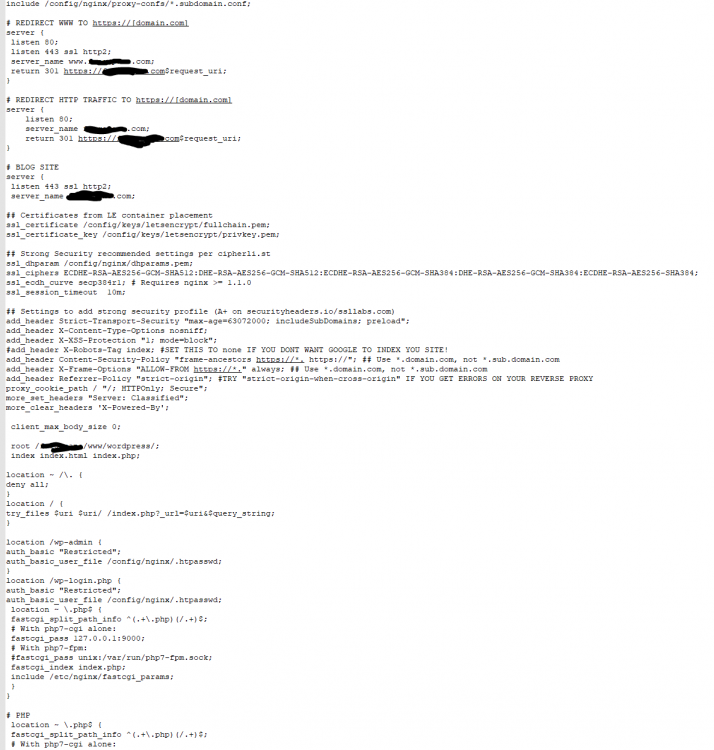
Hey guys, I've been using my Letsencrypt for most of my dockers under domain1.com dockers being ombi,organizr, chevereto, etc etc. I am currently trying to setup a wordpress site under my Nginx docker, and put it through the Lets encrypt docker for the reverse proxy, using a domain2.com. I'm having an issue where I try to set up the site conf "default" file to direct the root location to the nginx docker, but I don't know how to make it work. The root location is the appdata for the nginx docker, both /config and the docker made path for the /ngix-config cause the same issue of not sending the site outside the network. Wordpress does work just fine locally. Any and all help is appreciated.