





jnex26
Members
-
Joined
-
Last visited
-
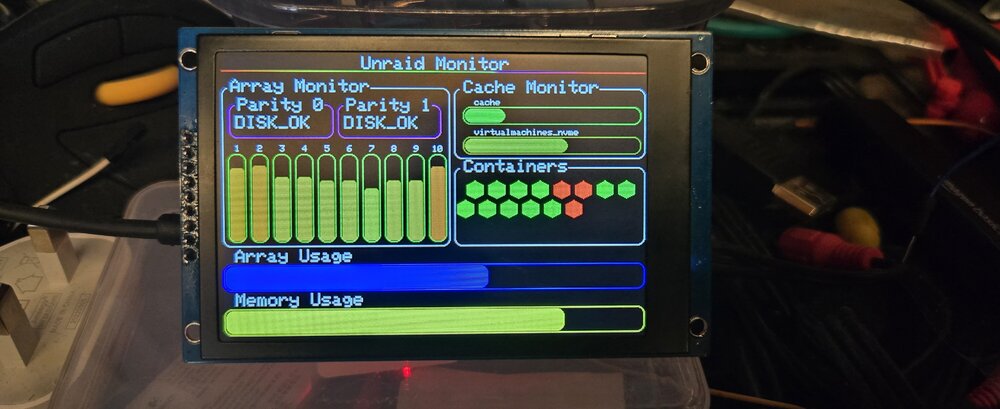
I created a Unraid dashboard using ESP32 based Dashboard, along with a ESP32 based Graphql query class, apparently on reddit they liked this so I though I would post it here.. This is the repo with the code and the instructions on how to build. GitHubGitHub - jnex26/Unraid-ESP-MonitorContribute to jnex26/Unraid-ESP-Monitor development by creating an account on GitHub. This is my interface for the Unraid GraphQL for ESP32 GitHubGitHub - jnex26/Unraid-GraphQL-api: This is an attempt at...This is an attempt at getting a ESP32 to query a graphQL - GitHub - jnex26/Unraid-GraphQL-api: This is an attempt at getting a ESP32 to query a graphQL Please be kind, it's kinda my first time showing this off. J
-
I'm in the Same boat, unraid needed a USB replacement when I replaced the USB Key I can no longer update the my servers plugin i get the following error. plugin: bad file SHA256: /boot/config/plugins/dynamix.my.servers/unraid-api.tgz
-
Hi, My USB Key went read only and I had to replace it. that is ok it was in use since 2018 so fine. however I followed the instructions to the letter but when I click replace key it just bounces back to the front page with a button saying finalise replacement key and do nothing when i click it. There seems to be no other option of support and don't want to buy a new license again !!! Thanks

