KillerHacker
Members
-
Joined
-
Last visited
Everything posted by KillerHacker
-
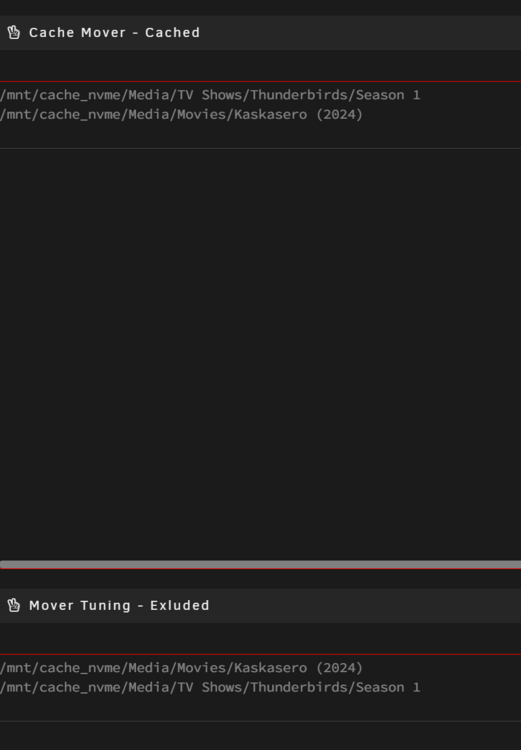
Correct, it is showing up at after the gdb process. Below are some examples of the error: Jan 14 00:59:41 Server root: cache-mover: (gdb) update access time: /mnt/cache_nvme/Media/TV Shows/Thunderbirds/Season 1 Jan 14 00:59:42 Server root: cache-mover: parse error: Invalid numeric literal at line 1, column 60 Jan 14 01:17:12 Server root: cache-mover: (gdb) Detaching from program: /usr/libexec/unraid/shfs, process 15492 Jan 14 01:17:12 Server root: cache-mover: [Inferior 1 (process 15492) detached] Jan 14 01:17:13 Server root: cache-mover: (gdb) update access time: /mnt/cache_nvme/Media/Movies/Kaskasero (2024) Jan 14 01:17:14 Server root: cache-mover: parse error: Invalid numeric literal at line 1, column 60 Yes, the cache Mover Lists are popululating as expected.
-
I created the mover folder like you said and that resolved the mover_excl error. Thanks You were correct on the Cache name. The GUI showed it with a capital letter but the backend was lower case. I corrected that and that resolved the space error. Now there is an error when it tries to switch over to the cached file. I did confirm that the file it is switching to is at that path. Jan 14 00:59:40 Server root: cache-mover: /mnt/cache_nvme/Media/TV Shows/Thunderbirds/Season 1/Thunderbirds - S01E01 - Trapped in the Sky Bluray-720p.mkv Jan 14 00:59:40 Server root: cache-mover: ready to switch live Jan 14 00:59:40 Server root: cache-mover: -: No such file or directory. Jan 14 00:59:40 Server root: cache-mover: (gdb) Attaching to process 15492 Jan 14 00:59:40 Server root: cache-mover: [New LWP 31777] Jan 14 00:59:40 Server root: cache-mover: [New LWP 30457] Jan 14 00:59:40 Server root: cache-mover: [New LWP 25084] Jan 14 00:59:40 Server root: cache-mover: [New LWP 22262] Jan 14 00:59:40 Server root: cache-mover: [New LWP 20869] Jan 14 00:59:40 Server root: cache-mover: [New LWP 19572] Jan 14 00:59:40 Server root: cache-mover: [New LWP 16473] Jan 14 00:59:40 Server root: cache-mover: [New LWP 15583] Jan 14 00:59:40 Server root: cache-mover: [New LWP 15495] Jan 14 00:59:40 Server root: cache-mover: [New LWP 15494] Jan 14 00:59:40 Server root: cache-mover: [Thread debugging using libthread_db enabled] Jan 14 00:59:40 Server root: cache-mover: Using host libthread_db library "/lib64/libthread_db.so.1". Jan 14 00:59:40 Server root: cache-mover: 0x000014a9ce477c4f in __futex_abstimed_wait_cancelable64 () Jan 14 00:59:40 Server root: cache-mover: from /lib64/libc.so.6 Jan 14 00:59:40 Server root: cache-mover: (gdb) $1 = 24 Jan 14 00:59:40 Server root: cache-mover: (gdb) $2 = 21 Jan 14 00:59:40 Server root: cache-mover: (gdb) $3 = 0 Jan 14 00:59:40 Server root: cache-mover: (gdb) Detaching from program: /usr/libexec/unraid/shfs, process 15492 Jan 14 00:59:40 Server root: cache-mover: [Inferior 1 (process 15492) detached] Jan 14 00:59:41 Server root: cache-mover: (gdb) update access time: /mnt/cache_nvme/Media/TV Shows/Thunderbirds/Season 1 I still getting "Server root: cache-mover: parse error: Invalid numeric literal at line 1, column 60" in the log. Thanks again.
-
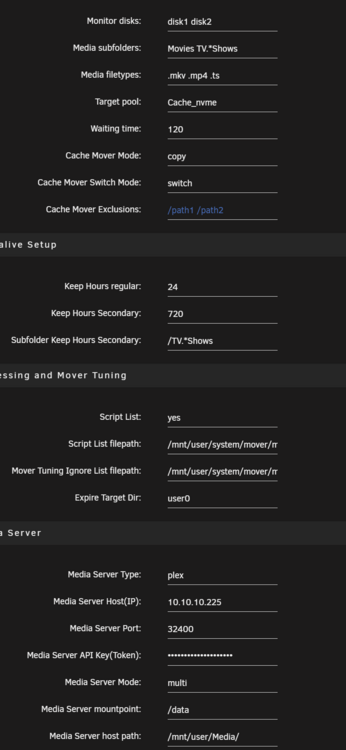
Cache Mover Plugin Alturismo, I am getting error when the mover is trying to move files to the cache. It detects the files that are running in Plex without any issues. When it tries to copy the file to the cache it errors out. The first error that I notices is no space left on device. The cache has 1.5 TB of free space. The second error is that it can not find the mover_excl.txt. Not sure about that one. The third error is parse error: Invalid numeric literal at line 1, column 60. Below is a copy of the log when it is trying to move the file/s to the cache. I also attached a screenshot of the settings in case that helps. Thanks in advance for any help you can provide. Jan 13 15:52:14 Server root: cache-mover: rsync: [receiver] write failed on "/mnt/Cache_nvme/Media/TV Shows/Thunderbirds/Season 1/Thunderbirds - S01E26 - Security Hazard Bluray-720p.mkv": No space left on device (28) Jan 13 15:52:14 Server root: cache-mover: rsync error: error in file IO (code 11) at receiver.c(380) [receiver=3.3.0] Jan 13 15:52:14 Server root: cache-mover: rsync: [sender] write error: Broken pipe (32) Jan 13 15:52:14 Server root: cache-mover: /usr/local/emhttp/plugins/cache-mover/scripts/cache_mover2: line 99: /mnt/user/system/mover/mover_excl.txt: No such file or directory Jan 13 15:52:14 Server root: cache-mover: awk: inplace:59: warning: inplace::begin: Cannot stat `/mnt/user/system/mover/mover_excl.txt' (No such file or directory) Jan 13 15:52:14 Server root: cache-mover: awk: inplace:59: fatal: cannot open file `/mnt/user/system/mover/mover_excl.txt' for reading: No such file or directory Jan 13 15:52:14 Server root: cache-mover: /mnt/disk2/Media/TV Shows/Thunderbirds/Season 1/Thunderbirds - S01E01 - Trapped in the Sky Bluray-720p.mkv Jan 13 15:52:14 Server root: cache-mover: open file will be switched to new path Jan 13 15:52:15 Server root: cache-mover: /mnt/Cache_nvme/Media/TV Shows/Thunderbirds/Season 1/Thunderbirds - S01E01 - Trapped in the Sky Bluray-720p.mkv Jan 13 15:52:15 Server root: cache-mover: ready to switch live Jan 13 15:52:15 Server root: cache-mover: -: No such file or directory. Jan 13 15:52:15 Server root: cache-mover: (gdb) Attaching to process 15492 Jan 13 15:52:15 Server root: cache-mover: [New LWP 31777] Jan 13 15:52:15 Server root: cache-mover: [New LWP 30457] Jan 13 15:52:15 Server root: cache-mover: [New LWP 25084] Jan 13 15:52:15 Server root: cache-mover: [New LWP 22262] Jan 13 15:52:15 Server root: cache-mover: [New LWP 20869] Jan 13 15:52:15 Server root: cache-mover: [New LWP 19572] Jan 13 15:52:15 Server root: cache-mover: [New LWP 16473] Jan 13 15:52:15 Server root: cache-mover: [New LWP 15583] Jan 13 15:52:15 Server root: cache-mover: [New LWP 15495] Jan 13 15:52:15 Server root: cache-mover: [New LWP 15494] Jan 13 15:52:15 Server root: cache-mover: [Thread debugging using libthread_db enabled] Jan 13 15:52:15 Server root: cache-mover: Using host libthread_db library "/lib64/libthread_db.so.1". Jan 13 15:52:15 Server root: cache-mover: 0x000014a9ce477c4f in __futex_abstimed_wait_cancelable64 () Jan 13 15:52:15 Server root: cache-mover: from /lib64/libc.so.6 Jan 13 15:52:16 Server root: cache-mover: (gdb) $1 = 30 Jan 13 15:52:16 Server root: cache-mover: (gdb) $2 = 29 Jan 13 15:52:16 Server root: cache-mover: (gdb) $3 = 0 Jan 13 15:52:16 Server root: cache-mover: (gdb) Detaching from program: /usr/libexec/unraid/shfs, process 15492 Jan 13 15:52:16 Server root: cache-mover: [Inferior 1 (process 15492) detached] Jan 13 15:52:16 Server root: cache-mover: update access time: /mnt/Cache_nvme/Media/TV Shows/Thunderbirds/Season 1 Jan 13 15:52:18 Server root: cache-mover: parse error: Invalid numeric literal at line 1, column 60