



Skip to content
View in the app

A better way to browse. Learn more.

Unraid

A full-screen app on your home screen with push notifications, badges and more.

To install this app on iOS and iPadOS
  1. Tap the Share icon in Safari
  2. Scroll the menu and tap Add to Home Screen.
  3. Tap Add in the top-right corner.
To install this app on Android
  1. Tap the 3-dot menu (⋮) in the top-right corner of the browser.
  2. Tap Add to Home screen or Install app.
  3. Confirm by tapping Install.

iwi

Members
  • Joined

  • Last visited

  1. When i run sas2flsh -list a i get this
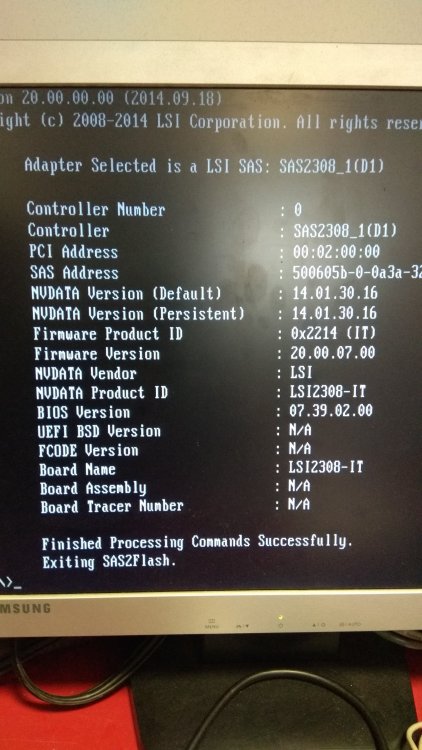
  2. On the card is a label SAS9205-8i H3-25278-05D on another label is SAS adress on 3rd label is SP: 660088-001(which after googling says that is this HP 220 card) CT: PBUHT0A8S8J0JT AS: 638834-001 DG:: 638834
  3. I found out that the HP220 is an LSI 2308 based card which should be able to operate both modes IT or IR. Have anyone some information please?
  4. Hello all, i need advice. I bought HP220 (LSI 2308) card in IT mode and i need it to flash to IR mode, can someone please provide me step by step instructions? I try to erase firmware sas2flsh -o -e 6 then i tried to flash IR firmware sas2flsh -f 2308IR207.ROM but i get an error NVSRAM is required to flash ir firmware. p.s. sorry for my bad english

Account

Navigation

Search

Search

Configure browser push notifications

Chrome (Android)
  1. Tap the lock icon next to the address bar.
  2. Tap Permissions → Notifications.
  3. Adjust your preference.
Chrome (Desktop)
  1. Click the padlock icon in the address bar.
  2. Select Site settings.
  3. Find Notifications and adjust your preference.