davper
Members
-
Joined
-
Last visited
-
Diagnostics attached tower-diagnostics-20251110-0923.zip
-
Hi I have been experiencing server failures forcing me to do hard boots. My syslog has no logging for 24 hours until 16:03 tonight. Then no logging for 90 minutes before failure. Nov 8 16:36:38 Tower Parity Check Tuning: ... but suppressed as system notifications do not appear to be enabled Nov 9 16:03:54 Tower root: /mnt/cache_download: 931.5 GiB (1000203837440 bytes) trimmed on /dev/sdg1 Nov 9 16:03:54 Tower root: /var/lib/docker/btrfs: 6.6 GiB (7104176128 bytes) trimmed on /dev/loop2[/btrfs] Nov 9 16:03:55 Tower kernel: sd 9:0:5:0: [sdg] tag#435 UNKNOWN(0x2003) Result: hostbyte=0x00 driverbyte=DRIVER_OK cmd_age=1s Nov 9 16:03:55 Tower kernel: sd 9:0:5:0: [sdg] tag#435 Sense Key : 0x5 [current] Nov 9 16:03:55 Tower kernel: sd 9:0:5:0: [sdg] tag#435 ASC=0x21 ASCQ=0x0 Nov 9 16:03:55 Tower kernel: sd 9:0:5:0: [sdg] tag#435 CDB: opcode=0x42 42 00 00 00 00 00 00 00 18 00 Nov 9 16:03:55 Tower kernel: critical target error, dev sdg, sector 1951699269 op 0x3:(DISCARD) flags 0x0 phys_seg 1 prio class 0 Nov 9 16:06:52 Tower root: /mnt/cache_protected: 83.0 GiB (89162940416 bytes) trimmed on /dev/sde1, /dev/sdh1 Nov 9 17:40:39 Tower rc.rsyslogd: Syslog server daemon... Started. Is this the reason my server is failing or should I be looking for something else? Nov 9 16:03:55 Tower kernel: critical target error, dev sdg, sector 1951699269 op 0x3:(DISCARD) flags 0x0 phys_seg 1 prio class 0
-
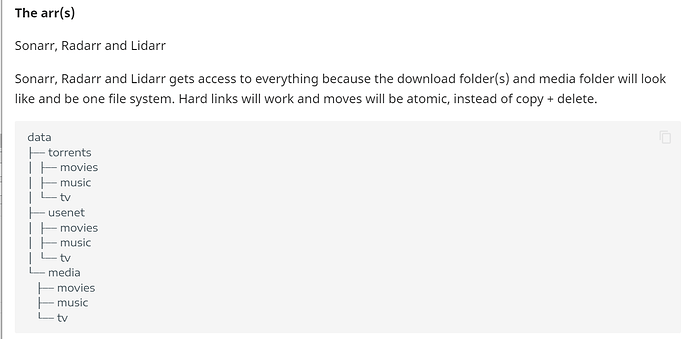
Hi I created my shares sometime ago before the trash guides. And so I have seperate shares for downloads, TV, and movies. I would like to change it to follow the trash guides folder stucture: How can I move the data from the old shares into a new share efficiently? I thought about rsync, but it only makes a copy and doesn't delete the old file after.
-
-
{"error":"Key Not Found"}
-
This is the error I am getting when I try to use my key
-
Great link for support. It says to come here to get help, pay for 1on1 support, or a link to outdated instructions to change my key. I submitted the form to contact support.
-
I do, but the link I enter from the email is not working.
-
The only license key file I have is the trial key. The contents of my config folder got corruted.
-
I was able to install Unraid connect without getting the array started. But I still can't get my license. I found my email with the original license key. But that is not working. I am using the same USB drive.
-
My server failed and the config folder got corrupted. I can't find where my license is on my account to enter it in. It looks like I need to install a plug-in but I can't start the array to install a plug-in because it says my trial has expired almost 3 years ago. I tried extending the trial but nothing happened.
-
It changes to Tower.. But why wouldn't it remember any of my drives and configs? I thought that was what replacing the config folder would do? As of now, I have a flesh install of unraid amd itlooks like I need to build a new array from scratch.
-
It looks like I fat fingered the I address when I was recreating the USB. I change the IP in network.cfg and renamed it backto network.cfg and it is loading into the correct IP. But my issue with towertest is still there. It recognizes nothing of the old server despite me replacing the config folder from the old USB.
-
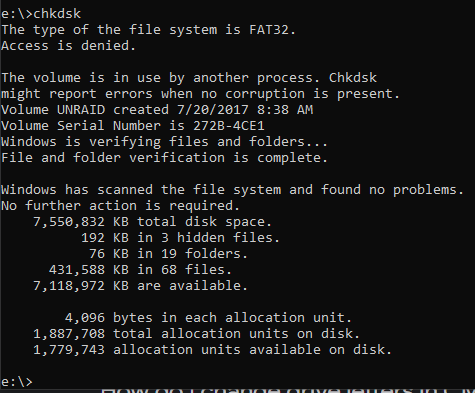
Hi The dates look correct to me. Some files were created years ago when I 1st created my server. But many are from the last 2 days, when I tried to recreate the USB. The network.cfg file did not get recreated. Per earlier instructions, I renamed the networkconfig file. Chkdsk did not find anny errors
-
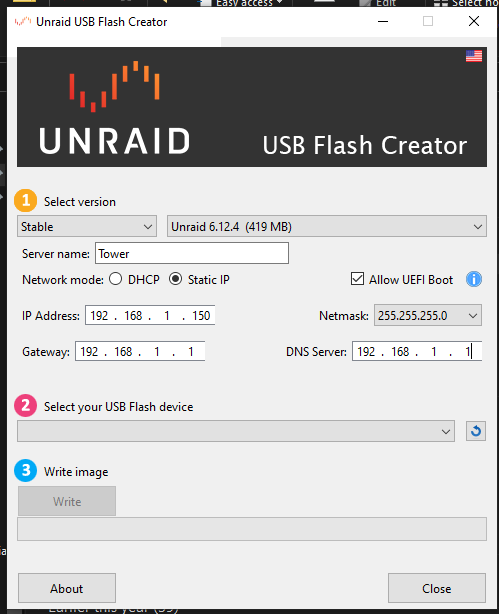
Don't understand why, here is the configuration I used to recreate the USB