





multiplY
Members
-
Joined
-
Last visited
Everything posted by multiplY
-
Hey, i still have this Problem. Can somebody see what the Problem is?
-
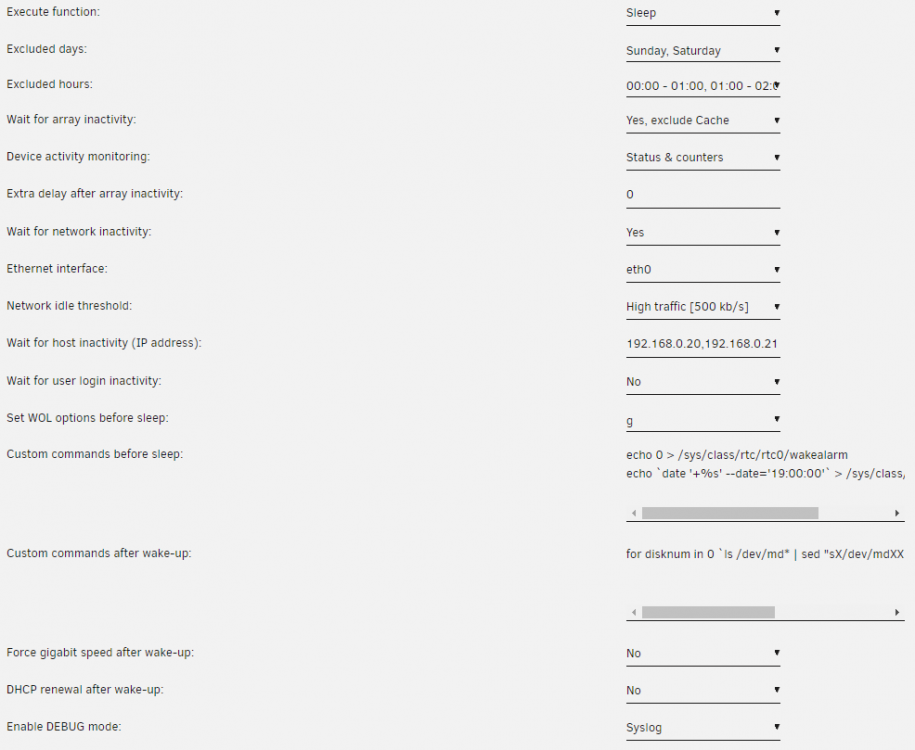
Hi, since i updated to unraid Version 6.9.2, i have a Problem with the S3 Sleep Plugin. It seemed to shut the system down instead of sleep and never came back up, i mirrored the syslog to flash and now finaly found the time to look into it but i don't really understand why its happening: The Server was supposed to go sleep at 2:00 and wakeup the same day at 19:00. To Achive this i set this custom command before sleep: echo 0 > /sys/class/rtc/rtc0/wakealarm echo `date '+%s' --date='19:00:00'` > /sys/class/rtc/rtc0/wakealarm It was working fine for years. In the syslog i now saw whats happening: Its going to sleep at night as planned: Oct 6 02:00:16 unRAID s3_sleep: Disk activity detected. Reset timers. Oct 6 02:01:16 unRAID s3_sleep: All monitored HDDs are spun down Oct 6 02:01:16 unRAID s3_sleep: Extra delay period running: 0 minute(s) Oct 6 02:01:16 unRAID s3_sleep: Initialize TCP activity counter Oct 6 02:02:16 unRAID s3_sleep: All monitored HDDs are spun down Oct 6 02:02:16 unRAID s3_sleep: Check TCP/SSH/TTY/IP activity Oct 6 02:02:38 unRAID s3_sleep: Communication state is idle Oct 6 02:02:38 unRAID s3_sleep: Execute custom commands before sleep Oct 6 02:02:38 unRAID s3_sleep: Enter sleep state now Oct 6 02:02:38 unRAID kernel: PM: suspend entry (deep) Oct 6 02:02:38 unRAID kernel: Filesystems sync: 0.003 seconds But when it wakes up, it seems to do some stuff that was supposed to be done before sleep but i never looked into the syslog before the problem so it could be normal: Oct 6 19:00:12 unRAID kernel: Freezing user space processes ... (elapsed 0.001 seconds) done. Oct 6 19:00:12 unRAID kernel: OOM killer disabled. Oct 6 19:00:12 unRAID kernel: Freezing remaining freezable tasks ... (elapsed 0.000 seconds) done. Oct 6 19:00:12 unRAID kernel: printk: Suspending console(s) (use no_console_suspend to debug) Oct 6 19:00:12 unRAID kernel: e1000e: EEE TX LPI TIMER: 00000011 Oct 6 19:00:12 unRAID kernel: sd 5:0:0:0: [sde] Synchronizing SCSI cache Oct 6 19:00:12 unRAID kernel: sd 6:0:0:0: [sdf] Synchronizing SCSI cache Oct 6 19:00:12 unRAID kernel: sd 6:0:0:0: [sdf] Stopping disk Oct 6 19:00:12 unRAID kernel: sd 5:0:0:0: [sde] Stopping disk Oct 6 19:00:12 unRAID kernel: sd 4:0:0:0: [sdd] Synchronizing SCSI cache Oct 6 19:00:12 unRAID kernel: sd 4:0:0:0: [sdd] Stopping disk Oct 6 19:00:12 unRAID kernel: sd 3:0:0:0: [sdc] Synchronizing SCSI cache Oct 6 19:00:12 unRAID kernel: sd 2:0:0:0: [sdb] Synchronizing SCSI cache Oct 6 19:00:12 unRAID kernel: sd 2:0:0:0: [sdb] Stopping disk Oct 6 19:00:12 unRAID kernel: sd 3:0:0:0: [sdc] Stopping disk Oct 6 19:00:12 unRAID kernel: bond0: (slave eth0): link status definitely down, disabling slave Oct 6 19:00:12 unRAID kernel: device eth0 left promiscuous mode Oct 6 19:00:12 unRAID kernel: bond0: now running without any active interface! Oct 6 19:00:12 unRAID kernel: br0: port 1(bond0) entered disabled state Oct 6 19:00:12 unRAID kernel: ACPI: Preparing to enter system sleep state S3 Oct 6 19:00:12 unRAID kernel: PM: Saving platform NVS memory Oct 6 19:00:12 unRAID kernel: Disabling non-boot CPUs ... After that it seems to do normal wakeup stuff: Oct 6 19:00:12 unRAID kernel: smpboot: CPU 1 is now offline Oct 6 19:00:12 unRAID kernel: smpboot: CPU 2 is now offline Oct 6 19:00:12 unRAID kernel: smpboot: CPU 3 is now offline Oct 6 19:00:12 unRAID kernel: ACPI: Low-level resume complete Oct 6 19:00:12 unRAID kernel: PM: Restoring platform NVS memory Oct 6 19:00:12 unRAID kernel: smpboot: Scheduler frequency invariance went wobbly, disabling! Oct 6 19:00:12 unRAID kernel: Enabling non-boot CPUs ... Oct 6 19:00:12 unRAID kernel: x86: Booting SMP configuration: Oct 6 19:00:12 unRAID kernel: smpboot: Booting Node 0 Processor 1 APIC 0x2 Oct 6 19:00:12 unRAID kernel: CPU1 is up Oct 6 19:00:12 unRAID kernel: smpboot: Booting Node 0 Processor 2 APIC 0x1 Oct 6 19:00:12 unRAID kernel: CPU2 is up Oct 6 19:00:12 unRAID kernel: smpboot: Booting Node 0 Processor 3 APIC 0x3 Oct 6 19:00:12 unRAID kernel: CPU3 is up Oct 6 19:00:12 unRAID kernel: ACPI: Waking up from system sleep state S3 Oct 6 19:00:12 unRAID kernel: sd 2:0:0:0: [sdb] Starting disk Oct 6 19:00:12 unRAID kernel: sd 5:0:0:0: [sde] Starting disk Oct 6 19:00:12 unRAID kernel: sd 3:0:0:0: [sdc] Starting disk Oct 6 19:00:12 unRAID kernel: sd 4:0:0:0: [sdd] Starting disk Oct 6 19:00:12 unRAID kernel: sd 6:0:0:0: [sdf] Starting disk After that, there seems to be the problem, s3_sleep initiates a shutdown, which its not supposed to do and while at the same time still wakeup tasks are execudet like spinup: Oct 6 19:00:12 unRAID s3_sleep: Shutdown system now Oct 6 19:00:12 unRAID emhttpd: read SMART /dev/sdc Oct 6 19:00:12 unRAID shutdown[27671]: shutting down for system halt Oct 6 19:00:12 unRAID init: Switching to runlevel: 0 Oct 6 19:00:12 unRAID s3_sleep: System woken-up. Reset timers Oct 6 19:00:12 unRAID init: Trying to re-exec init Oct 6 19:00:14 unRAID kernel: mdcmd (46): nocheck cancel Oct 6 19:00:15 unRAID emhttpd: Spinning up all drives... Oct 6 19:00:15 unRAID emhttpd: read SMART /dev/sdd Oct 6 19:00:15 unRAID emhttpd: read SMART /dev/sde Oct 6 19:00:15 unRAID emhttpd: read SMART /dev/sdb Oct 6 19:00:15 unRAID emhttpd: read SMART /dev/sdf Oct 6 19:00:15 unRAID emhttpd: read SMART /dev/sdc Oct 6 19:00:15 unRAID emhttpd: read SMART /dev/sda Oct 6 19:00:15 unRAID emhttpd: Stopping services... Oct 6 19:00:15 unRAID emhttpd: shcmd (74385): /etc/rc.d/rc.libvirt stop Oct 6 19:00:15 unRAID root: Waiting on VMs to shutdown Here are my Plugin-settings, its Version 3.0.8 Full syslog is also attached. I hope you can help me with this problem, thanks in advance. syslog
