




Skip to content
View in the app

A better way to browse. Learn more.

Unraid

A full-screen app on your home screen with push notifications, badges and more.

To install this app on iOS and iPadOS
  1. Tap the Share icon in Safari
  2. Scroll the menu and tap Add to Home Screen.
  3. Tap Add in the top-right corner.
To install this app on Android
  1. Tap the 3-dot menu (⋮) in the top-right corner of the browser.
  2. Tap Add to Home screen or Install app.
  3. Confirm by tapping Install.

beaner

Members
  • Joined

  • Last visited

Everything posted by beaner

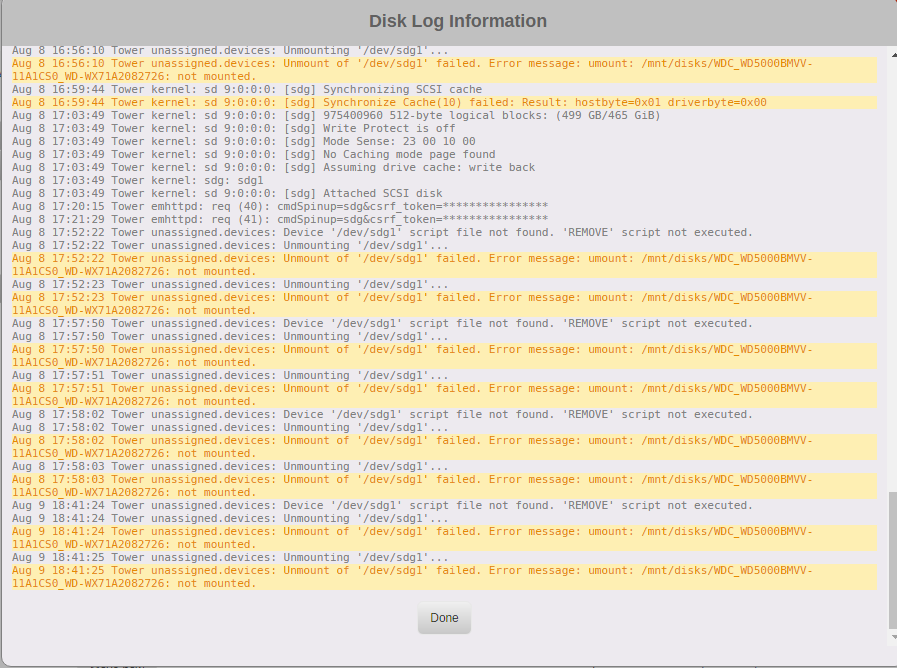
  1. Hi all, i am having an issue with unassigned devices. system: -Unraid v 6.5.3 -Unassigned devices v 2018.06.01a i have a WD 500gb usb external hard drive that i have plugged into my server to copy files into my array. when i plug the usb into windows i can see the files through file explorer no problem, however when i plug the usb into the server, unassigned devices (and dolphin) show nothing on the disk. i have formated the usb twice and tried test files, still nothing shows. I forgot to mention that when i plug the usb into the server it auto mounts, and i cannot unmount the device. i hope you folks can help, i am a newb so bare with me a little bit!

Account

Navigation

Search

Search

Configure browser push notifications

Chrome (Android)
  1. Tap the lock icon next to the address bar.
  2. Tap Permissions → Notifications.
  3. Adjust your preference.
Chrome (Desktop)
  1. Click the padlock icon in the address bar.
  2. Select Site settings.
  3. Find Notifications and adjust your preference.