




Skip to content
View in the app

A better way to browse. Learn more.

Unraid

A full-screen app on your home screen with push notifications, badges and more.

To install this app on iOS and iPadOS
  1. Tap the Share icon in Safari
  2. Scroll the menu and tap Add to Home Screen.
  3. Tap Add in the top-right corner.
To install this app on Android
  1. Tap the 3-dot menu (⋮) in the top-right corner of the browser.
  2. Tap Add to Home screen or Install app.
  3. Confirm by tapping Install.

mojotaker

Members
  • Joined

  • Last visited

  1. I just wanted to say thank you for your time and effort, and really appreciate you sharing. Thanks alot.
  2. Hello, please did you find a solution ?
  3. Bump. Im having this exact same problem. Any Help please !!!
  4. PLEASSEEEEEEE How did you fix it. I have this problem with fresh installs also
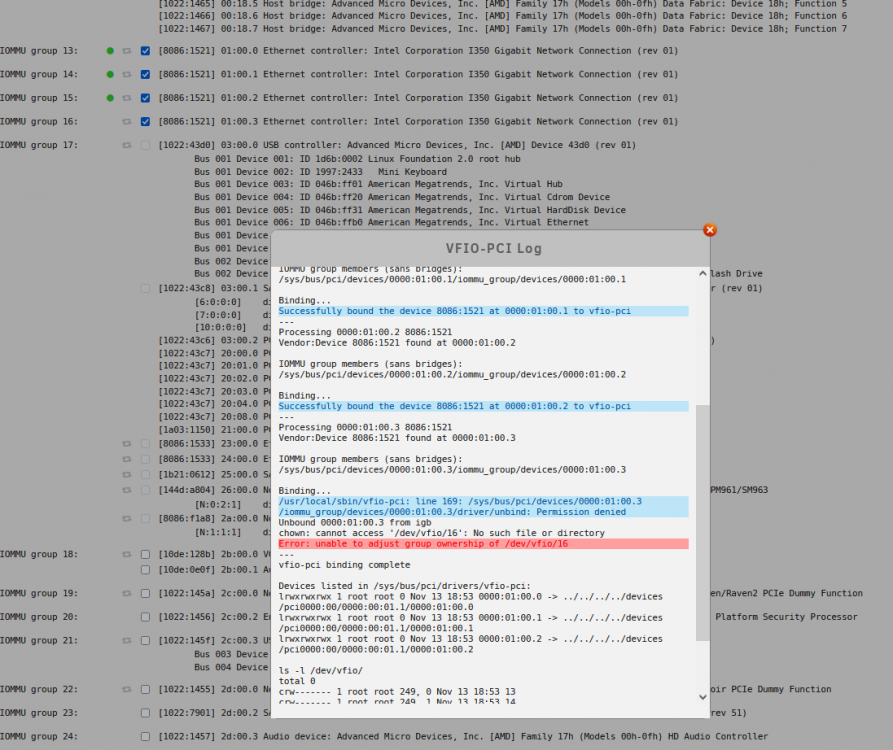
  5. Fellow Friends, I ran into this problem when I upgraded to 6.8 and had to downgrade back to 6.7.2. Advice, please what is the consensus here should i upgrade to rc 6.8.7 or stay on 6.7.2 ? or at least what did you settle with for now ? Thank you.

Account

Navigation

Search

Search

Configure browser push notifications

Chrome (Android)
  1. Tap the lock icon next to the address bar.
  2. Tap Permissions → Notifications.
  3. Adjust your preference.
Chrome (Desktop)
  1. Click the padlock icon in the address bar.
  2. Select Site settings.
  3. Find Notifications and adjust your preference.