





fmjets11
Members
-
Joined
-
Last visited
-
I am having my server drop its connection about every 2-3 seconds, it comes back very intermittently and when it’s back it’s only up for a few seconds as well. I originally thought it was the onboard NIC going bad, so I installed a gigabit card and changed it to eth0 and its still having the exact same problem. I also did some troubleshooting and it doesnt appear to be the switch its hooked into either because the other devices on that switch are not having the same issues. Could this be a possible configuration problem? Would be odd it just came up out of nowhere unless an update caused this somehow. I also tried a new cable and no luck there either. Could it possible be an IP address conflict and its colliding with something? Let me know thoughts and if posting logs or anything will help as well, I am very stuck with what to do next.
-
ah I see now, thanks! will update with how this goes when I get it!
-
perfect will save and try when I get the new drive in this weekend, another dumb question. How do I tell if its BTRFS or ZFS currently?
-
got it I think this is it tower-diagnostics-20241220-1344.zip
-
getting a little out of my comfort zone, which diags for pool status?
-
what guide would you suggest to replace it? Its cache 2 in the pool, I just dont want to mess something up in doing so. Ill order a new drive today though to be safe.
-
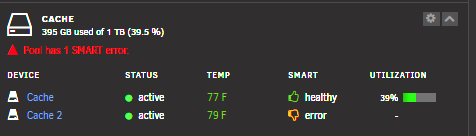
Please help dumb this down for me, I have run many smart tests and still get the error. I also re-seated the SATA connections along with tried new cables, nothing fixed it so I do believe its the drive. My two questions I have are these: 1. Can someone help me dissect the logs to help confirm if I should replace the drive itself with a new one? Note this is a second cache drive. (SMART test and Pic attached). 2. What method is easiest/best for me to replace it if so. I have googled some ways and read up on it but see multiple different ways to do it. Do I need to back anything up first as well and if so best way to do that as well. As always I appreciate the help! Unconfirmed 438283.crdownload
-
I got it figured out. No idea how this happens (especially when I am not home) but somehow in the bios Advanced - PCI Subsystem setting - LSI onboard Oprom - was set to disabled. Once I went in and enabled this it detected all of the drives right away with no issues. Hopefully this helps someone else.
-
I just looked at how everything is wired in and this is the breakdown: 2 SATA onboard connections go to the SSD drives (the two that are showing up) There are 3 SAS connections on the board - These connect to 7 Hard Drives and one CD ROM / BluRay Drive (cd/dvd HL-DT-ST BD-RE WH16NS40) 2 SAS connections go from the motherboard to the expansion card (which then connect to 7 hard drives in total 1 of the connections from the motherboard has a SAS to SATA connector cable (with 4 SATAs connections on it - 3 have always been disconnected and still are) but one of the four connects to the CD ROM drive that is showing up successfully (cd/dvd HL-DT-ST BD-RE WH16NS40) Not sure if this means there is possibly something that has gone bad with the SAS part of the motherboard, or if something has happened relating to SAS BIOS (I originally followed this tutorial here: https://www.serverbuilds.net/flashing-onboard-sas-2008 ) Additional Info: Motherboard Specs - https://www.gigabyte.com/us/Enterprise/Server-Motherboard/GA-7PESH2-rev-10#Support-Manual Original Server Guide Used to Build- https://www.serverbuilds.net/anniversary
-
Confirmed the expansion card is in PCI-E slot one and it is enabled. There is another open PCI-E slot, I moved the expansion card there and nothing changed.
-
Not sure I understand exactly what you mean, but the SAS Expander Card is connected into the motherboard via two separate Mini SAS 36-Pin to SFF-8087 Cables then SATA connections from the expander card go directly to the hard drives.
-
Through an HP 24-Bay 3GB SAS Expander Card 487738-001.
-
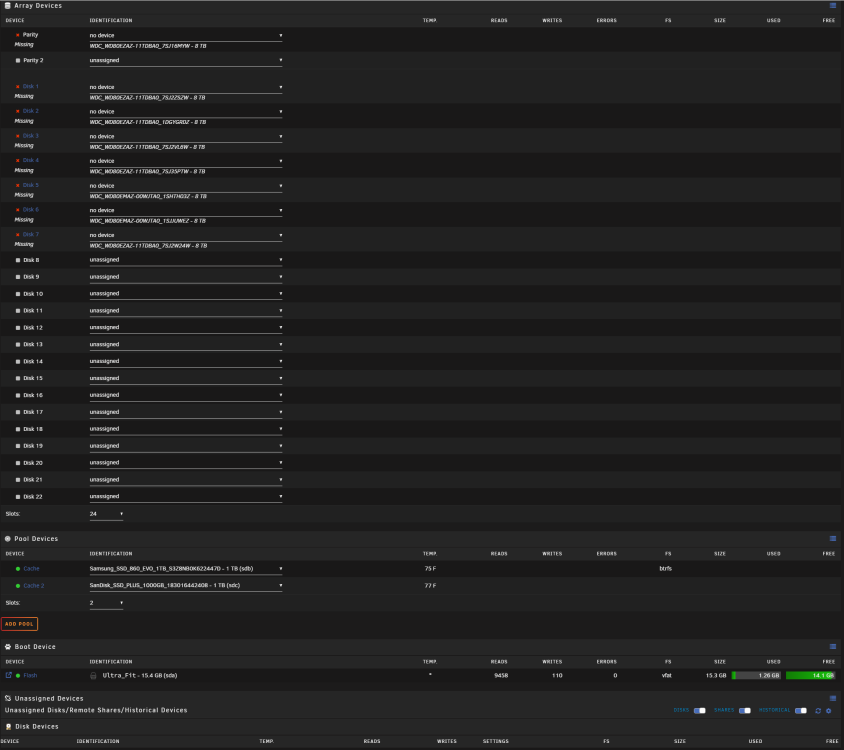
I just got back from being out of town and my server is in shambles it seems. I have never had any issues since I have built this thing a few years ago. When I powered it on the main message is that 7 of the devices (not the two cache drives - see screenshot) are all missing and the array is unable to be started. I hope I can get some help as far as where do I even start. They are not showing up in un-assigned devices that I can tell. I am no Unraid expert but this feels to me like it could be hardware related but I do not know what to do to even begin to figure that out. I checked all connections twice, re-seeded everything and confirmed the drives have power so my gut goes to, is this the SATA expansion card? Hoping someone can guide me here and see something in the logs that gives me a path forward. Would the hardware profiler be helpful here to help diagnose a potential issue? I appreciate any help in advance. tower-syslog-20240315-1732.zip tower-diagnostics-20240315-1331.zip
-
Updated to the most recent OS and get this message when I try to restart the plex docker app. I searched around and some say just be patient and it fixes itself but its been 6 hours and still the same message. I restarted the server, restarted the container still same error. "MAINTENANCE" STATUS="PMS IS CURRENTLY RUNNING STARTUP MAINTENANCE TASKS." Is the next best thing to try to revert the docker to an old version, if so what does that entail/is it the right move. Thanks all for the help and patience in helping explain and troubleshoot.
-
It is interesting that when I did the upgrade something similar happened to me....my cache drives were both unmourned and taken out of the array but data wasn’t lost. Maybe 6.9 isn’t stable? Sent from my iPhone using Tapatalk

